News Posts matching #Windows 11

Return to Keyword Browsing

Windows 11 Gets Major Taskbar and Start Menu Customization in New Feature Update

Microsoft has begun rolling out a new feature update KB5120998 for Windows 11, introducing significant visual changes to the user experience. Among the notable additions is the long-awaited expanded taskbar customization, allowing users to position the taskbar at the top, left, or right side of the display, in addition to its traditional bottom placement. Microsoft is also introducing a smaller taskbar mode that reduces both icon and taskbar size, which should be particularly useful on devices with limited screen space. The Start menu is receiving similar attention, with small, medium, and large size options, and the Recommended section has been renamed to "Recent."

Windows Search has undergone a visual and functional refresh, featuring a less cluttered search home and clearer indicators showing whether a result comes from an application, setting, file, web result, or the Microsoft Store. Users can now disable web and Store suggestions, and Windows can automatically index frequently used folders. File Explorer Home should launch faster, and its Recommended section now supports touch scrolling. Additionally, Microsoft has updated progress indicators for startup, sign-in, restart, shutdown, and update installation, while virtual desktop switching and display settings receive reliability improvements.


Microsoft "Resolves" Windows 11 Crashing Games with a Registry Hack

Late last week, we reported that the Windows 11 August update was causing gameplay issues such as forced crashes, random freezing, errors, and unexpected device restarts. The company investigated the problem and discovered that the interaction between games and RGB peripherals was the root cause. They released a workaround involving a registry hack and marked the issue as resolved, even though no proper update was provided. Microsoft has pointed to the existence of RGB peripherals as problematic, shifting the blame to these devices and stating that the only solution is to block the inpoutx64 driver from loading, rather than offering a complete fix.
MicrosoftThis issue is resolved by a block that prevents the inpoutx64 driver from loading. The block targets devices with this specific driver enabled and the game ARC Raiders installed. This resolution disables the inpoutx64 driver and displays a message window with information about the disablement. Following this message, the game will launch as normal.

Turtle Beach Launches Vulcan II XP Gaming Keyboard

Leading gaming accessories maker Turtle Beach Corporation, today revealed the all-new Vulcan II XP Full-Size Mechanical RGB Gaming Keyboard. Built on the award-winning Vulcan design, the Turtle Beach Vulcan II XP combines hot-swappable TITAN HS mechanical switches for easy maintenance and replacement, refined typing acoustics, and premium construction in a full-size gaming keyboard engineered to deliver exceptional performance, customization and comfort.

At the heart of the Vulcan II XP are Turtle Beach TITAN HS mechanical switches, engineered to deliver smooth, consistent keystrokes with exceptional stability and long-term durability. Compatible with both 3-pin and 5-pin hot-swappable mechanical switches, it's easy to experiment with new switch types, replace worn switches, or fine-tune your typing feel without soldering.

Windows 11 to Get Unified Memory Control Options Ahead of RTX Spark Launch

Microsoft is working on providing processors with unified memory dedicated control parameters in Windows 11, as indicated by the recent Windows 11 build 29648.1000. This build, originally released on August 17, includes a hidden feature called IntelligentCarveout. This feature will allow the system to manage unified memory in SoCs like NVIDIA's upcoming RTX Spark, AMD Ryzen Halo, and other APU-like chips that integrate the CPU and GPU into a single package. These are connected to external LPDDR5X memory, which acts as a unified pool for both the CPU and GPU. With the new feature, we will see specialized controls that allow settings to be configured for independent partitions of this unified memory. During Computex, Microsoft even hinted at this feature arriving for Windows 11 in their announcement for NVIDIA's RTX Spark platform.
MicrosoftTo realize the potential of up to 128 GB of unified memory on RTX Spark, we have focused on improving how Windows supports unified memory systems, starting with a new higher, smarter limit on total system memory accessible by the GPU. This updated limit increases the memory available to the GPU on high-memory systems, unlocking the ability to load larger local AI models or render more complex projects.

Windows 11 26H2 Update Focuses on Extended Servicing, Not New Features

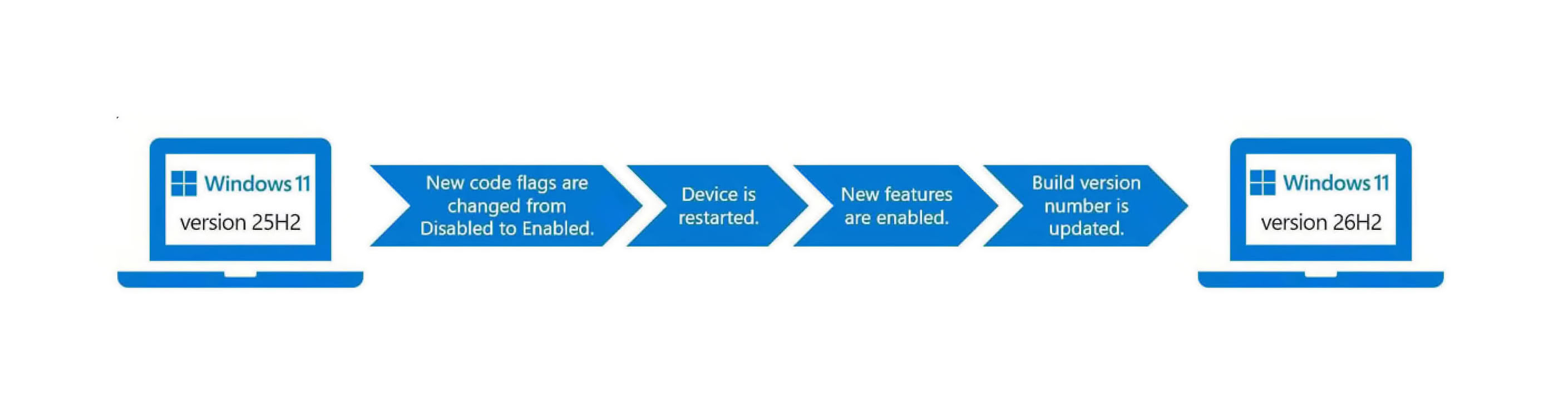
According to Windows Latest, Microsoft's upcoming Windows 11 26H2 is expected to be one of the most uneventful releases in terms of new features. Instead, this release focuses on resetting the support cycles that Microsoft is implementing, rather than introducing major features or overhauls. For those who are not aware, Microsoft has altered its update approach for Windows 11 for some time now. Since Windows 11 24H2, the company has adopted a shared servicing model applied to the Windows 11 24H2 and 25H2 branches. Since late 2024, support and updates have been rolled out across every OS branch, with each new release cycle activating these features rather than leaving them dormant in the kernel. Enablement packages (eKB) are central to this process, as downloading an update essentially involves eKBs that activate certain functionalities.

For instance, on a device running Windows 11 24H2 or 25H2, a simple eKB is needed to upgrade to the latest Windows 11 26H2 version. For older versions like 22H2 and 23H2, which are on an older servicing branch, Windows 11 26H2 will be a full feature update. In terms of new functionality with 26H2, Microsoft's focus is on resetting the support cycle timeline. The 26H2 version will receive regular support for 24 months on Home and Pro versions, while Enterprise and Education versions will receive 36 months of support. Starting from 2026, this support will extend until October 2028 for Home and Pro, and until October 2029 for Enterprise and Education. For those already running Windows 11 24H2 and 25H2 with the latest updates and patches, 26H2 will not introduce any new features.

Microsoft Blames RGB Peripherals for Game-Breaking Windows 11 Update—Still No Real Fix

TechPowerUp recently reported on what appeared to be a Windows 11 update resulting in forced crashes, freezing, errors, and even forced restarts. Microsoft had previously said that it was conducting an investigation into the issue, and the software giant has since found an explanation for the issues users were reporting. According to an update published by Microsoft, the investigation has determined that some interaction between games and RGB peripherals is the cause of the issues.
Ongoing investigation indicates that this issue is related to peripherals or internal device components which have RGB lighting features. Such devices may install drivers or code components with file names similar to inpoutx64. In systems where these drivers are found, the issue is then triggered by launching certain games.

Windows 11 August Update is Breaking Games, Microsoft Investigates

According to an updated Microsoft support document, the Windows 11 August update is causing problems with games, and the company has officially confirmed that an investigation is underway. The document states that games like ARC Raiders, MARVEL Tōkon: Fighting Souls, and The Finals are experiencing forced crashes, random freezing, errors, and unexpected device restarts due to the update. After receiving complaints from internal testing and gamers, gaming studios have started to acknowledge the issue and report that the Windows 11 August update is causing applications to crash. Microsoft has confirmed the problem and is actively investigating its cause.
MicrosoftFollowing the release of Windows updates on August 11, 2026 (KB5121003) and later, Microsoft received reports of issues involving inability to run games as expected. This issue has been reported for a limited number of games, including ARC Raiders, MARVEL Tōkon: Fighting Souls, and The Finals... If you are experiencing this issue, or a similar issue, please use Feedback Hub to file a report

CachyOS and AlmaLinux Beat out Windows 11 in Workstation Benchmarks

With the advent of the Steam Deck and the bump in Linux adoption that we've seen since then, a number of Linux distributions have appeared that make tweaks to the Linux kernel in the hopes of gaining performance. CachyOS is one such Linux distribution, and it appears that those kernel performance tweaks are paying off, according to some recent testing by Phoronix.

In a comparison between CachyOS, AlmaLinux 10.2, Ubuntu 26.04, Fedora Workstation 44, and Windows 11, CachyOS consistently performed at or near the top of the list, with CachyOS in performance mode claiming first place in the geometric mean of the results of a workstation benchmark. Windows 11 Pro was right at the bottom of the chart, coming in 14.9% slower than CachyOS in performance mode.

Windows 11 Adds Per-App Control for Microphone, Location, and Camera Access

Microsoft is preparing an update for Windows 11 that will help privacy-conscious users protect themselves from digital spyware across applications. According to a discovery by X user Jakub, the latest Experimental Insider Build v26340.9212 will allow Windows 11 users to manually turn off the camera and microphone for each Win32 application. This means that camera and microphone settings can now be applied on a per-application basis, as opposed to the previous global settings. For example, you can maintain permissions for Zoom or Teams while playing games but remove these permissions for Chrome or any other web browser to ensure your online privacy by having Windows directly cut off access to these apps.

Additionally, Windows Latest was able to reproduce these findings and discovered that this Experimental Insider Build also includes per-app settings for location. This is great news for anyone who actively blocks location services globally but needs them for specific applications like maps, which require location data for accuracy. Furthermore, permission prompts have been introduced, so every Win32 application will ask if you want to allow the use of the microphone, camera, or other resources the app requires, which is a welcome change. All of these permissions can later be adjusted in settings, and any permission can be revoked again.

Microsoft Unifies Copilot Features Into a Super App

Microsoft is finally scaling back on creating numerous Copilot variants for every use case and is instead consolidating many Copilot buttons, icons, and functions into the main Copilot app. According to the latest support document update, Microsoft is rolling out a unified Copilot experience to create a Copilot "super application," bringing all the functionality that was previously spread across the operating system under one roof. These features include Deep Research, Group Chat, and Podcasts. The Deep Research functionality is being retired for consumers, but existing content will remain available. The same applies to Podcasts and Group Chat, which will be fully retired starting August 18.

Microsoft notes that the updated Copilot application is introducing a fresh look, with the ability to access Word, Excel, Outlook, and many other Microsoft 365 services and apps directly from the Copilot super app. Users who were using Copilot functionality across the operating system that is being retired will now find everything under one roof, with chat history and the majority of content being moved to the new home. The migration will include chats, images, and any type of content that has been created with Copilot.

Windows 11 Gets Dynamic File Sizes in File Explorer, Low Latency Profile for Apps, and More

Microsoft today released its August update, KB5121003, which finally brings more user-requested features as part of a simple Patch Tuesday security update. One of the most useful changes is the way File Explorer now displays file sizes. Instead of the old method of showing everything in kilobytes, Windows 11 has switched to a dynamic system that displays file sizes in KB, MB, or GB, depending on the size of the file. This makes it easier for users to view file sizes without having to manually convert them.

Additionally, the Low Latency Profile is expanding to more applications, potentially making software launch faster on weaker hardware. Previously introduced for Microsoft-branded "in-box" applications, this feature boosts the CPU to its maximum frequency for 1-3 seconds, resulting in noticeably smoother app launches during testing. When launching Microsoft applications like Edge and Outlook, the result is about a 40% faster application launch. Other applications, such as the Start Menu and context menus across the operating system, may be up to 70% faster. Now, other applications are getting this update, meaning the overall experience will be much smoother.

Microsoft Hikes Windows License Fees for OEMs by Up to 10%

If it wasn't enough that memory, storage, and CPU shortages are driving up the prices of PCs, Microsoft is now imposing a price increase on OEM PC makers for their Windows licenses. According to Taiwanese UDN, Microsoft has notified OEM PC makers that Windows licensing fees are going up by 7% to 10%. One of the PC vendors noted that Microsoft typically increases its Windows license fees every year, but only by a low, single-digit percentage. However, this time the increase goes up to 10%, making it one of the most significant increases OEMs have experienced. We don't know the exact dollar amount, as Microsoft works with PC OEMs individually to set prices.

PC OEMs likely receive better prices based on volume, with large makers such as Dell, HP, ASUS, Acer, and others getting much better deals than smaller OEMs with fewer shipments. Thus, the 7-10% increase depends on the PC OEM's volume and individual deals with Microsoft. However, no one is spared from these increases as the Redmond-based giant seeks to extract a few more percentage points from the world's most widely used PC operating system. The company is investing heavily in engineering efforts to remodel its Windows 11 operating system for a better user experience after years of updates that compromised it. Increasing the license fees for OEMs is one way to offset these efforts.

Windows 11's Built-In Weather App Wastes More Than 1 GB of RAM

According to Windows Latest, the default weather application in Windows 11 can consume more than 1 GB of RAM just by displaying the weather forecast. When the Weather application is open, it uses nearly 1.2 GB of RAM, even without any scrolling, clicking, or other interactions. By default, Windows 11 uses the "MSN Weather" application, which not only uses a significant amount of RAM but also displays ads. For an operating system that costs real money, having ads in a Microsoft-owned weather app, for which you paid a licensing fee, is a disappointing experience.

Last week, Microsoft removed documentation from its website and materials that recommended 32 GB of RAM for new PC builds or purchases. The company now emphasizes that 8 GB devices are optimized to run Windows 11 smoothly. However, with an 8 GB RAM configuration, the weather application alone consumes about 15% of the available RAM. This is before any other services start running or daily tasks begin. Below screenshots are taken by the Windows Latest team.

ASUS DisplayWidget Center Update Introduces AI Agent-Ready Controls

ASUS today announced a major update to the ASUS DisplayWidget Center monitor management software, providing users with a more intuitive way to control compatible ASUS and ROG displays. This latest release adds AI-based automation, deeper personalization with App Tweaker and OLED Care, and broader device integration—all while keeping monitor management simple with a mouse or keyboard instead of physical monitor buttons. Available as a free download from the ASUS website, DisplayWidget Center supports Windows 11 or later and macOS on compatible devices. Additional improvements include a firmware update notification feature and one-key product registration that automatically fills in the device serial number.

AI agent-ready display control
This latest update to DisplayWidget Center moves it into the AI agent era. With ASUS Display Control Command Line Interface (CLI) and Agent Skill installed, compatible AI agents can adjust monitor settings through natural-language requests. Users can manage brightness, color mode, color temperature, and OLED Anti-Flicker without having to manually navigate through menus.

Microsoft Is Quietly Deleting 32 GB RAM Recommendation for Windows 11

Microsoft is retroactively removing documentation from its website and materials that mention 32 GB of RAM as a recommendation for new PC builds or purchases. Instead, the company is now emphasizing 8 GB devices that are optimized to run Windows 11 smoothly, even with that RAM configuration. Thanks to Windows Latest, which spotted the changes, Microsoft's Windows Learning Center has been updated to remove mentions of the 32 GB RAM recommendation. Previously, Microsoft published a document suggesting that 16 GB is a baseline for a modern PC, describing it as a good "starting point." However, the company also used to recommend that gamers try to surpass this baseline, suggesting 32 GB as a "no worries" upgrade for gaming PCs.

At that time, this sparked significant controversy as gamers were vocal about Microsoft recommending more RAM when purchasing additional memory could cost as much as an entire PC, depending on the configuration. Amid a severe DRAM shortage, Microsoft faced pushback from gamers and quietly removed the mention of the 32 GB "no worries" recommendation. This also raised concerns about whether Microsoft would optimize the Windows 11 operating system to perform better on lower-spec PCs with less than 16 GB of RAM, such as the 8 GB PCs that Microsoft sells itself, like the Surface Pro 12 and Surface Laptop 13, both of which come with 8 GB base configurations.

Microsoft Denies New Tracking Service in Windows 11

Over the weekend, social media drama took a turn when the community accused Microsoft of running a new background tracking service on Windows 11. However, the company officially denies this. The whole event started on July 31st when a user on X noticed a new background service called "Windows Health and Optimized Experiences" that starts automatically every time the system is booted. This background service monitors the CPU's thermals and reportedly sends data every 15 minutes. However, this feature is not actually new and is used for diagnostics. According to Microsoft VP Scott Hanselman, when Windows 11 detects slow or sluggish behavior, it can record performance traces that can be sent to Microsoft via the Feedback Hub.

The service is not standalone telemetry but is initiated by Windows 11 itself, saving these files under "%SystemRoot%\Temp\DiagOutputDir\Whesvc." These files are stored locally, but there is an option to send them back to Microsoft for diagnostics and to improve future experiences using the Feedback Hub. Contrary to the fear-inducing post, this data-sending service is optional if the user chooses to submit a report. Additionally, Microsoft did not suddenly introduce this feature to Windows 11, as it has existed for over a year, having been included in the Windows 11 Canary build introduced in May 2025.

Microsoft Promises Better Windows 11 Memory Efficiency

Following large-scale dissatisfaction with the overall Windows experience, Microsoft in March 2026 issued a statement explaining that it would be working to deliver "smoother navigation and more reliable performance for everyday tasks." Now, over four months later, Pavan Davaluri, President of Windows + Devices, has provided an update on the progress of this initiative in a new X post.

In this X post, one of the more notable improvements Davuluri claims Microsoft has made during recent months—along with improvements to the Taskbar and Start—is improved memory efficiency. He explains that Microsoft has implemented "substantial improvements in memory efficiency and latency," in order to "accelerate the modernization of Windows 11," that it has reduced memory overhead across apps and components, and that the company has tuned WinUI 3 to make built-in apps use less memory. Microsoft also outlined its plans for the future of Windows 11 memory efficiency improvements, specifically stating that the Windows team will be working on "memory optimization for 8 GB and above."

Microsoft Adds Original Xbox Games to PC via New Backward Compatibility Program

Microsoft has launched Xbox Backward Compatibility on PC, starting with four original Xbox titles: BLiNX: The Time Sweeper, Conker: Live and Reloaded, Crimson Skies: High Road to Revenge, and Fuzion Frenzy. All four games are available through the Xbox app on PC and included with every Xbox Game Pass tier. Digital console license holders can also access them via Xbox Play Anywhere. The feature requires Windows 11 and works on PC and supported handhelds including the ROG Xbox Ally and Xbox Ally X. Hardware requirements are modest, all you need is an NVIDIA GTX 950, AMD Radeon RX 550, or Intel UHD 770 / Arc A310 on the GPU side, a quad-core CPU, and 8 GB of RAM.

The company added several PC-specific enhancements like 4x resolution upscaling, V-Sync, fullscreen and windowed modes, anisotropic filtering, improved antialiasing, and adjustable language and audio settings. According to the official blog post published today by Jason Ronald, VP of Next Generation, Xbox, more backward-compatible titles are planned for later, however, no timing or hints about future titles have been made.

RTX Spark Core Counts Leaked by NVIDIA's Own Driver

NVIDIA has released a developer preview of GeForce drivers for its RTX Spark PC platform, confirming the variants of the N1X chip and the SKU separation that will occur. In GeForce driver version 616.00, this marks the company's first driver package compiled for the Windows-on-Arm (WoA) platform. Thanks to Windows Latest, which extracted the installation file and examined the information file, it appears there are two main RTX Spark N1X chip SKUs: one with 6,144 CUDA cores and another with 5,120 CUDA cores. Both are based on the "Blackwell" GPU microarchitecture and are paired with a 20-core Arm CPU and up to 128 GB of LPDDR5X memory.

NVIDIA is working with Microsoft to optimize Windows 11, and developers now have access to the optimization techniques needed to get their AAA titles, productivity software, and other applications ported and optimized for running on NVIDIA's latest platform. A few days ago, we noted that NVIDIA is rolling out the CUDA toolkit for its RTX Spark platform, specifically as a native Windows-on-Arm software toolkit, and this driver version 616.00 is part of that toolkit.

Microsoft is Modernizing Decades-Old Properties Window in File Explorer

Microsoft is finally addressing the UI inconsistencies in Windows 11, which currently features a mix of design elements from various Windows eras, starting from Windows 7 to the modern design language. According to the latest preview build of Windows 11, the File Properties window within File Explorer is getting an update with the WinUI 3 framework to better align with the rest of the Windows 11 operating system. This change was first noticed by Phantomofearth on BlueSky, who documented a new framework update in this decades-old Windows component. Until now, Microsoft had not prioritized updating these smaller UI elements, leading to a patchwork of inconsistencies across Windows versions. The company had only given cosmetic upgrades to the main applications, leaving these smaller elements unchanged.

Currently, the Windows 11 OS is a mix of legacy Microsoft frameworks for the user interface. This mishmash of UIs has resulted in significant inconsistency, with users encountering non-uniform interfaces from the Windows 7 era in daily operations. This mix includes web-based WebView2, React, and others. Microsoft plans to transition its entire user experience to the desktop-only WinUI 3 framework, which will reduce application latency, improve user experience, and create a noticeably smoother feel. The company is making progress in replacing all frameworks that don't fit a uniform desktop, and we are beginning to see the effects of this effort. Soon, all desktop elements will run on WinUI 3 for the first time since the launch of Windows 11 in late 2021. It has taken several years, but Microsoft couldn't port legacy code without encountering many issues.

Steam Machine Running Windows With Performance On-Par With SteamOS

Valve recently released Windows drivers for the new Steam Machine living room console, and it turns out the drivers are pretty good, given recent benchmark results from ETA Prime. The notorious YouTuber and gaming hardware reviewer installed Windows 11 on the Steam Machine, noting that the process was fairly painless, and that all the hardware worked flawlessly. It's both notable and somewhat comical that the GPU shows up in both Windows Task Manager and AMD's Radeon Adrenaline driver as an AMD Radeon RX 7600.

The Steam Machine in question has been upgraded to have 64 GB of memory, so there may be slight differences in performance, especially once the Windows installation starts to accrue more and more programs. In terms of actual gaming and productivity performance, SteamOS and Windows mostly trade blows, but Windows does have a few notable performance wins over SteamOS.

Windows 11 vs Linux Gaming Test Reveals There's More to It Than FPS

It seems as though the launch of Valve's Steam Deck has resulted in an almost non-stop slew of comparisons between Linux and Windows as a gaming operating system. In one recent test, Meta PCs sought out to test the two operating systems head-to-head to get some hard numbers and potentially settle the debate, however, the results brought up an interesting debate about what makes one operating system better than another.

Benchmarks were conducted on an all-AMD system running an AMD Ryzen 7 9850X3D, an XFX Swift AMD Radeon RX 9070 XT 16 GB, and 16 GB of RAM, with the AMD Linux drivers effectively making this a best-case scenario for Linux. The benchmarks were run on the latest version of Windows 11 and Fedora Linux 44, games were tested at the same resolution, and results were an average across three runs. All games tested were also the Windows versions running via Valve's Proton compatibility layer.

Microsoft is Finally Fixing Windows Search, No More Promotional Content

Microsoft has finally addressed one of the biggest pain points in using the modern Windows 11 operating system—the Windows Search Box. What used to be a complicated mess filled with content you didn't care about is now becoming a usable interface, with less visual clutter. Starting with new builds being rolled out to Windows Insiders on the Experimental Channel, Windows 11 will now display fewer results when running a Windows Search, meaning that the visual clutter is mostly gone, as you can see in the picture below. Recent searches are very easy to find, and the Search Box actually does what it is supposed to do. It will now display where the search result comes from, whether it is an application, a setting, a file, a web result, or even a Microsoft Store suggestion. The aim is for the Search Box to finally give users more transparency on what their actual search result is.

Perhaps the most important part of the update is the removal of promotional content. Previously, whenever you made a search in the Search Box, Microsoft would push promotions onto the user, showing related products first. This meant your search experience felt more like an advertising marketplace instead of a genuine search. Importantly, local search matches, like those from apps, settings, or files, are shown first before the web results, tailoring your experience towards a more local indexing of results. Additionally, these search results are customizable, as going to Settings > Privacy & Security > Search allows you to turn off web searches and Microsoft Store searches entirely.

Blame the Plumbing: Why Intel Handles USB Onboard Audio Codecs Better Than AMD

Back in March, I wrote a detailed editorial on how hardware-accelerated audio is possible in Windows 11, and it's possible for sound card manufacturers to put native audio stack processing on the card to overcome issues with DPC latency spikes. Today, I'll talk a bit about USB-based onboard audio codecs, and how the Intel platform is better suited to handle them than the AMD platform, particularly given how motherboard designers handle the latter. The Intel "Azalia" high-definition audio (HDA) bus, introduced in the early-2000s, laid the foundation for high-quality onboard audio, offering consumers high-resolution 24-bit/192 kHz audio. This is a low-latency interface designed to ensure the quickest possible movement of audio data between the system and the DAC. On Intel platforms, the HDA bus tends to be wired out from the PCH (the chipset), whereas on the AMD platform, the HDA bus is located on the SoC (the processor), and not the FCH (the chipset). This was a deliberate choice by AMD, and has to do with the chipset bus the company uses.

Unlike Intel, AMD's platform designers adopted a "SoC first" strategy. Modern Ryzen client-segment processors are fully-fledged SoCs in their own right; while the chipset only serves to increase downstream platform connectivity. Ryzen SoCs put out not just PCIe lanes, but also certain platform connectivity, such as USB and SATA; while the FCH puts out additional USB and SATA connectivity. Traditionally, on the Intel platform, the processor only puts out PCIe lanes, while the PCH handles all other forms of connectivity, including USB and SATA; and of course the HDA bus. Intel is able to place the HDA bus on the chipset, while AMD avoids this. The HDA bus is instead put out by the SoC.

Valve Releases Windows Drivers for Steam Machine

Valve released Windows drivers for its Steam Machine console, letting end-users replace the pre-installed SteamOS with 64-bit Windows 10 or Windows 11. The driver package from Valve covers graphics, Wi-Fi, Bluetooth and memory card reader. Since Steam Machine is based on a semi-custom SoC the company co-developed with AMD, and not a production AMD Ryzen SKU, the graphics driver isn't from the same AMD Software Adrenalin trunk. What's also interesting to note here, is that the machine doesn't support dual-booting between Windows and SteamOS. With Windows in place, you can simply install the Steam application, and use it in Big Picture mode for an experience resembling SteamOS.
Return to Keyword Browsing
Nov 11th, 2026 23:49 CST change timezone

New Forum Posts

Popular Reviews

TPU on YouTube

Controversial News Posts