Thursday, December 25th 2025

Microsoft's Hardware-Accelerated BitLocker Brings Massive Performance Gains

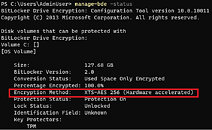
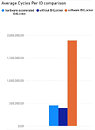
Microsoft has unveiled a new hardware-accelerated BitLocker encryption system for Windows 11, which shifts cryptographic operations from software to dedicated accelerator units integrated into future CPU microarchitectures. Historically, software-based BitLocker in Windows 11 has caused massive performance degradation. For example, in Windows 11 going from no BitLocker to software-based BitLocker has caused average number of cycles per I/O to skyrocket from roughly 400,000 cycles to about 1.9 million cycles. This is a 375% increase in cycles per I/O, and can cause significant storage performance degradations. However, Microsoft is finally bringing hardware-based encryption to solve this.

The new hardware acceleration, announced at Ignite 2025 in November, is now available in Windows 11 version 25H2 and Windows Server 2025 with the September update. Early testing shows that some workloads experience double the storage performance while reducing CPU usage by over 70%. The system offloads AES-XTS-256 encryption processing from the main processor to a fixed-function cryptography engine embedded within the SoC. Encryption keys are hardware-wrapped to enhance security against memory-based attacks. The initial rollout will target Intel vPro platforms with the upcoming Core Ultra Series 3 "Panther Lake" processors, but Microsoft plans to extend support to other vendors as well.

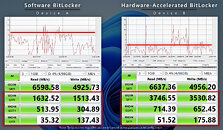
Performance data indicates that sequential read and write speeds are similar between software and hardware approaches. However, random 4K operations show significant improvements with hardware acceleration. In the RND4K Q32T1 read and write tests, hardware-accelerated BitLocker is 2.3 times faster. For single-queue random reads, hardware-based encryption is approximately 40% faster, and for single-queue random writes, it is about 2.1 times faster. These results demonstrate that hardware-based acceleration significantly enhances small-block random performance. These random access patterns are crucial for modern multitasking, which explains why the previous software-only implementation experienced the most significant slowdowns.
Source: Microsoft
Add your own comment

62 Comments on Microsoft's Hardware-Accelerated BitLocker Brings Massive Performance Gains

#26
CosmicWanderer
This is really good. BitLocker used to have a serious performance impact on drives. I remember how bad it was on Windows Vista, where you had to compromise performance for security. It improved in later versions of Windows, but with this update performance is basically on-par with not having it enabled.

And to everyone complaining, I've never lost data because of BitLocker. It's never caused me any issues besides having to enter my key when I tinker too much. Keys are automatically tied to my MS account, and with 2FA I've never suffered a breach. You wanna access your data remotely? Use the cloud, a NAS, or RDP into your PC. Ya'll acting like there are no alternative ways of doing things necessary to keep your data safe.

By all means, use competing drive encryptors instead of BitLocker. Use competing anti-viruses instead of Windows Defender. You have choices. I just prefer to stick with native solutions because I'm careful and know what I'm doing on my devices.
Posted on Reply
#27
windwhirl
azraelAlso, I may be in the minority, but who truly needs encryption on a desktop pc?
I really don't, and I'd argue most home users don't, because their main data theft/loss scenario involves ransomware the user let execute due to error or ignorance, not some guy coming into their home to steal their PC, so Bitlocker is useless for that.
CosmicWandererYa'll acting like there are no alternative ways of doing things necessary to keep your data safe.
Personally it's more about "why did this shit turn on by itself unannounced?"
Posted on Reply
#28
lexluthermiester
windwhirlYeah, I'm not using that Bitlocker crap.

"What do you mean you auto-encrypted my drives without fucking thinking whether I might be interested in accessing them outside of Windows?!"
Exactly right! It inappropriate for microsoft to be making assumptions like that. Not acceptable at all.
FoulOnWhiteOr because i am human and might lose, forget the encryption key
This as well!
windwhirlPersonally it's more about "why did this shit turn on by itself unannounced?"
Yup. Behind the back crap is not ok!
Posted on Reply
#29
trsttte
R-T-BYeah, it's like they learned nothing from blindly trusting hardware security.
I think they learned something - going from the drive self-encryption hardware with a huge number of vendors using shitty and/or outdated implementations to having dedicated instructions in the CPU that are provided by only 2 vendors is something.

At the end of the day though they should be relying on existing standard stuff like AES-NI and VAES, why bring in a new thing!?
Posted on Reply
#30
TheinsanegamerN
windwhirlWe already have AES acceleration in CPUs. Why do we need a new thing for the stupid Bitlocker that craps out from time to time...
Because that way when they introduce TPM 3.0 now with more stupid, they can require you to buy new CPUs instead of using those pesky older models, oh and dont forget your new Windows license keys!

It's a bone thrown to manufacturers to say "Please dont think of shipping Ubuntu instead of Windows!".
Posted on Reply
#31
Vayra86
lexluthermiesterFor those of us who do not and will not use bitlocker, this is of zero concern. What we really need is microsoft to stop trying to force useless garbage on us.
This. The only correct answer to MS doing change is 'cool, one less item of bloat on my PC!' Disable = zero problems
CosmicWandererThis is really good. BitLocker used to have a serious performance impact on drives. I remember how bad it was on Windows Vista, where you had to compromise performance for security. It improved in later versions of Windows, but with this update performance is basically on-par with not having it enabled.

And to everyone complaining, I've never lost data because of BitLocker. It's never caused me any issues besides having to enter my key when I tinker too much. Keys are automatically tied to my MS account, and with 2FA I've never suffered a breach. You wanna access your data remotely? Use the cloud, a NAS, or RDP into your PC. Ya'll acting like there are no alternative ways of doing things necessary to keep your data safe.

By all means, use competing drive encryptors instead of BitLocker. Use competing anti-viruses instead of Windows Defender. You have choices. I just prefer to stick with native solutions because I'm careful and know what I'm doing on my devices.
Pray tell what is safer about having encrypted data on a local drive... drive's already in your control. This is only useful if you actually do want remote access. All you have is a Microsoft gateway to your data that is supposed to make you feel safe but all you really have is additional dependancy to mitigate a non issue.
Posted on Reply
#32
Gunbound
This is good for people who want to use BitLocker. Do they even still make BitLocker optional anymore without resorting to workarounds?
Posted on Reply
#33
windwhirl
GunboundThis is good for people who want to use BitLocker. Do they even still make BitLocker optional anymore without resorting to workarounds?
They turn it on by default on 24H2 but you can disable it regardless going to Settings.
Posted on Reply
#34
aktpu
TheinsanegamerNBecause that way when they introduce TPM 3.0
Well, have you heard about Pluton?
Posted on Reply
#35
Easo
I am truly fascinated by the hate, though. This thing is used everywhere in enterprise, "it just works".
Posted on Reply
#36
R-T-B
azraelPluton upon us
To be fair, Pluton is virtually unused. It's off by default on all platforms minus the Xbox One family. Heck, even if I opt-in, the implementation is outright broken on my MSI board, so I CAN'T use it.
trsttteI think they learned something - going from the drive self-encryption hardware with a huge number of vendors using shitty and/or outdated implementations to having dedicated instructions in the CPU that are provided by only 2 vendors is something.
Seagate and Micron are pretty much the only vendors I trust to handle their Opal/SED implementation correctly (and Seagate just uses prepackaged Phison firmwares in SSD land so... not so sure anymore outside HDDs).

In CPU land, I'm not sure I'd trust any of them, but I'd trust Intel marginally more than AMD.

The real takeaway from this is this shit needs to be audited and updateable not blackbox frozen firmware.
EasoI am truly fascinated by the hate, though. This thing is used everywhere in enterprise, "it just works".
It has no place in consumer land without informing the end user. Already we have users on this very forum who have lost data to being unaware this thing is on.
Posted on Reply
#37
Vayra86
EasoI am truly fascinated by the hate, though. This thing is used everywhere in enterprise, "it just works".
Until it doesnt and the nice thing about enterprise is at that point that they have facility/IT management and you get a replacement device that has the credentials to access your cloud environment.

Apples / apples...? Dont make the mistake of thinking you have the same position as an enterprise user. For MS you as a consumer are the bottom of the food chain, nothing else.
Posted on Reply
#38
lexluthermiester
Vayra86Disable = zero problems
My version: Deletion = zero problems. If it's not present on the system, it can't run or be made to run later.
Posted on Reply
#39
Vayra86
lexluthermiesterMy version: Deletion = zero problems. If it's not present on the system, it can't run or be made to run later.
Yeah potato potatoe, I just disable Biocker in Rufus and that is all I ever see of it lol
Posted on Reply
#40
lexluthermiester
Vayra86Yeah potato potatoe, I just disable Biocker in Rufus and that is all I ever see of it lol
I take that a step further and delete both the offending exe and the service it depends on. Bitlocker is incapable of running on my system because it doesn't exist.
Posted on Reply
#41
Easo
Vayra86Until it doesnt and the nice thing about enterprise is at that point that they have facility/IT management and you get a replacement device that has the credentials to access your cloud environment.

Apples / apples...? Dont make the mistake of thinking you have the same position as an enterprise user. For MS you as a consumer are the bottom of the food chain, nothing else.
Well, it's not like enteprises have some kind of special Windows or hardware running it - and it happens rarely enough (in my experience over 13 years of work on 500-1000 computers). I honestly don't remember need to replace anything, because you have recovery key and after that it's fixable - issues almost always were caused by user plugging in something they should not, which triggered BitLocker protection - as it should.
R-T-BIt has no place in consumer land without informing the end user. Already we have users on this very forum who have lost data to being unaware this thing is on.
Disagree - your data being encrypted is overall good for you, the consumer. I thought we all were privacy nuts, no?
I will not argue about users on this forum, except that we are not talking about the average "I just browse FB and play games", but those who deviate from standard use practices thus are more likely to break something (regardless of OS in use).
Posted on Reply
#42
lexluthermiester
EasoDisagree - your data being encrypted is overall good for you, the consumer. I thought we all were privacy nuts, no?
As a rule, yes we agree. Forcing it on people without their consent? Not at all acceptable.
Posted on Reply
#43
R-T-B
EasoDisagree - your data being encrypted is overall good for you, the consumer. I thought we all were privacy nuts, no?
No, I am not all for privacy at the expense of everything else.

The end user being at risk of losing data because they were not informed encryption was being done at all is a perfect example of an overuse of a privacy enhancing tech.

The answer to this is super simple: Just inform the user at install and allow them to opt out if they don't want it. You can even explain the downsides there: It's not hard at all.
lexluthermiesterForcing it on people without their consent? Not at all acceptable.
To be fair this seems to only happen with bioses complying with the "securePC" styled settings. This is almost exclusively OEM devices. But still, that's enough to be bad.
Posted on Reply
#44
TumbleGeorge
Easois overall good for you, the consumer
Ok. Microsoft, do me a favor by paying off my loans as a gift from you. Is good dor me, the consumer.
Posted on Reply
#45
Vayra86
EasoWell, it's not like enteprises have some kind of special Windows or hardware running it - and it happens rarely enough (in my experience over 13 years of work on 500-1000 computers). I honestly don't remember need to replace anything, because you have recovery key and after that it's fixable - issues almost always were caused by user plugging in something they should not, which triggered BitLocker protection - as it should.


Disagree - your data being encrypted is overall good for you, the consumer. I thought we all were privacy nuts, no?
I will not argue about users on this forum, except that we are not talking about the average "I just browse FB and play games", but those who deviate from standard use practices thus are more likely to break something (regardless of OS in use).
It doesnt matter if it was one in a billion, I didnt ask for it, kindly fuck off is the basic stance here ;) You cant say that in enterprise, but privately, I can, do, and will continue doing so. Risk mitigation is good, but Ill decide what I define as risk.
Posted on Reply
#46
lexluthermiester
Vayra86You cant say that in enterprise
Even in Enterprise deployments where entities have their own custom solutions it's unacceptable and even against the law in certain situations. In reality, microsoft is pulling on the general public what they can not get away with in the business and enterprise sectors without severe consequences.
Posted on Reply
#47
CosmicWanderer
Vayra86Pray tell what is safer about having encrypted data on a local drive... drive's already in your control. This is only useful if you actually do want remote access. All you have is a Microsoft gateway to your data that is supposed to make you feel safe but all you really have is additional dependancy to mitigate a non issue.
Pray tell what happens when someone breaks into your home and steals your unencrypted PC? Or when someone snatches your unencrypted laptop at a coffee shop the second you look away?

Like that's never happened to people before. But no, according to you, drive encryption on a local drive "is only useful if you actually do want remote access". 😂
Posted on Reply
#48
windwhirl
CosmicWandererPray tell what happens when someone breaks into your home and steals your unencrypted PC?
Then let people make the decision instead of taking the decision for them.
Posted on Reply
#49
CosmicWanderer
windwhirlThen let people make the decision instead of taking the decision for them.
For "most people", having it on by default is the better practice, because it keeps their data safe even if they don't pay attention to data safety.

It's like Windows Defender being on by default, because "most people" won't bother installing a third-party anti-virus.

For people who know what they want. The option is there to disable BitLocker and they can use whatever drive encryption solution they want.
Posted on Reply
#50
windwhirl
CosmicWandererFor people who know what they want. The option is there to disable BitLocker and they can use whatever drive encryption solution they want.
And it would have been great if it had been freaking communicated from the start, which Microsoft didn't communicate shit.
Posted on Reply
Add your own comment
Nov 21st, 2026 12:48 PST change timezone

New Forum Posts

Popular Reviews

TPU on YouTube

Controversial News Posts