Monday, April 6th 2026

Steam Will Estimate Game FPS Before Purchase to Show Expected PC Performance

Steam is reportedly in the process of adding a "Frame Estimator" tool that can estimate your PC's performance before you purchase a game. As you know, Valve's Steam platform is the largest gaming platform in the world, with access to millions of PCs. The Steam Client application offers an option to include your PC in Valve's telemetry system, which processes data such as your PC's specifications and game information, including your library. Using these data points, Steam will estimate how many frames per second your PC can generate in any game, depending on your configuration. For example, for a specific CPU, GPU, and available system memory, the Steam Client will indicate whether a game can reach 60 FPS at 1440p using high settings, or whatever your preference is. We can only speculate at this point about what the feature will look like, as Steam is still refining it before the public beta release.

Additionally, Valve has already started asking users for anonymous FPS data collection about a month ago whenever they run a game. With this data pool, likely involving millions of participants, Valve aims to build a system that estimates your FPS output based on your specific PC configuration, without needing to run a game first. Reportedly, this feature will appear in the Steam Client and show how much performance your PC can deliver before you even purchase a game. This is a classic recommendation system that will indicate what your configuration typically delivers at specific game settings and resolutions.
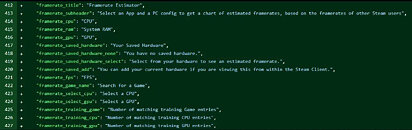
In the world of DIY PC building, there are countless configurations gamers can choose from. Starting with the CPU, options diverge into AMD and Intel, each with numerous models over many generations. Then there are GPUs from AMD, Intel, and NVIDIA, which also vary across generations and configurations, each running with specific drivers on different operating systems. To add to the diversity, systems have different types of DDR memory like DDR3, DDR4, and DDR5, all installed in various capacities and running at different timings, depending on the CPU host. This variance in configurations makes it almost impossible to get an accurate system performance estimation without the resources of Valve to create a system, likely similar to AI recommendation engines, to estimate your PC's performance accurately within a margin of error.
Source: u/dex3108 on Resetera
Add your own comment

33 Comments on Steam Will Estimate Game FPS Before Purchase to Show Expected PC Performance

#1
JIWIL
I wonder how data collection handles framerate caps, vsync, etc. I never run games at full GPU/CPU usage.
Posted on Reply
#2
Hyderz
Hrmmm I think it can be useful for users who are not computer hardware savvy, but a game will perform differently on day one and months after patches… not sure abt this one
Posted on Reply
#3
neatfeatguy
Heard about this a handful of days ago and it makes me wonder if the latest Steam Survey that popped up on two of my machines - something I haven't seen for many, many years - this past week is the reason behind them. Gotta get that data!
Posted on Reply
#4
AGlezB
And now they have a reason to ask users for performance data, to which most users will respond "yes" without thinking twice. Let's hope this remains opt-in because I'm not interested. In my estimation this will be no better than minimum/recommended harware estimations and instead of help will have a lot of user asking why their games don't run at the framerates Steam estimated, which will cause Steam to give more conservative estimates which will make this "feature" even more useless to anyone but Steam. I'll be happy to be proven wrong. :ohwell:
Posted on Reply
#5
Shihab
HyderzHrmmm I think it can be useful for users who are not computer hardware savvy, but a game will perform differently on day one and months after patches… not sure abt this one
OP says the data is from real world users. Updating the stats would be trivial (server costs notwithstanding) if that's the case.
Never underestimate how much data big corps has and how much info they can squeeze out of it (at least this time it's something benign that benefits the user)...
Posted on Reply
#6
Athena
I don't see this being very helpful, people will still buy whatever and test it on their own system, and if they don't like the performance, they will do a refund
Posted on Reply
#7
mtosev
Useful feature. Hopefully gamers will find it useful.
Posted on Reply
#8
Yashyyyk
unless it collects power limit data (and thermal) it's kinda useless on laptops
Posted on Reply
#9
EatingDirt
JIWILI wonder how data collection handles framerate caps, vsync, etc. I never run games at full GPU/CPU usage.
I'd imagine they'd scrub the data of Vsync and framecapped systems. That's the only realistic way they can estimate FPS by just looking at hardware information.

It'd be up to you to figure out how much your niche power saving effects performance compared to what your hardware is entirely capable of.
Posted on Reply
#10
Solaris17
Super Dainty Moderator
I can’t wait for the flood of gamers in the forum over the next few years.

“Why game 19fps?? Steam says 22?”
Posted on Reply
#11
Darmok N Jalad
I wonder if it would be that specific, or if it will just provide general guidance, like with when a game is “SteamDeck verified.” It will know your hardware configuration, including monitor refresh rate and resolution, and then inform you if your hardware is strong enough to provide a viable experience. I don’t think it needs to promote a FPS for the intended purpose, but rather a rating on how “playable” the game is.
Posted on Reply
#12
Solaris17
Super Dainty Moderator
Darmok N JaladI wonder if it would be that specific, or if it will just provide general guidance, like with when a game is “SteamDeck verified.” It will know your hardware configuration, including monitor refresh rate and resolution, and then inform you if your hardware is strong enough to provide a viable experience. I don’t think it needs to promote a FPS for the intended purpose, but rather a rating on how “playable” the game is.
“Valve FPS WEN?”
Posted on Reply
#13
tsunami2311
I kinda look forward to see how accurate this is, I would not of bought Rise of the Ronin on PC yet if I knew I would be severely cpu limited before hand, As i dont trust "requirements" anymore more to be true

though I didnt know they where ask people for anonymous data about frame rates when in games? i dont remember be ask this
Posted on Reply
#14
theglaze
Considering the insane amount of variables (monitor resolution, DLSS/FSR/XESS, game quality settings, etc), this may just lead to a litmus test of "Minimum" and "Recommended" hardware specs on the Store page.

Lots of developers have misleading "Minimum" system requirements. They don't want a prospect customer to disqualify themselves from the purchase. Likewise, "Recommended" is a big net and probably just represents 1080p @ 60FPS. But if the dev egregiously misleads, it results in Steam refunds and customer service requests, and unhappy customers affects Valve's profits.

I want this tool to hold the developer accountable to their marketing promises. But it will need to collect more data (like monitor resolution) to provide a nuanced performance expectation to each user. Even then I have my doubts on it's usefulness, but given the insane amount of data Valve (could) collect, maybe the meta-analysis can do that litmus test to Min and Recommended.
Posted on Reply
#16
mrnagant
Or just ask developers to list FPS as part of their minimum/maximum specs. Include the resolution, and a requirement that the minimum spec be for 30fps.

Even just the game settings and resolutions. You might get 30fps, but I run at lower settings/resolution so get 60fps with the same exact hardware.
Posted on Reply
#17
Darmok N Jalad
Seems like it’s trying to prepare for the Steam Machine, so you can get something more akin to a console experience.
Posted on Reply
#18
u2knetwork
Seems like a pointless tool. I don't even really look at system reequipment's for games anymore, only if its SSD or HDD recommended. I just play a game and keep it moving and see how it performs when i play it. or am i missing something here??????
Posted on Reply
#19
Darmok N Jalad
u2knetworkSeems like a pointless tool. I don't even really look at system reequipment's for games anymore, only if its SSD or HDD recommended. I just play a game and keep it moving and see how it performs when i play it. or am i missing something here??????
I’m not against the idea. The system requirements the developers provide is often pretty vague as to what sort of experience to expect with my hardware that’s above recommended. They might consider 30fps in ugly mode as playable. Real world data should be more informative. Not that I purchase many new titles, but I can see the appeal, especially for those that don’t really care about or understand hardware minimums and how each component comes into play.
Posted on Reply
#20
Rjc31
Aren't a good amount of devs putting out a setting/performance table with what hardware is needed to achieve that nowadays? Example given
Posted on Reply
#21
Ruru
Trepie
JIWILI wonder how data collection handles framerate caps, vsync, etc. I never run games at full GPU/CPU usage.
I'm still sure that the majority of us gamers will run at full throttle. I personally only use 144fps cap if a game runs well enough.
Posted on Reply
#22
SiliconSeraph
RuruI'm still sure that the majority of us gamers will run at full throttle. I personally only use 144fps cap if a game runs well enough.
Same. I will 100% my GPU unless it's running a little choppy, which then I apply a 100-120FPS cap and it usually evens out the 1% lows. The only exception is if you use Multi-Frame-Gen, where for whatever reason, it doesn't play well with framerate caps.
Posted on Reply
#23
Darmok N Jalad
Rjc31Aren't a good amount of devs putting out a setting/performance table with what hardware is needed to achieve that nowadays? Example given
Yes, but even then there are so many hardware variables that it doesn’t tell the full story. Then again, I’m not sure how Steam plans to handle all those variables. They certainly have the widest sample size—I doubt devs can test for every variable.
Posted on Reply
#24
Rjc31
Darmok N JaladYes, but even then there are so many hardware variables that it doesn’t tell the full story. Then again, I’m not sure how Steam plans to handle all those variables. They certainly have the widest sample size—I doubt devs can test for every variable.
Yeah I understand and agree overall but I was just pointing out that some some devs are already giving a more detailed spec for their games than the basic minimum and recommended... Kind of a step in between that and what Steam is attempting
Posted on Reply
#25
Darmok N Jalad
Rjc31Yeah I understand and agree overall but I was just pointing out that some some devs are already giving a more detailed spec for their games than the basic minimum and recommended... Kind of a step in between that and what Steam is attempting
I guess what they often don’t cover are things like laptops and handhelds with iGPUs. It’s probably also a play at providing a benchmark for the Steam Machine.
Posted on Reply
Add your own comment
Nov 17th, 2026 12:30 CST change timezone

New Forum Posts

Popular Reviews

TPU on YouTube

Controversial News Posts