Wednesday, August 19th 2026

CachyOS and AlmaLinux Beat out Windows 11 in Workstation Benchmarks
With the advent of the Steam Deck and the bump in Linux adoption that we've seen since then, a number of Linux distributions have appeared that make tweaks to the Linux kernel in the hopes of gaining performance. CachyOS is one such Linux distribution, and it appears that those kernel performance tweaks are paying off, according to some recent testing by Phoronix.
In a comparison between CachyOS, AlmaLinux 10.2, Ubuntu 26.04, Fedora Workstation 44, and Windows 11, CachyOS consistently performed at or near the top of the list, with CachyOS in performance mode claiming first place in the geometric mean of the results of a workstation benchmark. Windows 11 Pro was right at the bottom of the chart, coming in 14.9% slower than CachyOS in performance mode.
 It's worth reading the full write-up at Phoronix for the in-depth results, especially if you're using benchmarks to determine which operating system to use with specific software, because there are enough cases in which Windows scores a decent victory that an application-specific approach is warranted.
The tests comprised of a mix of CPU and GPU benchmarks on a $46,000+ HP Z4 G6i workstation PC with a 48-core Intel Xeon 678X Granite Rapids WS CPU, 128 GB of DDR5-6400 memory, and an NVIDIA RTX Pro 6000 Blackwell workstation GPU. First up was 3D rendering and modelling, which tested Blender and IndigoBench 4.4 in both CPU and GPU rendering modes. Here, almost surprisingly, given NVIDIA's reputation in the Linux community, CachyOS and AlmaLinux were both faster than Windows 11 in both CUDA and CPU compute. The biggest differences in the render workloads came from CPU-only rendering, where Windows 11 was up to 12% slower than CachyOS. Ubuntu and Fedora were both measurably slower than CachyOS, but only by about 3-4%.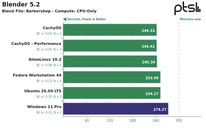 Tides turned with Chaos Group's V-Ray 6.0 rendering engine, where RTX testing resulted in 6% more rays on Windows, while CUDA rendering resulted in a 2% advantage for Windows. In CPU rendering, Linux was once again ahead, with CachyOS leading the pack at 18% faster than Windows but only marginally faster than the other Linux distributions tested. Neatbench video benchmarking, GravityMark 1.87, Unigine Superposition 1.0, and OctaneBench also saw CachyOS pulling ahead, although in some tests, gains were minimal, and in Octane, only CachyOS in Performance mode and AlmaLinux managed to pull ahead of Windows. In FluidX3D fluid dynamics simulations, performance was largely identical, but Windows 11 did manage to technically edge out a lead, even if only by fractions of a percent.
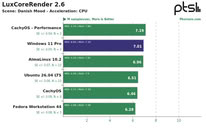
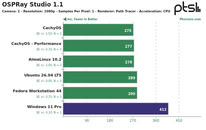 OSPRay Studio and LuxCoreRender produced peculiar results, with Windows matching or edging out Linux in a number of tests but losing badly to all of the Linux distributions in others. 7-Zip compression benchmarks once again saw Linux beating Windows by a decent margin, although it was basically a wash between the different Linux distributions.
Source:
Phoronix
In a comparison between CachyOS, AlmaLinux 10.2, Ubuntu 26.04, Fedora Workstation 44, and Windows 11, CachyOS consistently performed at or near the top of the list, with CachyOS in performance mode claiming first place in the geometric mean of the results of a workstation benchmark. Windows 11 Pro was right at the bottom of the chart, coming in 14.9% slower than CachyOS in performance mode.


The tests comprised of a mix of CPU and GPU benchmarks on a $46,000+ HP Z4 G6i workstation PC with a 48-core Intel Xeon 678X Granite Rapids WS CPU, 128 GB of DDR5-6400 memory, and an NVIDIA RTX Pro 6000 Blackwell workstation GPU. First up was 3D rendering and modelling, which tested Blender and IndigoBench 4.4 in both CPU and GPU rendering modes. Here, almost surprisingly, given NVIDIA's reputation in the Linux community, CachyOS and AlmaLinux were both faster than Windows 11 in both CUDA and CPU compute. The biggest differences in the render workloads came from CPU-only rendering, where Windows 11 was up to 12% slower than CachyOS. Ubuntu and Fedora were both measurably slower than CachyOS, but only by about 3-4%.


87 Comments on CachyOS and AlmaLinux Beat out Windows 11 in Workstation Benchmarks
Being built on COM, WinRT is supposed to be a native approach: at least in the case of C++/WinRT. C# and other languages have their objects repackaged at runtime for interoperability with the ABI, entailing a cost.
I always thought that Qt runs sluggishly because of wasteful C++ usage, particularly dynamic allocation. I am not sure why it would be faster on Linux. Perhaps Qt's implementation on that platform is better.
Also Qt runs apps don't use C++ properly?
EDIT: Forgot to mention ZorinOS..
When I started at this particular company my initial assigned asset was a Surface Laptop 4. It had the 1135G7 and 16GB of RAM. I quickly had to have a jump box for us spun up with enough RAM to RDP into many different systems at once because their base image bloat was hogging more than half of the available RAM causing RDP sessions to crash or the RDC manager software to crash when the OS would try swapping. This was while still using W10. I was part of the testing group to move to W11 21H2 summer of 2022. There was no perceivable slowdown back to back with everyday tasks.
My current asset should technically in theory be faster than my main rig as it's a Dell Pro Max that cost around 7000 (after fake shortage pricing adjustments) with a Core 2 Ultra 9 285H and 32GB 8400 RAM but it is definitely bogged down by their bloat. Dinking about in Windows is quick and responsive, loading a program or moving files is not.