Wednesday, August 19th 2026

CachyOS and AlmaLinux Beat out Windows 11 in Workstation Benchmarks

With the advent of the Steam Deck and the bump in Linux adoption that we've seen since then, a number of Linux distributions have appeared that make tweaks to the Linux kernel in the hopes of gaining performance. CachyOS is one such Linux distribution, and it appears that those kernel performance tweaks are paying off, according to some recent testing by Phoronix.

In a comparison between CachyOS, AlmaLinux 10.2, Ubuntu 26.04, Fedora Workstation 44, and Windows 11, CachyOS consistently performed at or near the top of the list, with CachyOS in performance mode claiming first place in the geometric mean of the results of a workstation benchmark. Windows 11 Pro was right at the bottom of the chart, coming in 14.9% slower than CachyOS in performance mode.
It's worth reading the full write-up at Phoronix for the in-depth results, especially if you're using benchmarks to determine which operating system to use with specific software, because there are enough cases in which Windows scores a decent victory that an application-specific approach is warranted.

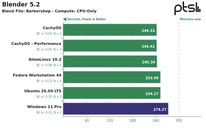
The tests comprised of a mix of CPU and GPU benchmarks on a $46,000+ HP Z4 G6i workstation PC with a 48-core Intel Xeon 678X Granite Rapids WS CPU, 128 GB of DDR5-6400 memory, and an NVIDIA RTX Pro 6000 Blackwell workstation GPU. First up was 3D rendering and modelling, which tested Blender and IndigoBench 4.4 in both CPU and GPU rendering modes. Here, almost surprisingly, given NVIDIA's reputation in the Linux community, CachyOS and AlmaLinux were both faster than Windows 11 in both CUDA and CPU compute. The biggest differences in the render workloads came from CPU-only rendering, where Windows 11 was up to 12% slower than CachyOS. Ubuntu and Fedora were both measurably slower than CachyOS, but only by about 3-4%.
Tides turned with Chaos Group's V-Ray 6.0 rendering engine, where RTX testing resulted in 6% more rays on Windows, while CUDA rendering resulted in a 2% advantage for Windows. In CPU rendering, Linux was once again ahead, with CachyOS leading the pack at 18% faster than Windows but only marginally faster than the other Linux distributions tested. Neatbench video benchmarking, GravityMark 1.87, Unigine Superposition 1.0, and OctaneBench also saw CachyOS pulling ahead, although in some tests, gains were minimal, and in Octane, only CachyOS in Performance mode and AlmaLinux managed to pull ahead of Windows. In FluidX3D fluid dynamics simulations, performance was largely identical, but Windows 11 did manage to technically edge out a lead, even if only by fractions of a percent.
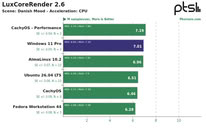
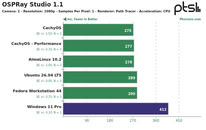
OSPRay Studio and LuxCoreRender produced peculiar results, with Windows matching or edging out Linux in a number of tests but losing badly to all of the Linux distributions in others. 7-Zip compression benchmarks once again saw Linux beating Windows by a decent margin, although it was basically a wash between the different Linux distributions.
Source: Phoronix
Add your own comment

87 Comments on CachyOS and AlmaLinux Beat out Windows 11 in Workstation Benchmarks

#51
LittleBro
GeoffreyAThere are a few different Linux distributions in the test, one of which is an optimised variant, CachyOS. So, why not test different Windows distributions? Or at least, stock and VBS off. No doubt, even Defender is taking up cycles.
CachyOS is built on idea being lightweight and using libraries compiled for modern hardware (modern ISAs).
It's not an optimization that any user has to do. CachyOS comes with this in default state, after fresh new installation.
As a counterpart, CachyOS does not support older hardware quite well.

If VBS is part of Win11's default config and that's causing it to perform worse, who's to blame?

Win11 is shit, I've seen it with my own eyes - I worked on company laptop for 3 years on Win10 and then IT dept. migrated it do Win11.
It's way slower. Opening Outlook, Teams, even fucking right-clicking on item for properties takes ages. Not to mention Explorer needs seconds to load directory.
It's so bloated, that's why it performs like shit. They want to play it "modern" by requiring Secure Boot and TPM 2.0 stuff turned on by default, but as it has been
already proved multiple times, Windows 11 could be installed on older hardware without fulfilling these requirements. It's artificial requirement.
Not to mention that whole Win11 was brute forced update to last version of Windows which was meant to be Win10.
There was no need for Win11. It's a bloated Win10 reskin with many things glued together. What proves this theory is Win11 updates: they break a lot of things.
This happens when you glue a lot of things together. Win10 could continue with new security patches, but yeah, MS wanted to milk customers once again.

CachyOS, on the other hand, is specialized for modern ISAs, it's goal is to use what those new CPUs offer. That's why it's so fast and responsive.
JustBenchingTurning VBS off isn't butchering anything. Someone on the other side of the extremist table could argue that linux not having it on by default makes it an unsafe swiss cheese OS.
That someone on the other side of the table must be a dumb person who does not know how Linux or any UNIX-based OS handles privileges.
That's why kernel level anti-cheat is a big problem in Linux, while it's absolutely common in Windows. Windows will let anyone to it's kernel lol.
Posted on Reply
#52
JustBenching
LittleBroCachyOS is built on idea being lightweight and using libraries compiled for modern hardware (modern ISAs).
It's not an optimization that any user has to do. CachyOS comes with this in default state, after fresh new installation.
As a counterpart, CachyOS does not support older hardware quite well.

If VBS is part of Win11's default config and that's causing it to perform worse, who's to blame?

Win11 is shit, I've seen it with my own eyes - I worked on company laptop for 3 years on Win10 and then IT dept. migrated it do Win11.
It's way slower. Opening Outlook, Teams, even fucking right-clicking on item for properties takes ages. Not to mention Explorer needs seconds to load directory.
It's so bloated, that's why it performs like shit. They want to play it "modern" by requiring Secure Boot and TPM 2.0 stuff turned on by default, but as it has been
already proved multiple times, Windows 11 could be installed on older hardware without fulfilling these requirements. It's artificial requirement.
Not to mention that whole Win11 was brute forced update to last version of Windows which was meant to be Win10.
There was no need for Win11. It's a bloated Win10 reskin with many things glued together. What proves this theory is Win11 updates: they break a lot of things.
This happens when you glue a lot of things together. Win10 could continue with new security patches, but yeah, MS wanted to milk customers once again.

CachyOS, on the other hand, is specialized for modern ISAs, it's goal is to use what those new CPUs offer. That's why it's so fast and responsive.


That someone on the other side of the table must be a dumb person who does not know how Linux or any UNIX-based OS handles privileges.
That's why kernel level anti-cheat is a big problem in Linux, while it's absolutely common in Windows. Windows will let anyone to it's kernel lol.
I just asked 3 ais and they all said Linux needs LVBS much more windows due to a lot of attacks it faced recently. So as usual, all this hate against windows is completely unwarranted.

The rest is just your personal opinion which doesn't mean anything. I can say win 11 is great, much faster than win 10 and linux yadayada. It's a pointless argument.
Posted on Reply
#53
LittleBro
JustBenchingI just asked 3 ais and they all said Linux needs LVBS much more windows due to a lot of attacks it faced recently. So as usual, all this hate against windows is completely unwarranted.

The rest is just your personal opinion which doesn't mean anything. I can say win 11 is great, much faster than win 10 and linux yadayada. It's a pointless argument.
Was is JustTrolling AI model A, B, C Ultra 3.0c you asked?


Posted on Reply
#54
JustBenching
LittleBroWas is JustTrolling AI model A, B, C Ultra 3.0c you asked?


Do you want me to link my results and have ais fight each other? We're there kernel level attacks against Linux recently? Why is it even developed for Linux if it's useless?

BTW even your result says they need it equally so kinda disprove your original spiel. But nice try.
Posted on Reply
#55
GeoffreyA
LittleBroCachyOS is built on idea being lightweight and using libraries compiled for modern hardware (modern ISAs).
It's not an optimization that any user has to do. CachyOS comes with this in default state, after fresh new installation.
That's what I said: CachyOS is an optimised variant. Since bloat and VBS are controversial in this test, why not try LTSC, which is lightweight (VBS still enabled if requirements are met). In other words, if different Linux distributions are tested, why not test different Windows "distributions" too?
LittleBroWin11 is shit, I've seen it with my own eyes - I worked on company laptop for 3 years on Win10 and then IT dept. migrated it do Win11.
It's way slower. Opening Outlook, Teams, even fucking right-clicking on item for properties takes ages. Not to mention Explorer needs seconds to load directory.
It's so bloated, that's why it performs like shit. They want to play it "modern" by requiring Secure Boot and TPM 2.0 stuff turned on by default, but as it has been
already proved multiple times, Windows 11 could be installed on older hardware without fulfilling these requirements. It's artificial requirement.
Not to mention that whole Win11 was brute forced update to last version of Windows which was meant to be Win10.
There was no need for Win11. It's a bloated Win10 reskin with many things glued together. What proves this theory is Win11 updates: they break a lot of things.
This happens when you glue a lot of things together. Win10 could continue with new security patches, but yeah, MS wanted to milk customers once again.
I agree that W11 has performance issues; but there is a difference between bloat and code running slowly in the shell---the two are often conflated. Bloat is unnecessary things packaged with an OS distribution: LTSC fixes this problem, not even shipping with the Windows Store. Apps and parts of the shell running slowly are, regrettably, due to Microsoft using web wrappers, managed code, and unoptimised WinRT. If they simply restored the classic Win32 code, it would, once again, run like lightning. To see what speed NT is capable of, try any classic Win32 program, such as IrfranView, Sumatra PDF, or MPC-HC.


Win32 programs open instantly on Windows 11. The 50-fps GIF hinders fluidity a bit. AVG and SmartScreen reputation are running, so those might or might not further hinder program opening. Cold start after Windows reboot.
Posted on Reply
#56
MTS-C
LittleBroI worked on company laptop for 3 years on Win10 and then IT dept. migrated it do Win11.
It is widely known that corporate assets are inherently slower due to base image bloat loaded for every asset in a company. They also have the need to have every security mitigation turned on for compliance purposes which will slow things down further. Not exactly even remotely close to what a normal home user would be doing if we're to stay in context with the thread topic.
Posted on Reply
#57
AleXXX666
LittleBroWin11 is shit, I've seen it with my own eyes - I worked on company laptop for 3 years on Win10 and then IT dept. migrated it do Win11.
It's way slower. Opening Outlook, Teams, even fucking right-clicking on item for properties takes ages. Not to mention Explorer needs seconds to load directory.
It's so bloated, that's why it performs like shit. They want to play it "modern" by requiring Secure Boot and TPM 2.0 stuff turned on by default, but as it has been
already proved multiple times, Windows 11 could be installed on older hardware without fulfilling these requirements. It's artificial requirement.
Not to mention that whole Win11 was brute forced update to last version of Windows which was meant to be Win10.
Exactly. At first these idiots claimed that “win10” will be “saas” (sucks as a service lol), then thought win 11 is great idea, with completely controversial UI (yeah way nicer than stupid “flat” 10 was, but still many note right that UI design HARDLY REMAINS SOME LINUX “DE”), and overbloated core. But, to each its own. On modern hw using outdated win 10 is just stupid, as it was back then when ppl stayed on 7 on modern pcs not wanting win 10 lmfao. But of course, same as with Vista was - on modern hw both were/are good, but sucks on older hw meant for older OS. Should be obvious lol:rolleyes:
Posted on Reply
#58
Grimling
At this point we have to ask, what is Windows 11?
From the first release of W11 in Oct. 4, 2021 (21H2), to the newest build of W11 in Feb. 10, 2026 (26H1), it has changed so much, to the point that this are completely different products now!
So you could ask why is Microsoft promoting different products under the same name?
And if they now "optimize" the code for the UI to make it less slow (LOL), in a new version, then even more so.
This feels like an "early access OS" for me. It is in early access for 5 years, and it is still alpha.
Posted on Reply
#59
jdrch
Not news. But those OSes have zero chance of being widely deployed in any S&P500 or Fortune 500 environment.
Posted on Reply
#60
lexluthermiester
jdrchNot news. But those OSes have zero chance of being widely deployed in any S&P500 or Fortune 500 environment.
Of course not. No "S&P500 or Fortune500" type company is going to install a GAMING distro for workstation use. Seriously? The test was about how well they compare on pricey hardware not about how useful they are in a workstation environment. Context is important.
GeoffreyAI agree that W11 has performance issues
In a default/stock fresh install config? Yes, sort of, on weaker systems. In a tweaked, customized and/or debloated state? No.

The same can be said for many Linux distro's.
Posted on Reply
#61
jdrch
lexluthermiesterhow well they compare on pricey hardware
It would have been better to run gaming benchmarks because that's what those OSes are actually used for.
Posted on Reply
#62
lexluthermiester
jdrchIt would have been better to run gaming benchmarks because that's what those OSes are actually used for.
Again, you're missing the point. I can't help you with that.
Posted on Reply
#63
GeoffreyA
GrimlingAt this point we have to ask, what is Windows 11?
From the first release of W11 in Oct. 4, 2021 (21H2), to the newest build of W11 in Feb. 10, 2026 (26H1), it has changed so much, to the point that this are completely different products now!
So you could ask why is Microsoft promoting different products under the same name?
And if they now "optimize" the code for the UI to make it less slow (LOL), in a new version, then even more so.
This feels like an "early access OS" for me. It is in early access for 5 years, and it is still alpha.
Judged under the pre-10 model, both 10 and 11 have been through a few versions, or, at the very least, service packs. 10, in particular, had a great deal of work done between RTM and Build ~14,000, VBS being implemented among other things. For comparison, Vista to 7 was 1,600 builds (of course, internally, it's a different story). 10 RTM to 22H2 was almost 9,000 builds. 11 has gone through about 4,000 since RTM.
GrimlingAnd if they now "optimize" the code for the UI to make it less slow (LOL)
Regrettably, WinRT's design incurs overhead when crossing the non-C/C++ language boundary. This is in contrast to Apple's toll-free bridging from the inception of Mac OS X. Apple got it right when migrating to Cocoa and are sailing smoothly today; Microsoft made a mess of it by being too ambitious and tainting the design by focusing on tablet applications. Today, Windows is carrying this burden.

In my opinion, the solution is radical: the Windows team should only be allowed to use Win32 for the shell. If the programmers can't do it, they should start studying Charles Petzold today. As for the talk about dark mode, high DPI, etc., since WinUI is implemented on top of Win32, I don't see why those features can't be added at that level. Windows 98 could make all windows dark; what is the problem today? Laziness at Redmond? Dogma?
Posted on Reply
#64
Bigshrimp
GeoffreyAJudged under the pre-10 model, both 10 and 11 have been through a few versions, or, at the very least, service packs. 10, in particular, had a great deal of work done between RTM and Build ~14,000, VBS being implemented among other things. For comparison, Vista to 7 was 1,600 builds (of course, internally, it's a different story). 10 RTM to 22H2 was almost 9,000 builds. 11 has gone through about 4,000 since RTM.


Regrettably, WinRT's design incurs overhead when crossing the non-C/C++ language boundary. This is in contrast to Apple's toll-free bridging from the inception of Mac OS X. Apple got it right when migrating to Cocoa and are sailing smoothly today; Microsoft made a mess of it by being too ambitious and tainting the design by focusing on tablet applications. Today, Windows is carrying this burden.

In my opinion, the solution is radical: the Windows team should only be allowed to use Win32 for the shell. If the programmers can't do it, they should start studying Charles Petzold today. As for the talk about dark mode, high DPI, etc., since WinUI is implemented on top of Win32, I don't see why those features can't be added at that level. Windows 98 could make all windows dark; what is the problem today? Laziness at Redmond? Dogma?
The problem today has to be laziness due to them offloading their decisions and abilities to AI. Giving them a form of psychosis where they think AI can do the work of seasoned OS engineers that were laid off.
Posted on Reply
#65
GeoffreyA
lexluthermiesterIn a default/stock fresh install config? Yes, sort of, on weaker systems. In a tweaked, customized and/or debloated state? No.

The same can be said for many Linux distro's.
Agreed. However, I do think there are problem areas in the shell, springing from the use of XAML, WinUI/RT, managed code, etc. Other than that, the OS is fast.

Unfortunately, I feel that the discourse around Windows and Linux has grown very uncritical today. The NT kernel gets blamed for being bloated because of bloat in excess out-of-box apps. It's a "bad" or "ancient" design. Why? Well, it comes from Microsoft and it's not Linux so it must be bad.
Posted on Reply
#66
LittleBro
JustBenchingDo you want me to link my results and have ais fight each other? We're there kernel level attacks against Linux recently? Why is it even developed for Linux if it's useless?

BTW even your result says they need it equally so kinda disprove your original spiel. But nice try.
Dude, I don't know what AI shit are you smoking, but I used ChatGPT and Gemini and they spitted roughly the same thing. No one said VBS on Linux is useless.
Doesn't really matter. What matters is your lack of knowledge about how Linux handles security. There's fundamental difference in approach.

Linux, for years, have had open-sourced and transparent kernel. This means anyone could fix any issue they'd found in in the code.
When a new version of Linux kernel is planned for release, all new lines with code are deeply analyzed. That also includes new drivers that are part of kernel get analyzed.
Everything in Linux is treated as file and thus access to everything is managed by user accounts and privileges. This is important for how VBS is getting implemented on Linux.
Linux is mostly about preventing unwanted access, which means deploying different layers of security (per OS rings) to fight intrusions.

Everything on Windows is black box: OS itself, drivers, 3rd party apps, ...
User downloads and installs, say, a GPU driver. This driver is translation layer between OS and GPU. Unfortunately, part of this driver is used for telemetry. User is unaware of this.
This telemetry is run via service and has a process in task manager. Things such as GPU drivers require access to OS kernel, that's ring 0 level access.
Turns out, there's a vulnerability in telemetry process of the driver. Hacker exploits this vulnerability and gains access to kernel, which means hacker's access is unrestricted,
they can do anything they want. Why did this happen? Because of black box environment. You don't really know what's the code doing once you only get it served as compiled.
Even if there's a vulnerability, it's not in your power to know it or fix it, as you can't see inside the black box.
It goes the same for Windows kernel. It's a black box. It's not properly reviewed and tested before getting launched.
(See how many issues come with any update on Win11 - that's a valid proof there's a problem with testing before update deployment.)

Windows is much more popular than Linux. Both are universal OSes that can be run on many hardware.
With popularity comes price in terms of security. What is often being used is also interesting for hackers. That's why there are more attacks and malware, viruses,
and shit for Windows. And since Linux is becoming more and more popular, that's why it's facing increasing count of attacks as well. Same logic goes for Apple or any other relevant OS.
(Whoever said that Linux is safer because there are no viruses for it was dumb as f*ck. There have always been viruses for Linux, just not as many as for Windows.)

Any driver can get access to ring 0 area on Windows. Any antivirus, any anti-cheat system for games. These elements are all additional black boxes and may have vulnerabilities.
On Linux, drivers that are parts of kernel, were thoroughly reviewed/validated. And they are available for anyone as open source code. Anyone can download it and fix it.
(Of course, you can install 3rd party app on Linux and allow it access to ring 0, but that's on you.)
Windows implemented VBS to have some part of running code/kernel isolated in a way that even standard kernel can't touch it. That means, a hacker that compromised regular kernel
could not touch virtualized one. (Provided, implementation of VBS in CPU and OS has no vulnerabilities.)
Since Windows has tons of shitware and 3rd party black box apps/drivers installed, Windows' approach is like "everthing in the OS is vulnerable and may have been compromised".
With such idelogy in mind, there's no other choice than to settle for VBS and check signatures of everything every time. Again, Linux's approach is about prevention of attacks.

Why Linux is getting LVBS and what are key differences compared to Windows' VBS?
As you may know, Linux kernel is powering nearly 90% of cloud computers (AWS, Azure, ...). On these physical machines, hundreds, maybe thousand of OSes are virtualized.
Some use LXC, some docker, but in the end they share kernel of the host machine's OS. That's why Linux can handle so many virtualized OSes fast and at once.
(Other approach is standard virtual machine, but this is extremely heavy on CPU and RAM, as even all kernels are virtualized.)
When a dumb user rents a virtual server and it's kernel gets compromised because user installed a piece of shit software that was used as entry point for an attack,
hacker might theoretically escape virtualized OS and compromise host's kernel and bring the whole machine down. A nightmare scenario for any datacenter.
This is why Linux is getting VBS implemented. Linux has never ever been so popular. Datacenter companies asked for. (You may want to read Linus Torvalds opinion on this.)

The way VBS is getting implemented on Linux different. VBS can eat as much as 10-15% of performance on Windows (depends on CPU capabilities).
On Windows, whenever a driver or anything running in ring 0 requests access to kernel and memory, VBS verifies the operation, signatures, etc. Every damn time.
On Linux, as previously mentioned, everything is treated as file. VBS on Linux goes into operation only when file is being touched to be loaded into memory. It's verified once and then it's locked.

VBS on Windows is not a native part of the kernel. It's a sort of "layer" that can be turned off. When turned on, when something on ring 0 requires access to memory, regular kernel needs to wait
for approval from virtualized one first, then the operation can be executed by regular kernel. This "jump" between kernels is quite heavy on CPU, thus performance penalties on Windows with VBS on.
VBS on Linux (project LVBS) is about integrating all this logic into kernel, there's no hypervisor or any other layer that can be switched off. Thanks to this, LVBS' performance penalty is negligible (0-3%).

Due to way how Windows works (connection between changing registry entries, kernel, dynamic libraries), "validate once and lock approach" is not possible on Windows.
On the other hand, it is perfectly possible on Linux, as everything is treated as file, any configuration is stored as file, no registry to be loaded into memory on start and so on.

LVBS is being developed with help of Microsoft engineers. Hopefully, these engineers are not the same that make Windows 11 updates ...
GeoffreyAThat's what I said: CachyOS is an optimised variant. Since bloat and VBS are controversial in this test, why not try LTSC, which is lightweight (VBS still enabled if requirements are met). In other words, if different Linux distributions are tested, why not test different Windows "distributions" too?
LTSC version is a fork of Pro or Enterprise version with all Telemetry disabled and most bloatware not installed. It's the same kernel, same security patches, same driver subsystem.
Few others things (like OS reserved space on disk disabled by default) is also present on LTSC.
LTSC has roughly 30-35 less processes running in background, most of them are part telemetry and geolocation, Xbox, MS Store and so on.
You can easily optimize Win10 Pro to Win 10 IoT Enterprise LTSC with proper install script and proper tools (such as Chris Titus' Win tool).

CachyOS is how it is right out the box. There's no Linux OS. There's Linux kernel and then there are OSes that are built upon that kernel, called forks or distributions.
There are Linux forks that are "classic" (Arch, Fedora, Debian, SUSE, Gentoo, ...) and then versions based on classic ones with modifications (other GUI, repository system, etc).

In your way of thinking, we can also consider Win11 being optimized version of Win10. By optimized I mean optimized in unfortunately, quite bad way. Optimized by being bloated, lol.
And yes, Win11 is in fact Win10 kernel, hell, Win11 even reports itself to apps and drivers as NT 10.0 kernel version, which is kernel version of Win10.
Windows 11 was deliberate move from MS to milk customers, artificially limiting customers and forcing them to "update". In fact, was no real (justified) need for Win11.
(It's like Win7 was optimized Vista, but most of gamers switched to Win8 and later because of lack of DirectX 12 on Win7. Decision to not allow Win7 to get DX12 was purely intentional.)
MTS-CIt is widely known that corporate assets are inherently slower due to base image bloat loaded for every asset in a company. They also have the need to have every security mitigation turned on for compliance purposes which will slow things down further. Not exactly even remotely close to what a normal home user would be doing if we're to stay in context with the thread topic.
Yes, corporate shitware is heavy. The other things is, it is not an excuse for Win11 being so slow.
I had Win10 with all corporate shitware, and on the next day my OS was migrated it was noticeable slow. The only change was the OS.
At the time my particular work laptop was migrated, company was using software that supports both Win10 and Win11. The migration took a year to happen on all company laptops.
Posted on Reply
#67
JustBenching
LittleBroDude, I don't know what AI shit are you smoking, but I used ChatGPT and Gemini and they spitted roughly the same thing. No one said VBS on Linux is useless.
Doesn't really matter. What matters is your lack of knowledge about how Linux handles security. There's fundamental difference in approach.

Linux, for years, have had open-sourced and transparent kernel. This means anyone could fix any issue they'd found in in the code.
When a new version of Linux kernel is planned for release, all new lines with code are deeply analyzed. That also includes new drivers that are part of kernel get analyzed.
Everything in Linux is treated as file and thus access to everything is managed by user accounts and privileges. This is important for how VBS is getting implemented on Linux.
Linux is mostly about preventing unwanted access, which means deploying different layers of security (per OS rings) to fight intrusions.

Everything on Windows is black box: OS itself, drivers, 3rd party apps, ...
User downloads and installs, say, a GPU driver. This driver is translation layer between OS and GPU. Unfortunately, part of this driver is used for telemetry. User is unaware of this.
This telemetry is run via service and has a process in task manager. Things such as GPU drivers require access to OS kernel, that's ring 0 level access.
Turns out, there's a vulnerability in telemetry process of the driver. Hacker exploits this vulnerability and gains access to kernel, which means hacker's access is unrestricted,
they can do anything they want. Why did this happen? Because of black box environment. You don't really know what's the code doing once you only get it served as compiled.
Even if there's a vulnerability, it's not in your power to know it or fix it, as you can't see inside the black box.
It goes the same for Windows kernel. It's a black box. It's not properly reviewed and tested before getting launched.
(See how many issues come with any update on Win11 - that's a valid proof there's a problem with testing before update deployment.)

Windows is much more popular than Linux. Both are universal OSes that can be run on many hardware.
With popularity comes price in terms of security. What is often being used is also interesting for hackers. That's why there are more attacks and malware, viruses,
and shit for Windows. And since Linux is becoming more and more popular, that's why it's facing increasing count of attacks as well. Same logic goes for Apple or any other relevant OS.
(Whoever said that Linux is safer because there are no viruses for it was dumb as f*ck. There have always been viruses for Linux, just not as many as for Windows.)

Any driver can get access to ring 0 area on Windows. Any antivirus, any anti-cheat system for games. These elements are all additional black boxes and may have vulnerabilities.
On Linux, drivers that are parts of kernel, were thoroughly reviewed/validated. And they are available for anyone as open source code. Anyone can download it and fix it.
(Of course, you can install 3rd party app on Linux and allow it access to ring 0, but that's on you.)
Windows implemented VBS to have some part of running code/kernel isolated in a way that even standard kernel can't touch it. That means, a hacker that compromised regular kernel
could not touch virtualized one. (Provided, implementation of VBS in CPU and OS has no vulnerabilities.)
Since Windows has tons of shitware and 3rd party black box apps/drivers installed, Windows' approach is like "everthing in the OS is vulnerable and may have been compromised".
With such idelogy in mind, there's no other choice than to settle for VBS and check signatures of everything every time. Again, Linux's approach is about prevention of attacks.

Why Linux is getting LVBS and what are key differences compared to Windows' VBS?
As you may know, Linux kernel is powering nearly 90% of cloud computers (AWS, Azure, ...). On these physical machines, hundreds, maybe thousand of OSes are virtualized.
Some use LXC, some docker, but in the end they share kernel of the host machine's OS. That's why Linux can handle so many virtualized OSes fast and at once.
(Other approach is standard virtual machine, but this is extremely heavy on CPU and RAM, as even all kernels are virtualized.)
When a dumb user rents a virtual server and it's kernel gets compromised because user installed a piece of shit software that was used as entry point for an attack,
hacker might theoretically escape virtualized OS and compromise host's kernel and bring the whole machine down. A nightmare scenario for any datacenter.
This is why Linux is getting VBS implemented. Linux has never ever been so popular. Datacenter companies asked for. (You may want to read Linus Torvalds opinion on this.)

The way VBS is getting implemented on Linux different. VBS can eat as much as 10-15% of performance on Windows (depends on CPU capabilities).
On Windows, whenever a driver or anything running in ring 0 requests access to kernel and memory, VBS verifies the operation, signatures, etc. Every damn time.
On Linux, as previously mentioned, everything is treated as file. VBS on Linux goes into operation only when file is being touched to be loaded into memory. It's verified once and then it's locked.

VBS on Windows is not a native part of the kernel. It's a sort of "layer" that can be turned off. When turned on, when something on ring 0 requires access to memory, regular kernel needs to wait
for approval from virtualized one first, then the operation can be executed by regular kernel. This "jump" between kernels is quite heavy on CPU, thus performance penalties on Windows with VBS on.
VBS on Linux (project LVBS) is about integrating all this logic into kernel, there's no hypervisor or any other layer that can be switched off. Thanks to this, LVBS' performance penalty is negligible (0-3%).

Due to way how Windows works (connection between changing registry entries, kernel, dynamic libraries), "validate once and lock approach" is not possible on Windows.
On the other hand, it is perfectly possible on Linux, as everything is treated as file, any configuration is stored as file, no registry to be loaded into memory on start and so on.

LVBS is being developed with help of Microsoft engineers. Hopefully, these engineers are not the same that make Windows 11 updates ...


LTSC version is a fork of Pro or Enterprise version with all Telemetry disabled and most bloatware not installed. It's the same kernel, same security patches, same driver subsystem.
Few others things (like OS reserved space on disk disabled by default) is also present on LTSC.
LTSC has roughly 30-35 less processes running in background, most of them are part telemetry and geolocation, Xbox, MS Store and so on.
You can easily optimize Win10 Pro to Win 10 IoT Enterprise LTSC with proper install script and proper tools (such as Chris Titus' Win tool).

CachyOS is how it is right out the box. There's no Linux OS. There's Linux kernel and then there are OSes that are built upon that kernel, called forks or distributions.
There are Linux forks that are "classic" (Arch, Fedora, Debian, SUSE, Gentoo, ...) and then versions based on classic ones with modifications (other GUI, repository system, etc).

In your way of thinking, we can also consider Win11 being optimized version of Win10. By optimized I mean optimized in unfortunately, quite bad way. Optimized by being bloated, lol.
And yes, Win11 is in fact Win10 kernel, hell, Win11 even reports itself to apps and drivers as NT 10.0 kernel version, which is kernel version of Win10.
Windows 11 was deliberate move from MS to milk customers, artificially limiting customers and forcing them to "update". In fact, was no real (justified) need for Win11.
(It's like Win7 was optimized Vista, but most of gamers switched to Win8 and later because of lack of DirectX 12 on Win7. Decision to not allow Win7 to get DX12 was purely intentional.)


Yes, corporate shitware is heavy. The other things is, it is not an excuse for Win11 being so slow.
I had Win10 with all corporate shitware, and on the next day my OS was migrated it was noticeable slow. The only change was the OS.
At the time my particular work laptop was migrated, company was using software that supports both Win10 and Win11. The migration took a year to happen on all company laptops.
I ain't reading all that. I'm happy for u tho. Or sorry that happened
Posted on Reply
#68
MTS-C
LittleBroYes, corporate shitware is heavy. The other things is, it is not an excuse for Win11 being so slow.
I had Win10 with all corporate shitware, and on the next day my OS was migrated it was noticeable slow. The only change was the OS.
At the time my particular work laptop was migrated, company was using software that supports both Win10 and Win11. The migration took a year to happen on all company laptops.
Being corporate IT for the transition from all the way back to XP, the switch from 10 to 11 saw no noticeable difference on the hardware I had at the time. And this is a place that has 2 different AVs running at the same time on top of Zscaler. Now is it noticeably slower than my home rig? Absolutely. Did the switch slow the machine down? No. And we're still on 23H2 so we don't even have any of the alleged speed ups.
Posted on Reply
#69
LittleBro
JustBenchingI ain't reading all that. I'm happy for u tho. Or sorry that happened
Once again, the contraristic troll yields back to his cave when faced with arguments.

You don't have to read my post, but you should definitely read more books. You really should.
MTS-CBeing corporate IT for the transition from all the way back to XP, the switch from 10 to 11 saw no noticeable difference on the hardware I had at the time. And this is a place that has 2 different AVs running at the same time on top of Zscaler. Now is it noticeably slower than my home rig? Absolutely. Did the switch slow the machine down? No. And we're still on 23H2 so we don't even have any of the alleged speed ups.
Depends how powerful the machine is. 4c/8t with 8GB RAM will be slowed down dramatically. 8c/16t with plenty of RAM not so much.
However, slow context menu and similar stuff will affect any PC.
Posted on Reply
#70
AshinaGravychiro
Who knew less bloat and legacy architecture would get you better performance?
Posted on Reply
#71
AshinaGravychiro
lexluthermiesterOf course not. No "S&P500 or Fortune500" type company is going to install a GAMING distro for workstation use. Seriously? The test was about how well they compare on pricey hardware not about how useful they are in a workstation environment. Context is important.


In a default/stock fresh install config? Yes, sort of, on weaker systems. In a tweaked, customized and/or debloated state? No.

The same can be said for many Linux distro's.
What would be a debloated / tweaked Windows? What do you personally do on your systems?
Posted on Reply
#72
AshinaGravychiro
GeoffreyAThat's what I said: CachyOS is an optimised variant. Since bloat and VBS are controversial in this test, why not try LTSC, which is lightweight (VBS still enabled if requirements are met). In other words, if different Linux distributions are tested, why not test different Windows "distributions" too?


I agree that W11 has performance issues; but there is a difference between bloat and code running slowly in the shell---the two are often conflated. Bloat is unnecessary things packaged with an OS distribution: LTSC fixes this problem, not even shipping with the Windows Store. Apps and parts of the shell running slowly are, regrettably, due to Microsoft using web wrappers, managed code, and unoptimised WinRT. If they simply restored the classic Win32 code, it would, once again, run like lightning. To see what speed NT is capable of, try any classic Win32 program, such as IrfranView, Sumatra PDF, or MPC-HC.


Win32 programs open instantly on Windows 11. The 50-fps GIF hinders fluidity a bit. AVG and SmartScreen reputation are running, so those might or might not further hinder program opening. Cold start after Windows reboot.
So I might be out of touch but win32 was made in Windows 3 era, so yeah modern hardware should run it pretty fast. Microsoft uses WinUI for modern applications now which.. isn't fast.
Posted on Reply
#73
GeoffreyA
AshinaGravychiroSo I might be out of touch but win32 was made in Windows 3 era, so yeah modern hardware should run it pretty fast. Microsoft uses WinUI for modern applications now which.. isn't fast.
Win32 shipped with Windows NT in 1993 and extended the older Win16 API.

WinUI/RT is not fast because it has to go through additional layers. Microsoft has settled on using this framework for rewriting the shell.
Posted on Reply
#74
AshinaGravychiro
GeoffreyAWin32 shipped with Windows NT in 1993 and extended the older Win16 API.

WinUI/RT is not fast because it has to go through additional layers. Microsoft has settled on using this framework for rewriting the shell.
Well yeah that's what I'm trying to say. Win32 is old so it will run fast in modern hardware. Or is there more nuance to this?
Even if you compare something platform neutral like Qt. It still runs noticeably slower than on Linux. So I won't say it's just a win32 issue imo.
Posted on Reply
#75
jspinks231
Windows 11 is impressive I guess..but like most people bought a retail copy of windows end up waiting awhile like my retail copy of 10 it’s not much different than 8.1 I just haven’t really care, in that camp still. I hope it has better firewall control 10 still boots some networking stuff it don’t like etc. about it only biggie have with it.
Posted on Reply
Add your own comment
Nov 13th, 2026 22:49 CST change timezone

New Forum Posts

Popular Reviews

TPU on YouTube

Controversial News Posts