Wednesday, August 19th 2026

CachyOS and AlmaLinux Beat out Windows 11 in Workstation Benchmarks
With the advent of the Steam Deck and the bump in Linux adoption that we've seen since then, a number of Linux distributions have appeared that make tweaks to the Linux kernel in the hopes of gaining performance. CachyOS is one such Linux distribution, and it appears that those kernel performance tweaks are paying off, according to some recent testing by Phoronix.
In a comparison between CachyOS, AlmaLinux 10.2, Ubuntu 26.04, Fedora Workstation 44, and Windows 11, CachyOS consistently performed at or near the top of the list, with CachyOS in performance mode claiming first place in the geometric mean of the results of a workstation benchmark. Windows 11 Pro was right at the bottom of the chart, coming in 14.9% slower than CachyOS in performance mode.
 It's worth reading the full write-up at Phoronix for the in-depth results, especially if you're using benchmarks to determine which operating system to use with specific software, because there are enough cases in which Windows scores a decent victory that an application-specific approach is warranted.
The tests comprised of a mix of CPU and GPU benchmarks on a $46,000+ HP Z4 G6i workstation PC with a 48-core Intel Xeon 678X Granite Rapids WS CPU, 128 GB of DDR5-6400 memory, and an NVIDIA RTX Pro 6000 Blackwell workstation GPU. First up was 3D rendering and modelling, which tested Blender and IndigoBench 4.4 in both CPU and GPU rendering modes. Here, almost surprisingly, given NVIDIA's reputation in the Linux community, CachyOS and AlmaLinux were both faster than Windows 11 in both CUDA and CPU compute. The biggest differences in the render workloads came from CPU-only rendering, where Windows 11 was up to 12% slower than CachyOS. Ubuntu and Fedora were both measurably slower than CachyOS, but only by about 3-4%.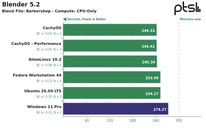 Tides turned with Chaos Group's V-Ray 6.0 rendering engine, where RTX testing resulted in 6% more rays on Windows, while CUDA rendering resulted in a 2% advantage for Windows. In CPU rendering, Linux was once again ahead, with CachyOS leading the pack at 18% faster than Windows but only marginally faster than the other Linux distributions tested. Neatbench video benchmarking, GravityMark 1.87, Unigine Superposition 1.0, and OctaneBench also saw CachyOS pulling ahead, although in some tests, gains were minimal, and in Octane, only CachyOS in Performance mode and AlmaLinux managed to pull ahead of Windows. In FluidX3D fluid dynamics simulations, performance was largely identical, but Windows 11 did manage to technically edge out a lead, even if only by fractions of a percent.
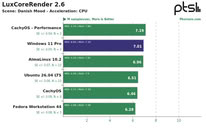
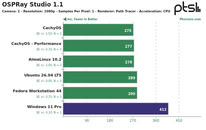 OSPRay Studio and LuxCoreRender produced peculiar results, with Windows matching or edging out Linux in a number of tests but losing badly to all of the Linux distributions in others. 7-Zip compression benchmarks once again saw Linux beating Windows by a decent margin, although it was basically a wash between the different Linux distributions.
Source:
Phoronix
In a comparison between CachyOS, AlmaLinux 10.2, Ubuntu 26.04, Fedora Workstation 44, and Windows 11, CachyOS consistently performed at or near the top of the list, with CachyOS in performance mode claiming first place in the geometric mean of the results of a workstation benchmark. Windows 11 Pro was right at the bottom of the chart, coming in 14.9% slower than CachyOS in performance mode.


The tests comprised of a mix of CPU and GPU benchmarks on a $46,000+ HP Z4 G6i workstation PC with a 48-core Intel Xeon 678X Granite Rapids WS CPU, 128 GB of DDR5-6400 memory, and an NVIDIA RTX Pro 6000 Blackwell workstation GPU. First up was 3D rendering and modelling, which tested Blender and IndigoBench 4.4 in both CPU and GPU rendering modes. Here, almost surprisingly, given NVIDIA's reputation in the Linux community, CachyOS and AlmaLinux were both faster than Windows 11 in both CUDA and CPU compute. The biggest differences in the render workloads came from CPU-only rendering, where Windows 11 was up to 12% slower than CachyOS. Ubuntu and Fedora were both measurably slower than CachyOS, but only by about 3-4%.


87 Comments on CachyOS and AlmaLinux Beat out Windows 11 in Workstation Benchmarks
The comments about the Windows config and stating Windows is crap do nothing about the validation of the results. Default Windows config and default Linux config give the most clear perspective for what the general public can expect from a fresh install. That is the most objective, impartial and valuable info to be considered.
Windows 11 & 10: Benchmarks on VBS performance loss, including HVCI; VBS (including HVCI) in Windows 11: Latest benchmarks on gaming performance loss
ComputerBase (de)Or disable virtualization in the BIOS, because without it, HVCI (VBS) remains non-functional.
Memory integrity and VBS enablementPersonally, a few "synthetic" benchmarks wouldn't convince me to switch. I only recommend Linux to people who just want to do some basic office work. It works well for that. Incidentally, I like to refer to various Linux distributions as "FrickelOS." It’s like those countless heavily modified custom ROMs that don't work quite as well as expected. I’ve mentioned this elsewhere before: if all those developers pooled their efforts, Linux could really become something great. How about we focus on Arch Linux? I like to compare it to LineageOS.
Minimalist, and therefore good.
Towards the end of the year, I’ll probably use my recently acquired "Lexar NM790 2TB" for a dual-boot setup. My 23H2 (Windows 11 IoT Enterprise) is reaching its end of support. I categorically rule out a Windows comeback. I selected "WinBoat" for "Office". I really don't care about gaming anymore, and for niche hardware like my dedicated sound card, there are if you will other, sometimes better solutions available. At a premium price, of course. But so be it.
Level up...
Regards,
Fred.
Regards,
Fred.
It's a very dishonest / misleading test to be done this way. People might get the wrong idea and go ahead and "upgrade" to linux. I've fallen pray to that a couple of years ago when I moved to bazzite for my laptop cause "it's lightweight, takes no resources, windows is bloated crap" and all that and it ended up killing baterry life almost twice as fast as windows did.
MS uses VBS as a brute force approach that has a massive overhead because they have to support an insane amount of legacy code (and let that legacy code do sketchy crap to preserve compatibility). The only way they can guarantee security is assuming the kernel is already compromised - that's not some super great genius security feature - it's a brute force throwing up your hands and going "F$@^ it, treat the kernel as already compromised and don't trust it, wrap it in a vm - performance be damned".
Also, just an FYI, Linux is, by it's very design, high customized and customizable. It's the complete nature of the beast, so complaining about my methodology as applied to Windows and in comparison to Linux makes as much sense as a screen-door on a submarine.
By the way,
When I recently mentioned somewhere deep within TPU that Windows 11 might perform better in a VM, I didn't just throw that out there at random.
Regards,
Fred.
But I also highly customize my Linux installs, removing things I don't want installed and general debloating. Yes, Linux has bloat too! Surprise, surprise!
ntfs is worse as ext4. BTRFS wins over etx4.
Whataboutism, If there would be performance degradation, i would see it on my 21 year old gnu gentoo linux installation. I do not use systemd, but openrc.
I moved several times the full system from hardware to hardware. I would have seen an impact from
corsair mp 600 pro 1tb -> crucial p5 plus -> KC 3000 -> mp 600 pro -> kc3000
the impact I may argue what you hint out, are file system regression which do not exists on modern high advanced file systems like btrfs, waht windows has massive issues wiht lint files.
e.g. try to run ntfs on a hdd with several defective sectors or on a sata ssd. vs btrfs + zstd compression
kernel issues, but you rebuild the kernel, that is one of teh components which get swapped out several times a month.
most userspace gets switched out. old packages gets removed. there are hardly any packages which are older than 2 years on my box.
I saw performance impact with low quality SATA SSDs on my previous harware, a gaming notebook, especially with ADATA SATA SSDS and sandisk SATA SSDS compared with quality drives from CRUCIAL or transcend.
I would also see it when changing file system, or for the compile speed.
I had to repair NTFS this year or last year for my windows 11 pro. It was defective. That is hard fact. And no, it is not the kc3000 m2 nvme drive fault
Windows users are stuck with ntfs and do not know the benefits of advanced file systems or the beneifts of encryption or 15 yera old features like lvm2.
I have used BitLocker encryption on Windows and if configured properly and with good hw it's pretty okay..:rolleyes::) But do I really need it? No. Better safe than sorry, so means better don't give your data even encrypted rather than give it for someone lol