Monday, October 19th 2026

NVIDIA's Faster DLSS 5 Model Gets Extracted From NBA 2K27, Modders Report Up to 90% Gains

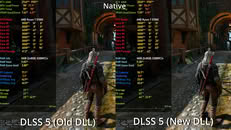
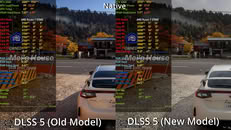
NVIDIA shipped its faster DLSS 5 Neural Rendering model with NBA 2K27 on October 16, and it didn't take modders long to pull it out and test it elsewhere. Renan Maniero on X extracted the new 310.9.16.0 build of the DLL. That lets people inject it into games that don't officially support DLSS 5 through tools like RenoDX and OptiScaler. The new DLL also keeps the older model around as Preset A, with the new one sitting under Preset B, so comparing the two is as simple as switching presets. Gaming Optimized on X did exactly that, and found the new model running up to 90% faster than the old one in The Witcher 3. The channel points out that the gain varies from game to game, so 90% looks like the best case rather than the norm.

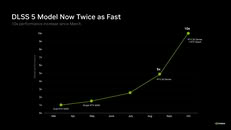
That roughly aligns with NVIDIA's own claims. The company says the October update shrinks the model by 24% to roughly 118 million parameters, cuts VRAM use at 4K by 20%, and runs the neural rendering workload up to 2x faster than the September version. NVIDIA also quoted up to 40% higher frame rates in NBA 2K27 specifically. Officially, DLSS 5 is still limited to RTX 50-series GPUs and GeForce NOW. NVIDIA plans to bring it to the RTX 40-series, though there's no date yet, and there's no word on RTX 30 or RTX 20 support. Modders, apparently, aren't waiting, since the OptiScaler README notes a modified runtime that gets it running on RTX 20-series cards as well.
Sources: Renan Maniero on X, Gaming Optimized on X, via Tom's Hardware
Add your own comment

13 Comments on NVIDIA's Faster DLSS 5 Model Gets Extracted From NBA 2K27, Modders Report Up to 90% Gains

#1
bobsled
The title is a bit confusing, as it indicates someone removed DLSS5 from the game.
Posted on Reply
#2
FierceRed
bobsledThe title is a bit confusing, as it indicates someone removed DLSS5 from the game.
Agreed, the use of "extracted", "migrated" or "cloned" would work better there.
Posted on Reply
#3
u2knetwork
DLSS5 doesn't look good with every game, i only seen maybe 4 games that with using DLSS5 where it looks pretty decent, the rest of them just looks like AI Slop. looks unnatural and too fake looking.
Posted on Reply
#4
evernessince
It's a nice performance bump but the reduction in model size might have some quality reduction. This version seems to add stronger haloing / disocclusion artifacts. There also seems to be some change in the color grading or something else going on. Hard to say without a reference, I can only say the colors are noticbly different comparing the old model to the new.

I also noted that 1% lows dont' seem to have the same performance uplift as averages, particularly on mid-range and lower end cards. There might be some overhead going on here that has to do with the infrastructure of the model that wasn't optimized here.
Posted on Reply
#5
Crackong
u2knetworkDLSS5 doesn't look good with every game, i only seen maybe 4 games that with using DLSS5 where it looks pretty decent, the rest of them just looks like AI Slop. looks unnatural and too fake looking.
It is Ray Tracing 2.0
It requires a lot of attention and optimization from the game developer.
Posted on Reply
#6
BlueScreenJunky
u2knetworkDLSS5 doesn't look good with every game, i only seen maybe 4 games that with using DLSS5 where it looks pretty decent, the rest of them just looks like AI Slop. looks unnatural and too fake looking.
Yes. But on the bright side, it's only actually used in NBA2K27

I was convinced DSLSS5 would be terrible, but the fact that the very first iteration already looks decent in some games that were never meant to run with it makes me think that later versions used in game that were designed to use it could actually be pretty good (Also I'm sure if an RTX 6000 ever comes to consumer market, it will run it with less of a performance hit than current gen cards).
Posted on Reply
#7
ISSEnterprise
We are having lots of frame generation/upscaling instead of native frame rate. Now we are about to meet AI filter on game models. What's the next? AI generated plots?
Posted on Reply
#8
SnoutBaron
I was sceptical at first as using the RenoDX mod doesn't seem to translate into any performance savings whatsoever so I don't know if I'm doing something wrong, however I did use an Optiscaler-based mod and man...it really is WAY faster.

In CP2077 maxed with RR and with 6xMFG, all are after SR at Performance 1080P:

Off: ~450 FPS

Preset A: ~340 FPS

Preset B: ~385 FPS
Posted on Reply
#9
ZoneDymo
CrackongIt is Ray Tracing 2.0
It requires a lot of attention and optimization from the game developer.
it is not though....not even close
Posted on Reply
#10
SnoutBaron
ZoneDymoit is not though....not even close
What exactly do you mean.
Posted on Reply
#11
evernessince
SnoutBaronWhat exactly do you mean.
Ray tracing is a signle distinct effect. DLSS 5 doesn't only approximate RT or PT but whatever effects it's trained to think looks good. You can't turn off individual effects that DLSS 5 provides.

DLSS 5 is also less accurate and is screen space only. It doesn't have knowledge of off screen lighting. This is why colors shift as the camera moves with DLSS 5, although Nvidia tries to hide this by spreading out the color change over time.

It also carries with it the same issues other image to image AI models have. Statistical outliers are removed (causing color crush is brights and darks), there's concept bleed, it converges outputs (games will be pushed towards DLSS 5's understanding of lighting, style, ect), and it slightly fries the image (an issue with every image generation model where each output get's progressively more fried).
Posted on Reply
#12
MufasaV
evernessinceRay tracing is a signle distinct effect. DLSS 5 doesn't only approximate RT or PT but whatever effects it's trained to think looks good. You can't turn off individual effects that DLSS 5 provides.

DLSS 5 is also less accurate and is screen space only. It doesn't have knowledge of off screen lighting. This is why colors shift as the camera moves with DLSS 5, although Nvidia tries to hide this by spreading out the color change over time.

It also carries with it the same issues other image to image AI models have. Statistical outliers are removed (causing color crush is brights and darks), there's concept bleed, it converges outputs (games will be pushed towards DLSS 5's understanding of lighting, style, ect), and it slightly fries the image (an issue with every image generation model where each output get's progressively more fried).
You (or at least devs can adjust intensity, mask objects, different adjustable presets, etc
Posted on Reply
#13
evernessince
MufasaVYou (or at least devs can adjust intensity, mask objects, different adjustable presets, etc
Which doesn't help the core issues explained above. Artifacting, concept bleed, statistical pruning, ect. Those are core issues with current image gen model. Certainly you could reduce intensity, which in the case of DLSS 5 is denoise strength, but that only hides the issue (and probably not the greatest given the performance impact is still hitting regardless). Masking objects is problematic because you cannot apply AI to parts of an image and not others and not expect visual dysphoria. Now I'm sure Nvidia will be applying blending to the edges of the mask area like most image gen inpaint programs do but that doesn't change the fact that the art-style, lighting, ect will shift in the unmasked regions and look different than the masked objects. If I were editing an AI image, I'd most likely have to run the masked area through i2i to ensure visual consistency.
Posted on Reply
Add your own comment
Nov 13th, 2026 04:21 PST change timezone

New Forum Posts

Popular Reviews

TPU on YouTube

Controversial News Posts