Tuesday, February 17th 2026

Blind Testing Shows Gamers Prefer NVIDIA DLSS 4.5 Over Native Resolution Rendering and AMD FSR 4

ComputerBase conducted a massive online blind test, allowing thousands of gamers to vote on their preferred game video output. The options included NVIDIA's latest Deep Learning Super Sampling 4.5, AMD's FSR Upscaling AI with FSR 4 on Radeon RX 9000 series GPUs, and native resolution rendering without AI upscaling. Interestingly, DLSS 4.5 received the highest percentage of votes, winning in every scenario. ComputerBase tested various games like Anno 117, ARC Raiders, Cyberpunk 2077, Horizon Forbidden West, Satisfactory, and The Last of Us Part II. Only in Cyberpunk 2077 did gamers almost equally prefer native resolution rendering, but DLSS 4.5 still came out on top with a slight edge.

Initially, the ComputerBase team conducted the comparison using videos labeled only with options like 1/2/3/4, without revealing which rendering method was used, to ensure a fully blind test. After two weeks of testing and thousands of votes, the results showed a significant preference for NVIDIA's latest DLSS 4.5 technology. This conclusion highlights that NVIDIA's newest technology is now so refined that its video output offers superior visual appeal. DLSS 4.5 uses a second-generation Transformer model trained on a much larger dataset of video games, with five times the computational investment of the first DLSS 4 Transformer upscaler. It utilizes the FP8 data format, allowing for more processing with minimal precision loss. The new algorithm is more context-aware, and NVIDIA confirmed that the input for upscaling is used more intelligently, resulting in much more detailed and precise video output.

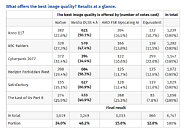
Out of all the games tested, AMD's latest ML-based video technologies, now part of the AMD "Redstone" package, fully support Cyberpunk 2077 and ARC Raiders with AMD's current best rendering techniques. Interestingly, in neither scenario have gamers overwhelmingly preferred the "Redstone" package, as in both cases, gamers felt better off with native resolution rendering. Although AMD's upscaling may not be the most visually appealing, it does provide a good enough FPS boost for gamers. However, NVIDIA's DLSS 4.5 continues to dominate, and the second-generation Transformer model powering it is the real differentiating factor for the vast majority.
Source: ComputerBase
Add your own comment

173 Comments on Blind Testing Shows Gamers Prefer NVIDIA DLSS 4.5 Over Native Resolution Rendering and AMD FSR 4

#102
Octopuss
The title should read "blind people prefer to use shitty upscaling tech".
Posted on Reply
#103
freeagent
I game at 4K60 because that is what my TV is..

I use DLSS and DLAA and things look fantastic.
Posted on Reply
#104
Lycanwolfen
It's true I love DLSS for quality. I never use frame gen or anything like that I use the A.I. for visual enhancement. 100% scaling. The way A.I. enhances everything is amazing. Also provides some FPS boost as well.
It's amazing tech if you can get the game to support it. Just wish some of my older games could run it. Or there was some patch to make it work.
freeagentI game at 4K60 because that is what my TV is..

I use DLSS and DLAA and things look fantastic.
Same here 4k120hz with DLAA and DLSS is like wow jaw dropping wow.

Im running a MSI EXPERT 5080 GTX.
Posted on Reply
#105
nguyen
Dragam1337
Dragam1337 in Blind Testing Shows Gamers Prefer NVIDIA DLSS 4.5 Over Native Resolution Rendering and AMD FSR 4Yeah, i agree about the sharpness. But curiously if you use preset K on 310.5 / 310.5.2 it's alot less clear than on 310.3, while still having this unappealing AI image look as preset M, something pre…
Which is the better looking image ?

As for why i replied as i did, perhaps you should look at how you wrote in the first place, dude.
You shouldn't be comparing 8K image to 4K image in the first place, you need to downsample the 8K image to 4K and compare the two, then they practically look the same. Why downsample? because your screen is only 4K but the image you took is 8K, the 8K image is not what is displayed to you when you play the game. That's why I said record the video at 4K and not using in-game screenshots.

I have compared 4K DLAA vs 8K (DSR4x) DLSS.Performance before, they look the same in 4K video, but I have only used DLSS3 and the Performance mode tend to have more ghosting than DLAA in motion so it was not a good idea at all, no idea how DLSS4/4.5 Performance would fare.
Posted on Reply
#106
wolf
Better Than Native
OctopussThe title should read "blind people prefer to use shitty upscaling tech".
2019 called, they want their edgy opinion back.

Still baffles me people are against upscaling just because it's upscaling, with zero consideration to the quality and framerate.
Posted on Reply
#107
oxrufiioxo
wolf2019 called, they want their edgy opinion back.

Still baffles me people are against upscaling just because it's upscaling, with zero consideration to the quality and framerate.
I think if you look at it from the perspective of the average gamer the reliance on upscaling and to a lesser degree framegen has left a lot of people bitter. Most people don't have 800+ usd gpus that run all these technologies pretty decent most are on 4060/5060 like hardware. I recently had a couple weeks with a 5060ti 8GB and all these technologies are worse than on my 4090. They're also worse than on a 5070/5070ti. I don't even care for how my 4090 or a 5080 handles framegen at 4k in actually demanding games. Same with DLSS it's significantly better the more powerful your hardware is being at it's best at 4k and only recently becoming more usable at 1440p below quality to anyone with half decent eyesight.

Still it's more a reflection of how the gaming industry and hardware industry isn't improving much in a half decade than a problem with the Technologies. I'm still surprised there isn't any RT/PT games that blow rasterized games out if the water 3/4 of a decade later. The best examples still rely heavily on rasterization.

People are also in general tired of anything related to AI and what it's doing to gaming hardware affordability. I mean even before the rampacolypse Nvidia offered an 80 class GPU that was 10-15% better than it's predecessor at launch over 2 years later which is less of an uplift than the refreshed 4070 super had over the 4070....
Posted on Reply
#108
wolf
Better Than Native
oxrufiioxoI think if you look at it from the perspective of
I absolutely see your point, there are many despondent people about PC gaming in recent years. The stagnation of hardware advancement due to multiple factors, abysmally optimised AAA slop, current hardware shortages and price increases and so on, can and does intersect with Upscaling to some degree, but what I replied to feels vague and misguided here.

I don't think it's constructive or insightful to not engage with the actual content of the article whatsoever, and proclaim "blind people prefer to use shitty upscaling tech". Clearly, upscaling isn't shitty, certainly not the options used in this comparison, we've come a long way from the days of DLSS/FSR 1.0 (which can still have a place mind you, well FSR1/NIS anyway), and the utility to gamers is eminent.
Posted on Reply
#109
nguyen
Well we can put the SMAA4x discussion to rest, it sucks

Searching my game library I finally found Shadow of the Tomb Raiders has SMAA4x, comparing it to DLAA 4.5 is night and day

DLAA 4.5 vs SMAA4x
With how much difference between the 2, DLSS.Q should be a league above SMAA4x as well
Posted on Reply
#110
oxrufiioxo
wolfI absolutely see your point, there are many despondent people about PC gaming in recent years. The stagnation of hardware advancement due to multiple factors, abysmally optimised AAA slop, current hardware shortages and price increases and so on, can and does intersect with Upscaling to some degree, but what I replied to feels vague and misguided here.

I don't think it's constructive or insightful to not engage with the actual content of the article whatsoever, and proclaim "blind people prefer to use shitty upscaling tech". Clearly, upscaling isn't shitty, certainly not the options used in this comparison, we've come a long way from the days of DLSS/FSR 1.0 (which can still have a place mind you, well FSR1/NIS anyway), and the utility to gamers is eminent.
I agree, and there is definitely ways to express you don't like upscaling without insulting others. I just understand why some people have a deep hatred towards it. I do think some are tired of people glazing it so hard though as well. I mean I like a lot about DLSS 4.5 but there are some clear regression compared to 4.0 as well as pretty meh performance on 30 series in some games and it's almost unusable on 20 series. I'm still happy Nvidia didn't leave then out but there should be a clear warning that they may face performance regression in the Nvidia app.

I love new technologies but only when the hardware at a base is fantastic, not when it feel more like they're a crutch for lack of hardware improvements and optimization in games.

I'm not blind to the fact that small hardware improvements is likely the future and gamers don't really matter, but nobody can convince me Nvidia couldn't have done better if they weren't so focused on AI on current generation hardware. Instead here is more interpolation and slightly better upscaling but not always.
nguyenWell we can put the SMAA4x discussion to the conclusion, it sucks

Searching my game library I finally found Shadow of the Tomb Raiders has SMAA4x, comparing it to DLAA 4.5 is night and day

DLAA 4.5 vs SMAA4x
With how much difference between the 2, DLSS.Q should be a league above SMAA4x as well
I don't understand the SMAA thing either in every game I can remember it in it isn't that great i remember in Crysis 3 it doing a terrible job and it being a shimmer fest.
Posted on Reply
#111
DemonicRyzen666
nguyenWell we can put the SMAA4x discussion to rest, it sucks

Searching my game library I finally found Shadow of the Tomb Raiders has SMAA4x, comparing it to DLAA 4.5 is night and day

DLAA 4.5 vs SMAA4x
With how much difference between the 2, DLSS.Q should be a league above SMAA4x as well
Did you disable depth of field the game has some really weird things going with depth of field enable????

I'd prefer to see it with depth of field disable against the DLSS 4.5.
Posted on Reply
#112
nguyen
DemonicRyzen666Did you disable depth of field the game has some really weird things going with depth of field enable????

I'd prefer to see it with depth of field disable against the DLSS 4.5.
Ok I disabled DOF and it's the same

DLAA 4.5 vs SMAA4x

According the dev, SMAA4x is just SMAA + MSAA 4x, IMO it looks worse than SMAA T2x which is SMAA + TAA. Using DLAA in this game makes it look like a remastered version LOL
Posted on Reply
#113
Vayra86
R0H1TBlind testing the blind :nutkick:

I think there should be a better allegory (alliteration?) out there :shadedshu:
In the land of the blind... vaseline is king
Posted on Reply
#114
DemonicRyzen666
nguyenOk I disabled DOF and it's the same

DLAA 4.5 vs SMAA4x

According the dev, SMAA4x is just SMAA + MSAA 4x, IMO it looks worse than SMAA T2x which is SMAA + TAA. Using DLAA in this game makes it look like a remastered version LOL
I think you might better off without the x4 part. Try SMAA alone might be the best since your at 4K
I do recall one other game Deux ex Mankind Divided showing issue with the RTX 4090 on MSAAx8 at 4K might be a similar issue. Where is just over doing the processing.
I'm 1080p & I can't get to run in DSR right now.
Posted on Reply
#115
nguyen
DemonicRyzen666I think you might better off without the x4 part. Try SMAA alone might be the best since your at 4K
I do recall one other game Deux ex Mankind Divided showing issue with the RTX 4090 on MSAAx8 at 4K might be a similar issue. Where is just over doing the processing.
I'm 1080p & I can't get to run in DSR right now.
SMAA is literally the worst AA, everything is shimmery and broken (slightly sharper and that's it)


You can try the Custom DSR Tool
www.forum-3dcenter.org/vbulletin/showthread.php?t=593534
Posted on Reply
#116
DemonicRyzen666
nguyenSMAA is literally the worst AA, everything is shimmery and broken (slightly sharper and that's it)


You can try the Custom DSR Tool
www.forum-3dcenter.org/vbulletin/showthread.php?t=593534
Mine does not look like that at all on any of the SMAA settings; my DLSS quality looks worse than my SMAA.

I turned of bloom & film grain.

I get far objects flickering on DLSS quality, but with no AA on, I get shimmering on foliage mostly.

I have to install the Nvidia application, but last time I did it kept disabling/removing my Nvidia control panel.
Posted on Reply
#117
wolf
Better Than Native
DemonicRyzen666my DLSS quality looks worse than my SMAA
I'd say without the app and forcing the override, it's using a very early DLSS version likely <2.5 which would explain it.

The app didn't get rid of NVCP for me.. Well worth trying to force at a bare minimum preset K if not M or L to see what 4.5 can do.
Posted on Reply
#118
lexluthermiester
nguyenAccording the dev, SMAA4x is just SMAA + MSAA 4x, IMO it looks worse than SMAA T2x which is SMAA + TAA. Using DLAA in this game makes it look like a remastered version LOL
Just shut off AntiAliasing and be done with it. You're spending time trying to figure out how to make it work and look when you could be spending your time enjoying your games.
Posted on Reply
#119
nguyen
DemonicRyzen666Mine does not look like that at all on any of the SMAA settings; my DLSS quality looks worse than my SMAA.

I turned of bloom & film grain.

I get far objects flickering on DLSS quality, but with no AA on, I get shimmering on foliage mostly.

I have to install the Nvidia application, but last time I did it kept disabling/removing my Nvidia control panel.
Like @wolf said, Install Nvidia app and in the DLSS Override - Model Preset M or L. Super Resolution to DLAA (100%)


Because the RT resolution in game is tied to the render resolution, using upscaling will make all the RT shadows flicker like crazy, forcing DLAA will fix it.
I tried 1080p and every AA looks rough LOL, perhaps DSR can boost image quality further than DLAA can
Posted on Reply
#120
Apocalypsee
So, it's a video, not actually people playing the actual game :roll: Eh, whatever makes you happy, I guess.
Posted on Reply
#121
Vayra86
ApocalypseeSo, it's a video, not actually people playing the actual game :roll: Eh, whatever makes you happy, I guess.
It takes sharp minds to figure out what a 'news' piece really is doesn't it... :)
OctopussThe title should read "blind people prefer to use shitty upscaling tech".
Yeah or 'Marketing - it just works'
Posted on Reply
#122
Dragam1337
OnasiTo me? Roughly similar. The 8K one might be slightly sharper, but I am unsure what DSR smoothening factor is in play there, if any, and how it differs from base DLSS one. Also would be interesting to see which performs better when not locked to 60 FPS, though that should be roughly similar as well.
I am also not sure what is this in response to, considering what I said. I don’t remember claiming that DSR + DLSS wouldn’t look good.


I was perfectly civil, I thought. A tad snarky, perhaps, but that’s just how I normally post. And talk, for that matter.
SLIGHTLY sharper ? The 8k image is significantly more detailed... load it up in a new window to get the image at full quality - if you can't see that her cloths and everything else is alot more detailed, then i don't know what to say.

As for performance, you can see the gpu load - a bit higher at 8k.
nguyenYou shouldn't be comparing 8K image to 4K image in the first place, you need to downsample the 8K image to 4K and compare the two, then they practically look the same. Why downsample? because your screen is only 4K but the image you took is 8K, the 8K image is not what is displayed to you when you play the game. That's why I said record the video at 4K and not using in-game screenshots.

I have compared 4K DLAA vs 8K (DSR4x) DLSS.Performance before, they look the same in 4K video, but I have only used DLSS3 and the Performance mode tend to have more ghosting than DLAA in motion so it was not a good idea at all, no idea how DLSS4/4.5 Performance would fare.
Video recordings will always be compressed and look worse than what is shown on the screen. And seeing what is actually shown on the screen is simple - just fit the screenshots to your screen... so fullscreen and 100% zoom for 4k, 50% zoom for 8k.

The differences in clarity and detail are still VERY noticable. You're in severe need of glasses if you can't see her armor is alot more detailed on the 8k image.
Posted on Reply
#123
Vayra86
Dragam1337SLIGHTLY sharper ? The 8k image is significantly more detailed... load it up in a new window to get the image at full quality - if you can't see that her cloths and everything else is alot more detailed, then i don't know what to say.

As for performance, you can see the gpu load - a bit higher at 8k.


Video recordings will always be compressed and look worse than what is shown on the screen. And seeing what is actually shown on the screen is simple - just fit the screenshots to your screen... so fullscreen and 100% zoom for 4k, 50% zoom for 8k.

The differences in clarity and detail are still VERY noticable. You're in severe need of glasses if you can't see her armor is alot more detailed on the 8k image.
Stills though, and a game is a thing you play, not a picture you watch.

The only relevant question in this regard is whether it improves gameplay for you.
I'll say right now, for most people it doesn't matter jack shit beyond a certain point. Good is good, is enough, and more is generally just wasted. This applies to almost anything you can tie a number to, like framerate, refresh rate, even things like pixel responsiveness has diminishing returns, or even worse, counterproductive effects at a certain point.

A good example of counterproductive effects is render resolution in competitive gaming - or even just having all settings on max and how this negatively affects a competitive edge, because you have to process more info.
Posted on Reply
#124
Dragam1337
Vayra86Stills though, and a game is a thing you play, not a picture you watch.

The only relevant question in this regard is whether it improves gameplay for you.
I'll say right now, for most people it doesn't matter jack shit beyond a certain point. Good is good, is enough, and more is generally just wasted. This applies to almost anything you can tie a number to, like framerate, refresh rate, even things like pixel responsiveness has diminishing returns, or even worse, counterproductive effects at a certain point.

A good example of counterproductive effects is render resolution in competitive gaming - or even just having all settings on max and how this negatively affects a competitive edge, because you have to process more info.
Lol what, that's such a wierd reply in a thread that is specifically discussing image quality...

Sure, the average walmart pc buyer probably doesn't notice... they probably don't notice that they don't have vrr turned on either... does that mean that you shouldn't care about having vrr turned on? Get lost with those strawman arguments...
Posted on Reply
#125
Vayra86
Dragam1337Lol what, that's such a wierd reply in a thread that is specifically discussing image quality...

Sure, the average walmart pc buyer probably doesn't notice... they probably don't notice that they don't have vrr turned on either... does that mean that you shouldn't care about having vrr turned on? Get lost with those strawman arguments...
We're prone to keep moving goalposts. Its only a weird reply because you've set yourself a new norm.

1080p was already a pretty decent landing place. 4K is 4x that resolution. Now you're telling us 8K is a must have because detail.
Posted on Reply
Add your own comment
Nov 14th, 2026 06:47 CST change timezone

New Forum Posts

Popular Reviews

TPU on YouTube

Controversial News Posts