Tuesday, February 17th 2026

Blind Testing Shows Gamers Prefer NVIDIA DLSS 4.5 Over Native Resolution Rendering and AMD FSR 4

ComputerBase conducted a massive online blind test, allowing thousands of gamers to vote on their preferred game video output. The options included NVIDIA's latest Deep Learning Super Sampling 4.5, AMD's FSR Upscaling AI with FSR 4 on Radeon RX 9000 series GPUs, and native resolution rendering without AI upscaling. Interestingly, DLSS 4.5 received the highest percentage of votes, winning in every scenario. ComputerBase tested various games like Anno 117, ARC Raiders, Cyberpunk 2077, Horizon Forbidden West, Satisfactory, and The Last of Us Part II. Only in Cyberpunk 2077 did gamers almost equally prefer native resolution rendering, but DLSS 4.5 still came out on top with a slight edge.

Initially, the ComputerBase team conducted the comparison using videos labeled only with options like 1/2/3/4, without revealing which rendering method was used, to ensure a fully blind test. After two weeks of testing and thousands of votes, the results showed a significant preference for NVIDIA's latest DLSS 4.5 technology. This conclusion highlights that NVIDIA's newest technology is now so refined that its video output offers superior visual appeal. DLSS 4.5 uses a second-generation Transformer model trained on a much larger dataset of video games, with five times the computational investment of the first DLSS 4 Transformer upscaler. It utilizes the FP8 data format, allowing for more processing with minimal precision loss. The new algorithm is more context-aware, and NVIDIA confirmed that the input for upscaling is used more intelligently, resulting in much more detailed and precise video output.

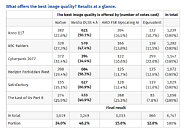
Out of all the games tested, AMD's latest ML-based video technologies, now part of the AMD "Redstone" package, fully support Cyberpunk 2077 and ARC Raiders with AMD's current best rendering techniques. Interestingly, in neither scenario have gamers overwhelmingly preferred the "Redstone" package, as in both cases, gamers felt better off with native resolution rendering. Although AMD's upscaling may not be the most visually appealing, it does provide a good enough FPS boost for gamers. However, NVIDIA's DLSS 4.5 continues to dominate, and the second-generation Transformer model powering it is the real differentiating factor for the vast majority.
Source: ComputerBase
Add your own comment

173 Comments on Blind Testing Shows Gamers Prefer NVIDIA DLSS 4.5 Over Native Resolution Rendering and AMD FSR 4

#126
Dragam1337
Vayra86We're prone to keep moving goalposts. Its only a weird reply because you've set yourself a new norm.

1080p was already a pretty decent landing place. 4K is 4x that resolution. Now you're telling us 8K is a must have because detail.
No, that was not what i said. What i said is that dsr 4x together with dlss performance looks better than native dlaa. This is true at any resolution.

But yes, more pixels, more better in regards to image quality - that should hardly come as a surprise to anyone.
Posted on Reply
#127
nguyen
Dragam1337SLIGHTLY sharper ? The 8k image is significantly more detailed... load it up in a new window to get the image at full quality - if you can't see that her cloths and everything else is alot more detailed, then i don't know what to say.

As for performance, you can see the gpu load - a bit higher at 8k.


Video recordings will always be compressed and look worse than what is shown on the screen. And seeing what is actually shown on the screen is simple - just fit the screenshots to your screen... so fullscreen and 100% zoom for 4k, 50% zoom for 8k.

The differences in clarity and detail are still VERY noticable. You're in severe need of glasses if you can't see her armor is alot more detailed on the 8k image.
You need to compare videos, just like how computerbase did.

No point in using 4x DSR with DLSS Performance/Ultra Performance when it smear when you move the camera, DLAA will always have the least amount of smearing/ghosting.

In fact even the reddit group FuTAA has nothing but praise for DLAA, which is crazy
Posted on Reply
#128
Dragam1337
nguyenYou need to compare videos, just like how computerbase did.

No point in using 4x DSR with DLSS Performance/Ultra Performance when it smear when you move the camera, DLAA will always have the least amount of smearing/ghosting.

In fact even the reddit group FuTAA has nothing but praise for DLAA, which is crazy
You do understand that the smear is based on render resolution and fps, right ? And 4x dsr + performance dlss has the same render resolution as dlaa, and nearly the same performance. Infact if smearing in motion is all you care about, then you will have alot less of it just using dlss quality, as that will improve fps by alot, which is the primary determinator for smearing with dlss. Fact of the matter is though that nothing gives the same image clarity and detail as dsr + dlss (short of true supersampling).

And no, smart guy, as i already told you, comparing it on a freaking video aint the way to do it, unless you like recording 300gb videoes fully uncompressed. The average video compression fully negates the improvements dsr 4x + dlss brings.

And lol at your last comment, acting like i am hating on dlaa cause im saying dsr + dlss is better...
Posted on Reply
#129
nguyen
Dragam1337You do understand that the smear is based on render resolution and fps, right ? And 4x dsr + performance dlss has the same render resolution as dlaa, and nearly the same performance. Infact if smearing in motion is all you care about, then you will have alot less of it just using dlss quality, as that will improve fps by alot, which is the primary determinator for smearing with dlss. Fact of the matter is though that nothing gives the same image clarity and detail as dsr + dlss (short of true supersampling).

And no, smart guy, as i already told you, comparing it on a freaking video aint the way to do it, unless you like recording 300gb videoes fully uncompressed. The average video compression fully negates the improvements dsr 4x + dlss brings.

And lol at your last comment, acting like i am hating on dlaa cause im saying dsr + dlss is better...
LoL nope, smearing is based on the upscaling factor LOL, they are using more temporal data to generate more details.
Posted on Reply
#130
Dragam1337
nguyenLoL nope, smearing is based on the upscaling factor LOL, they are using more temporal data to generate more details.
4k upscaled to 8k has no more smearing than native 4k... what you are talking about only holds true if you are comparing native 4k vs 1080p upscaled to 4k... and yes, obviously the later will have alot more visual issues.

But sorry dude, i can't take you seriously when you are basing your whole opinion on some compressed video you saw years ago... if you want to be just a bit serious then enable dsr 4x with 0% smoothing, and test something like horizon with the newest dlss performance or ultra performance. If you can’t see that the image is clearer and more detailed, then it's time to visit an optician.
Posted on Reply
#131
nguyen
Dragam13374k upscaled to 8k has no more smearing than native 4k... what you are talking about only holds true if you are comparing native 4k vs 1080p upscaled to 4k... and yes, obviously the later will have alot more visual issues.

But sorry dude, i can't take you seriously when you are basing your whole opinion on some compressed video you saw years ago... if you want to be just a bit serious then enable dsr 4x with 0% smoothing, and test something like horizon with the newest dlss performance or ultra performance. If you can’t see that the image is clearer and more detailed, then it's time to visit an optician.
And yet your own 8k screenshot is using Ultra Performance mode, which is rendering at 1440p, not 4k?

I based my opinion on my own testing, and I just tested DSR4x, 0% smoothness with Model L in Stellar Blade (excuse me but I'm a gooner, so I'm not into the Horizon series).

Here is 8K DLSS.Performance vs 4K DLAA in Stellar Blade
Even DLSS 4.5 Model L cannot get rid of smearing on the tree branches when using 8K DLSS Performance/Ultra Performance mode compare to DLAA. 8K downscaled on a 4K screen look exactly like 4K to me.

Btw I visit opticians every year for my pilot's medical license, every year they having been telling me I have 20/20 vision :roll:
Posted on Reply
#132
Dragam1337
nguyenAnd yet your own 8k screenshot is using Ultra Performance mode, which is rendering at 1440p, not 4k?

I based my opinion on my own testing, and I just tested DSR4x, 0% smoothness with Model L in Stellar Blade (excuse me but I'm a gooner, so I'm not into the Horizon series).

Here is 8K DLSS.Performance vs 4K DLAA in Stellar Blade
Even DLSS 4.5 Model L cannot get rid of smearing on the tree branches when using 8K DLSS Performance/Ultra Performance mode compare to DLAA. 8K downscaled on a 4K screen look exactly like 4K to me.

Btw I visit opticians every year for my pilot's medical license, every year they having been telling me I have 20/20 vision :roll:
Because i was comparing dsr 4x + dlss ultra performance to dlss quality, which is both 1440p render res, yes.

Lol what are you even trying to show here... the compression is so bad that you can't even read what the overlay says...

Sounds like that optician should have his license revoked.
Posted on Reply
#133
nguyen
Dragam1337Because i was comparing dsr 4x + dlss ultra performance to dlss quality, which is both 1440p render res, yes.

Lol what are you even trying to show here... the compression is so bad that you can't even read what the overlay says...

Sounds like that optician should have his license revoked.
Lol you couldn't see that the 8K DLSS.Performance was at 75 FPS, while the 4K DLAA was 104FPS and has no noticeable smearing on the tree branches?

Too bad you can't provide any evidence to support your case, then blame it on "compression" LOL.

Anyways you are free to enjoy worse visual and lower FPS, no need to attack others for showing what you are missing ;)
Posted on Reply
#134
Dragam1337
nguyenLol you couldn't see that the 8K DLSS.Performance was at 75 FPS, while the 4K DLAA was 104FPS and has no noticeable smearing on the tree branches?

Too bad you can't provide any evidence to support your case, then blame it on "compression" LOL.

Anyways you are free to enjoy worse visual and lower FPS, no need to attack others for showing what you are missing ;)
Dude, the "8k" image is compressed so badly that the overlay is barely readable.

If you wanna do a comparison, then do it uncompressed. All your current "comparison" proves is that you want the 8k image to look worse
Posted on Reply
#135
L0stS0ul
Techpowerup....It would be interesting if you ran such a test for different settings in appropriately selected games and parameters :>
Posted on Reply
#136
nguyen
Dragam1337Dude, the "8k" image is compressed so badly that the overlay is barely readable.

If you wanna do a comparison, then do it uncompressed. All your current "comparison" proves is that you want the 8k image to look worse
Yeah sure the compression cause only the 8K to have smearing :rolleyes: .

Here is 8K DLSS Ultra Performance vs 4K DLAA, so they have the same 100FPS

8K DLSS Ultra Performance looks slightly sharper on the flying robot, but then the tree are flickering LOL. Overall if you just want to take pretty game screenshots then DSR 8K DLSS P/UQ make sense, otherwise no, the image instabilities and ghosting negate all the sharpness benefits when playing game.
Posted on Reply
#137
KLMR
I read the original article (translated).

I want to make two points:

A) Has anyone pointed out the DLSS 4.5 vs Native includes frame generation.
Most people, regarding details on visual quality will preffer (60fps with 60 video frames) over (60fps video with 50ish frames) which is the normal ratio of FPS generation vs native.
Nowhere is stated that Native was 60fps rendered.
www.computerbase.de/artikel/grafikkarten/nativ-vs-dlss-4-5-vs-fsr-upscaling-ai-leser-blindtest.95965/#abschnitt_so_funktioniert_der_leserblindtest


B) No mention to responsiveness.
The article only mentions which visual quality "looked better". There is no responsiveness test because you analize/compare videos.
www.computerbase.de/artikel/grafikkarten/nativ-vs-dlss-4-5-vs-fsr-upscaling-ai-leser-blindtest.95965/seite-4#abschnitt_sidebysidevergleich

When comparing "videos" frame generation has the advantage of creating "motion blur" over generated frames, giving a more cinematic effect. TAA can create the effect of motion blur depending on the implementation (worse or bad) if equivalent FPS is available.

As for today, in the case of Cyberpunk (the one I selected to analyze), these are the numbers:

This is like throwing a dice with 3 faces: most people can tell one face is different (FRS) and about 90% see there are two different faces but are not different enough.

I think most conclusions are premature and poorly stated. And people is creating conclusions from those conclusions.

To be clear:
I love the Idea of blind tests and experiments, but bad experiments lead to bad conclusions and I think this is an example.
I like the idea of frame generation for low framerate scenarios to push smoothness.
Posted on Reply
#138
LastDudeALive
KLMRA) Has anyone pointed out the DLSS 4.5 vs Native includes frame generation.
Most people, regarding details on visual quality will preffer (60fps with 60 video frames) over (60fps video with 50ish frames) which is the normal ratio of FPS generation vs native.
Nowhere is stated that Native was 60fps rendered.
Nvidia's marketing may combine upscaling and FG under "DLSS 4.5," but ordinary usage does not. You can use the 2nd generation transformer model upscaling and the improved FG model independently of each other. The article only states that DLSS 4.5 upscaling was used. I think it's a very large leap to assume that FG was used when absolutely nothing in the article even suggests that. They're extremely careful to only mention upscaling.
KLMRB) No mention to responsiveness.
The article only mentions which visual quality "looked better". There is no responsiveness test because you analize/compare videos.
The entire article is analyzing image quality. Of course responsiveness doesn't matter lmao. You're criticizing them for not including a completely irrelevant factor. And if we want to talk about responsiveness, that's only going to be a point in favor of upscaling, obviously. Higher framerate = more responsive. If DLSS provides both the best image quality and is more responsive than native, that's a win-win.
Posted on Reply
#139
KLMR
A) We both are suposing. Thats what I'm saying.
B) More framerate is not more responsive when frame generation, there are lots of references about how frame generation adds lag.

I agreed that, image quality analisis is what they do, they analyze videos and video quality, but playing is not only that. Video does not include microstutter or other effects.

Thus prefering the most beautiful video does not translate in preffer DLSS to play. That was my point entirely.
Posted on Reply
#140
Sound_Card
It's funny when you take the Nvidia name and marketing out and do a blind test, the numbers are quite a bit different and less drastic.
Posted on Reply
#141
Toastytoy
ive been building PCs and gaming for 20 years and i have used not used upscaling for more than 5 mins to check it out. AMD or NVIDIA why would anyone use these is beyond me
Posted on Reply
#142
wolf
Better Than Native
Sound_CardIt's funny when you take the Nvidia name and marketing out and do a blind test, the numbers are quite a bit different and less drastic.
It's funny when you compare a single game instead of 6, where DLSS has a known bugs, and far less people take part in the test, the numbers are quite a bit different. Who could have possibly predicted that could happen under such conditions!
Posted on Reply
#143
Dragam1337
nguyenYeah sure the compression cause only the 8K to have smearing :rolleyes: .

Here is 8K DLSS Ultra Performance vs 4K DLAA, so they have the same 100FPS

8K DLSS Ultra Performance looks slightly sharper on the flying robot, but then the tree are flickering LOL. Overall if you just want to take pretty game screenshots then DSR 8K DLSS P/UQ make sense, otherwise no, the image instabilities and ghosting negate all the sharpness benefits when playing game.
Lol, so now you are using lower render res with 8k to try and skew it xD

Try taking your hand off your D, gooner boy, and use your brain instead. Just like 1080p looks better upscaled to 4k than native 1080p does, the same obviously holds true for 4k being upscaled to 8k vs native 4k.

The fact that even your "8K" video rendered at 1440p, which is heavily compressed by shadowplay, and then further compressed by youtube, still looks clearer and more detailed than native 4k says, says everything. And obviously 4k upscaled to 8k just looks that much better.

Besides that, stellar blade has trash visuals in the first place, so a poor game to make any graphical comparisons in.
Posted on Reply
#144
nguyen
Dragam1337Lol, so now you are using lower render res with 8k to try and skew it xD

Try taking your hand off your D, gooner boy, and use your brain instead. Just like 1080p looks better upscaled to 4k than native 1080p does, the same obviously holds true for 4k being upscaled to 8k vs native 4k.

The fact that even your "8K" video rendered at 1440p, which is heavily compressed by shadowplay, and then further compressed by youtube, still looks clearer and more detailed than native 4k says, says everything. And obviously 4k upscaled to 8k just looks that much better.

Besides that, stellar blade has trash visuals in the first place, so a poor game to make any graphical comparisons in.
Lol, calling people name when you didn't even know that Horizon apply a forced sharpening filter when upscaling pretty much sums it up.

Like I said earlier, enjoy your smearing and ghosting and sharpening artifact, all to show some heavily sharpened screenshots online :roll:
Posted on Reply
#145
Dragam1337
nguyenLol, calling people name when you didn't even know that Horizon apply a forced sharpening filter when upscaling pretty much sums it up.

Like I said earlier, enjoy your smearing and ghosting and sharpening artifact, all to show some heavily sharpened screenshots online :roll:
Yes, horizon has the same level of sharpening with sharpening set to 5 with dlaa as it does at 0 with dlss - which were the settings my screenshots were taken with. Neither of them are oversharpened, the 8k image is simply alot more clear and detailed, with zero sharpening artifacts.
Posted on Reply
#146
nguyen
Dragam1337Yes, horizon has the same level of sharpening with sharpening set to 5 with dlaa as it does at 0 with dlss - which were the settings my screenshots were taken with. Neither of them are oversharpened, the 8k image is simply alot more clear and detailed. with zero sharpening artifacts.
If that does not look oversharpen to you, it say alot about your eyesights than mine

Btw no one really compare visual quality with screenshots nowadays, Computerbase article is using side by side comparison, screenshots don't mean anything anymore, only if you play game with screenshots only :roll:
Posted on Reply
#147
Dragam1337
nguyenIf that does not look oversharpen to you, it say alot about your eyesights than mine

Btw no one really compare visual quality with screenshots nowadays, Computerbase is using side by side comparison, screenshots don't mean anything anymore, only if you play game with screenshots only :roll:
Point out a single place where there are sharpening artifacts like ringing, or the likes of it - you can't, cause it's not there.

I don't give a rats arse about what computerbase does - low quality german site.
Posted on Reply
#148
nguyen
Dragam1337Point out a single place where there are sharpening artifacts like ringing, or the likes of it - you can't, cause it's not there.

I don't give a rats arse about what computerbase does - low quality german site.
Oh you are commenting in computerbase article while you don't care what they does :roll: .

how about HUB then

Do they use screenshots to compare image quality, or they use compressed video?

ps: just look at the armor in your screenshots, the 8K one has increased contrast ratio, which should not happen without forced sharpening filter
imgsli.com/NDUyNzQ1
Posted on Reply
#149
Dragam1337
nguyenOh you are commenting in computerbase article while you don't care what they does :roll: .

how about HUB then

Do they use screenshots to compare image quality, or they use compressed video?
No, i was commenting on your comment regarding smaa + supersampling - not that low quality test that computerbase did.

HUB is a youtube channel... how do you imagine they would do their comparisons, if not on a compressed youtube video ? Jesus, use your brain dude...
Posted on Reply
#150
nguyen
Dragam1337No, i was commenting on your comment regarding smaa + supersampling - not that low quality test that computerbase did.

HUB is a youtube channel... how do you imagine they would do their comparisons, if not on a compressed youtube video ? Jesus, use your brain dude...
Use your brain to explain how your 8k screenshots has increased contrast vs 4K on, look at the armor
imgsli.com/NDUyNzQ1

If you can't tell that it's CAS, then all is lost.

Oh and you didn't know that HUB has a website called Techspot :roll:
Posted on Reply
Add your own comment
Nov 14th, 2026 06:47 CST change timezone

New Forum Posts

Popular Reviews

TPU on YouTube

Controversial News Posts