Sunday, September 6th 2026

DLSS 5 Testing Ends in a Melted RTX 5090 Connector, Power Shoots Past 600 W

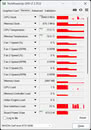
DLSS 5 seems to be contributing to increased power draw, and we have our first victim here. Videocardz reports a new melted-connector case on an MSI GeForce RTX 5090 Gaming Trio OC, which surfaced during DLSS 5 Neural Rendering testing in NBA 2K27, currently the only officially supported game. A reader nicknamed erek documented the incident, noting DLSS 5 pushed the card's power draw from around 450 W to over 600 W, which is above MSI's 575 W rating. A GPU-Z screenshot showed a peak board power reading of 613.5 W, which erek says held steady rather than spiking briefly.

Erek reported the card stopped working shortly after, and a burning smell led him to find that the connector's plastic had melted and fused to the socket. We already reported last week that DLSS 5 can push the RTX 5090's power draw unusually high, so this seems to be the first reported case where that added power draw has burned the notorious RTX 5090 power connectors. However, it should be remembered that GPU-Z tracks total board power rather than just the auxiliary connectors, since the PCIe slot also supplies power, so the reading doesn't necessarily mean the connector carried the full load.
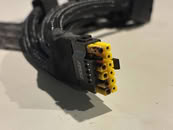
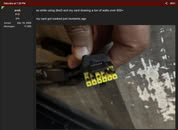
Melted RTX 5090 connectors have shown up under plenty of other workloads too, so DLSS 5 may have contributed without being the sole cause. Given how flimsy the 12V-2x6 connector has already proven, it's not unreasonable to wonder whether a feature that keeps cards pinned at high sustained power could make these failures more common, though one case isn't enough to confirm that. NVIDIA hasn't commented on this incident or the increased power draw of DLSS 5 in general.
Source: Videocardz
Add your own comment

342 Comments on DLSS 5 Testing Ends in a Melted RTX 5090 Connector, Power Shoots Past 600 W

#201
Let3r
Hecate91I don't understand though if 5090's are reserved for the rich, shouldn't those who could afford one expect to have a top quality card with every protection feature standard?
Not cost cut down from the 3090Ti spec, or having to buy fancy cables, a Wireview, or babysit their cables from bending or coming loose from the GPU.
@Hecate91 I swear Tyler is trying to ragebait you in every thread. Just ignore trolls like this.
Posted on Reply
#202
Simkin
swirl09The "I didnt experience it so its not real or not that big of a problem." post.

Thank you for your work sir, thank you, thank you so so much. You and everyone who posts hundreds if not thousands of these comments every day will never truly know how many peoples lives you have made better.
Statistics:

gamersnexus.net/gpus/12vhpwr-dumpster-fire-investigation-contradicting-specs-corner-cutting

A Gamers Nexus user survey reported a 4% failure rate for the 12vhpwr connector, and 3.3% for PCIe 8 pin.


1-3%
www.tomshardware.com/news/swiss-retailer-stats-reveal-which-gpu-brand-has-the-highest-failure-rates

So the vast majority of cards will run without problems.

A also had both versions of that angled cablemod adapter before they got recalled on my 4090 FE, did not melt.
Posted on Reply
#203
Klemc
I just wanted to say:

LoL
Posted on Reply
#204
Chrispy_
AusWolfHow so? Who's forcing you?
Business requirements for a 3090, 4090, 5090.
I have to source and provide what is needed for LLMs. If the only options that can run those LLMs come with a 16-pin, then that's what I have to use.
Posted on Reply
#205
Solaris17
Super Dainty Moderator
TesselatorEDIT:
And obviously, it's only a suggestion...


Just to be super clear. I do not use DLSS frame gen or any other AI feature on my cards.

I am running an 800w bios, I am totally fine doing so sustained, and my measurements are taken at native with all eye candy enabled (ray tracing, textures etc).

My readings are not an example of overshoot for the topic at hand. I am running under spec according to what the bios allows my card to do.

Over speccing the cable is not a surprise here.
Posted on Reply
#206
jnv11
Chrispy_Business requirements for a 3090, 4090, 5090.
I have to source and provide what is needed for LLMs. If the only options that can run those LLMs come with a 16-pin, then that's what I have to use.
Do you have options for installing GPU server racks somewhere in your business or offloading the jobs to a cloud service's GPUs? The page at www.nvidia.com/en-us/data-center/technologies/rubin/?ncid=no-ncid shows Nvidia GPU server racks that skip the 12V-2x6 connector in favor for connectors on their edges that appear to provide both power and data. Those probably would be a lot safer than 12V-2x6 connectors on the video cards.
Posted on Reply
#207
Sol_Badguy
Chrispy_Nvidia introduced the connector and current-sensing together as a single system to replace the previous connector-only single system. That's why it worked just fine in the 3090 and 3090Ti.
The 12V-2x6 connector does save PCB space compared to 3x 8 pin, however using the proper three-way load balancing still claims a portion of PCB space.
So in order to maximize the PCB space savings nVidia omitted the load balancing and the 50 series FE PCB sizes are ridiculously small.
Chrispy_Yes, these AIB partners are cutting the same corners on Radeons as they are on Geforce cards. Remember, Sapphire is Zotac so the mistakes of the Geforce 50-series are going to get copy-pasted onto Sapphire boards too. The biggest danger from 12VHPWR isn't the smaller cables and pins, it's the fact that a lazy/cost-cutting implementation at the PCB level can tie all 6 pins together into a single unmonitored bus.
Yet the PCB config on the Nitro looks different from Taichi and RTX cards.
tpucdn.com/review/sapphire-radeon-rx-9070-xt-nitro/images/front.jpg
It looks like it's separated into two paths, no? Could it be?
The 2x 8 pin Pulse is obviously split into two.
tpucdn.com/review/sapphire-radeon-rx-9070-xt-pulse/images/front.jpg
As opposed to a single one like below.
tpucdn.com/review/asrock-radeon-rx-9070-xt-taichi-oc/images/front.jpg
tpucdn.com/review/asrock-radeon-rx-9070-xt-taichi-white-oc/images/front.jpg
tpucdn.com/review/zotac-geforce-rtx-5080-amp-extreme/images/front.jpg
tpucdn.com/review/asus-geforce-rtx-5080-noctua-oc/images/front.jpg
tpucdn.com/review/asus-geforce-rtx-5080-astral-oc/images/front.jpg
How split into three looks like:
tpucdn.com/review/msi-geforce-rtx-3090-ti-suprim-x/images/front.jpg
tpucdn.com/review/xfx-radeon-rx-7900-xtx-magnetic-air/images/front.jpg
JustBenchingWith that said, do you think Sapphire , the most prominent Radeon manafacturer used it for planned obsolesence, in order to force you to buy a new card? That was the question...
Maybe they wanted to show that a proper implementation will work safely (that's assuming it is different somehow, like the possible two-way split hinted above) and then get bragging rights over nVidia's AIBs and make them look cheap and greedy, that they're chasing the cost cutting to the detriment of the buyers etc.
I don't know...
But that stupid sideways bend is what probably messed up their plan.
JustBenchingNot planning to get a radeon but if I was I would definitely be getting the sapphire nitro+, the one with the "16pin" cable.
Why? I don't find the overall design to be noteworthy, this is ignoring the connector.
I prefer the Pulse. You also get fuses on it, and the Nitro doesn't have dual BIOS anyway.
Posted on Reply
#208
Tess
AusWolfI'm curious whether we'll see it fixed on 60-series.
I highly doubt it.
Firstly, they aren't currently losing sales so it's not really a problem for them.
Secondly, PC users are now a very tiny segment of their customer base and

Thirdly, I believe the entire reason for the current design is that it's a retro-fit - taken from their server product.
They apparently design for the server room then use the majority of that layout in their consumer grade products.
And apparently the server parts don't need the better more sophisticated power design.

The more they can copy paste or go modular with the server -> workstation -> gamer designs and layouts the more they save in both engineering and manufacturing.

Server:


Consumer:

videocardz.com/newz/nvidia-rtx-pro-6000-blackwell-workstation-gpu-design-has-even-denser-pcb-layout

So, unless the much MUCH larger server market suddenly needs PC level power sophistication then the next gen of consumer cards isn't going have it either.


Disclaimer:
I have no idea what I'm talking about and you shouldn't take anything I say seriously!
Posted on Reply
#209
erek
KlemcI just wanted to say:

LoL
what’s so funny?
Posted on Reply
#210
Grimling
TheEndIsNearI will never understand the people that designed that connector.
It was actually AI!
Posted on Reply
#211
JustBenching
Sol_BadguyWhy? I don't find the overall design to be noteworthy, this is ignoring the connector.
I prefer the Pulse. You also get fuses on it, and the Nitro doesn't have dual BIOS anyway.
I like the design but mostly for the connector. Not going back to multiple 8pins.
Posted on Reply
#212
jnv11
Chrispy_How many of these need to happen before Nvidia change the connector, or mandate per-wire current monitoring?
613.5W may be over the spec, but only by 2%. If the connector burned at 102% of it's rated load, it would certainly have also burned at exactly 100% - it might have just taken a few minutes longer.
I honestly think that only government-mandated involuntary total recalls on video cards and power supply units with the 12V-2x6 and 12VHPWR connectors will force Nvidia to get this connector standard banned and replaced with something safe.
Posted on Reply
#213
AusWolf
Chrispy_Business requirements for a 3090, 4090, 5090.
I have to source and provide what is needed for LLMs. If the only options that can run those LLMs come with a 16-pin, then that's what I have to use.
You mean you work on your own personal computer at home? Man, that's a bummer.
Posted on Reply
#214
jnv11
AusWolfYou mean you work on your own personal computer at home? Man, that's a bummer.
There are some advantages for working on one's own personal computer at home.
  • Save space.
  • Use your own GPU and monitors that you like. When I tried connecting a company laptop to a 4K display at a previous work at home job, that laptop's GPU was so weak that the 4K display was forced to run at a very choppy 30 Hz. I had to get a 1920x1200 LCD display out to get the laptop to drive an external display at 60 Hz without forcing the display to upscale the image into a blurry mess.
However, working on your own personal computer at home does have some disadvantages, like not having a clean work/personal space boundary. Having a company laptop keeps a clean boundary.

Each way has its own advantages and problems. Neither is a complete bummer as a result.
Posted on Reply
#215
R-T-B
Let3rIsn’t this the second revision? Didn’t it start with 12vhpwr with Ampere and then after the 12v2x6 was supposed to solve melting issues with that but didn’t?
Yes, although 12v2x6 is a very minor modification honestly. They basically changed the lengths of some pins and called it good.
jnv11There are some advantages for working on one's own personal computer at home.
  • Save space.
  • Use your own GPU and monitors that you like. When I tried connecting a company laptop to a 4K display at a previous work at home job, that laptop's GPU was so weak that the 4K display was forced to run at a very choppy 30 Hz. I had to get a 1920x1200 LCD display out to get the laptop to drive an external display at 60 Hz without forcing the display to upscale the image into a blurry mess.
However, working on your own personal computer at home does have some disadvantages, like not having a clean work/personal space boundary. Having a company laptop keeps a clean boundary.

Each way has its own advantages and problems. Neither is a complete bummer as a result.
I hear you. When I worked at home on my PC, I was my own boss, it helps a ton with the boundaries, lol.
Solaris17Over speccing the cable is not a surprise here.
Man plays with fire, I like it.
Hecate91then again it wasn't a problem with 8 pin molex cables.
Certainly was if you played with certain adapters... just sayin'
N3utroHi, nice to see you're on TPU too :)

I'm going to be the devil's advocate here but you have 18k posts on hardforum, you post news regularly there, which means you knew about the melting connectors reports over time and that it was advised to 5090 owners to take special precaution.
That's probably why he used the "officially" qualifier.
TesselatorWhatever happened to the engineering guidelines where consumer devices are built to 2X over the "rating"? Or wait, do I mean half the rating? Anyway...
You aren't wrong. The lack of a sufficient safety margin on this connector I feel is a strong issue with it.
Posted on Reply
#216
AusWolf
jnv11There are some advantages for working on one's own personal computer at home.
  • Save space.
  • Use your own GPU and monitors that you like. When I tried connecting a company laptop to a 4K display at a previous work at home job, that laptop's GPU was so weak that the 4K display was forced to run at a very choppy 30 Hz. I had to get a 1920x1200 LCD display out to get the laptop to drive an external display at 60 Hz without forcing the display to upscale the image into a blurry mess.
However, working on your own personal computer at home does have some disadvantages, like not having a clean work/personal space boundary. Having a company laptop keeps a clean boundary.

Each way has its own advantages and problems. Neither is a complete bummer as a result.
The disadvantages of home work always outweigh the advantages, imo. A clear work/life boundary is a must, I would go crazy without it. But each to their own.
Posted on Reply
#217
wolf
Better Than Native
Let3r@Hecate91 I swear Tyler is trying to ragebait you in every thread. Just ignore trolls like this.
He's (Hecate) in every Nvidia news thread ragebaiting GeForce owners, literally always there to spread negativity. I wonder if you'd give us similar advice. Personally, I prefer to point out all the (many) fallacies and double standards.
Posted on Reply
#218
BoggledBeagle
jnv11I honestly think that only government-mandated involuntary total recalls on video cards and power supply units with the 12V-2x6 and 12VHPWR connectors will force Nvidia to get this connector standard banned and replaced with something safe.
Are you aware that this connector safely and reliably works in tens of millions GPUs?

Are you aware, that most of the melted connectors come from people with high power 600W GPUs (often drawing even more than this) who did not follow intended use and specs of this cable and the failure is a result of a mechanical damage of the plug, which was most of the time caused by straining the plugs when the cable was not properly mounted to provide the necessary strain relief?

Every single thing that is produced has a failure rate, but for some reason you believe that this particular cable/connector should never fail?

You want to ban a standard electrical connector - really?
Posted on Reply
#219
Crackong
jnv11I honestly think that only government-mandated involuntary total recalls on video cards and power supply units with the 12V-2x6 and 12VHPWR connectors will force Nvidia to get this connector standard banned and replaced with something safe.
Since Nvidia themselves had already made the 5090 with only 1+ve and 1-ve.
It is just Nvidia's ego or the pile of remaining stock of 12VHPWR connectors in the warehouses preventing the newer and safer standard.
Posted on Reply
#220
AusWolf
BoggledBeagleAre you aware that this connector safely and reliably works in tens of millions GPUs?

Are you aware, that most of the melted connectors come from people with high power 600W GPUs (often drawing even more than this) who did not follow intended use and specs of this cable and the failure is a result of a mechanical damage of the plug, which was most of the time caused by straining the plugs when the cable was not properly mounted to provide the necessary strain relief?

Every single thing that is produced has a failure rate, but for some reason you believe that this particular cable/connector should never fail?

You want to ban a standard electrical connector - really?
Yeah, I'm pretty sure Steve from HuB has no idea how to plug a GPU in properly. ;)

Seriously, where do you get all that crap from, accusing people of incompetence instead of accepting the fact that product designs can sometimes be faulty? :wtf:
Posted on Reply
#221
BoggledBeagle
AusWolfYeah, I'm pretty sure Steve from HuB has no idea how to plug a GPU in properly. ;)
Everybody can make a mistake, even you or me. And cables in media tend to have a very hard life and are rarely used as intended. Instead, they are often abused - used to test many components. Testing components is not an intended use of that cable. That cable is an internal cable in a consumer PC, meant for a fixed installation following all the good practises for installing cables, including preventing the wires straining the plugs. That is not a testing cable.

How many times do you have to write obvious things???
Posted on Reply
#222
AusWolf
BoggledBeagleEverybody can make a mistake, even you or me.
And Steve made a video on a mistake that he made while blaming Nvidia and praying that people would buy his lie, risking his reputation doing so. Riiight...
BoggledBeagleAnd cables in media tend to have a very hard life and are rarely used as intended. Instead, they are often abused - used to test many components. Testing components is not an intended use of that cable. That cable is an internal cable in a consumer PC, meant for a fixed installation following all the good practises for installing cables, including preventing the wires straining the plugs. That is not a testing cable.
Show me where it states that you're not supposed to unplug and plug the cable in several times. How many times is too many times anyway?

I swap GPUs quite often due to curiosity, but my 8-pin cables have never melted. Or do you think Seasonic will deny RMA if they do? Is my warranty only valid for the unit, but not the cables? How can anyone prove that I "abused" my cable? Do you see how many legal cans of worms such an argument opens?
BoggledBeagleHow many times do you have to write obvious things???
No, man. The "leave the cable alone" argument is full of shit.
Posted on Reply
#223
Tyler-98-W68
I swap my 12vhpwr cables all the time and they haven't melted....so is my statement less true than your statement that you swap you 8 pin cables all the time without issues?
Posted on Reply
#224
AusWolf
Tyler-98-W68I swap my 12vhpwr cables all the time and they haven't melted....so is my statement less true than your statement that you swap you 8 pin cables all the time without issues?
I never said that my cables have zero chance of melting, or that yours will definitely melt. All I said is, swapping GPUs is a normal part of a hobby PC builder's life. Several times even. Any cable should be ready for that, or it's unfit for purpose.
Posted on Reply
#225
JustBenching
AusWolfShow me where it states that you're not supposed to unplug and plug the cable in several times. How many times is too many times anyway?
On the specifications of pretty much every single cable in your PC. Not joking. The connections aren't supposed to be plugged and replugged. Most connectors inside your PC are rated for 25 mating cycles.
AusWolfI swap GPUs quite often due to curiosity, but my 8-pin cables have never melted. Or do you think Seasonic will deny RMA if they do? Is my warranty only valid for the unit, but not the cables? How can anyone prove that I "abused" my cable? Do you see how many legal cans of worms such an argument opens?
And I've done the same on my 12vhp and it hasn't melted either.
AusWolfI never said that my cables have zero chance of melting, or that yours will definitely melt. All I said is, swapping GPUs is a normal part of a hobby PC builder's life. Several times even. Any cable should be ready for that, or it's unfit for purpose.
Then no cable is fit for purpose
Posted on Reply
Add your own comment
Nov 26th, 2026 14:38 CST change timezone

New Forum Posts

Popular Reviews

TPU on YouTube

Controversial News Posts