Wednesday, July 23rd 2025
DDR6 Memory Arrives in 2027 with 8,800-17,600 MT/s Speeds
The semiconductor industry has officially accelerated its next-generation memory development, with DDR6 standard now coming soon. Although enthusiasts won't find these modules available until 2027, key players, Samsung, Micron, and SK Hynix, have already moved past prototype stages and embarked on rigorous validation cycles. In partnership with Intel, AMD, and NVIDIA, they're targeting an initial throughput of 8,800 MT/s, with plans to scale up to a staggering 17,600 MT/s, almost doubling the ceiling of today's DDR5. This increase is driven by DDR6's 4×24-bit sub-channel architecture, which requires entirely new approaches to signal integrity. Additionally, it also differs from DDR5's current 2x32-bit sub-channel structure. To overcome the physical limits that DIMM form factors faced at higher speeds, the industry is betting on CAMM2. Early indication is that server platforms will lead the change, with high-end notebooks following suit once manufacturing ramps up.
Behind the scenes, timelines are being mapped: platform validation is slated for 2026, server deployments in 2027, and broader consumer availability thereafter. This phased rollout mirrors the DDR5 journey; however, analysts predict that DDR6's architectural leap could accelerate adoption in AI and high-performance computing environments. Of course, cutting-edge technology comes with a premium: initial DDR6 modules are expected to carry price tags reminiscent of DDR5's 2021 debut, potentially limiting early adoption to hyperscale data centers and AI research labs. Yet with HPC and AI appetite for bandwidth, memory makers are targeting launch as soon as possible to satisfy the massive deployment of compute. By 2027, CAMM2-based modules running at DDR6 speeds may well define the new standard for high-performance systems.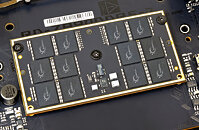
Source:
CTEE
Behind the scenes, timelines are being mapped: platform validation is slated for 2026, server deployments in 2027, and broader consumer availability thereafter. This phased rollout mirrors the DDR5 journey; however, analysts predict that DDR6's architectural leap could accelerate adoption in AI and high-performance computing environments. Of course, cutting-edge technology comes with a premium: initial DDR6 modules are expected to carry price tags reminiscent of DDR5's 2021 debut, potentially limiting early adoption to hyperscale data centers and AI research labs. Yet with HPC and AI appetite for bandwidth, memory makers are targeting launch as soon as possible to satisfy the massive deployment of compute. By 2027, CAMM2-based modules running at DDR6 speeds may well define the new standard for high-performance systems.

196 Comments on DDR6 Memory Arrives in 2027 with 8,800-17,600 MT/s Speeds
DDR5 most common capacity is already 32GB kit (2x16). Up from 16GB (2x8) on DDR4.
DDR6 will start from that and i would not be surprised if the most common DDR6 capacity will be 64GB.
I wonder if 16GB kits will even be made for it considering that already with DDR5 the 64GB kits are more numerous than 16GB kits.
Servers are 4, 8 or 12 channels, Diamond Rapids will be up to 16 channels. This will take up a lot of space as CAMM2 modules.
It's another pointless standard no one really is asking for, and you know the old saying; if it ain't broke, dont fix it. It's just bad engineering.I was referring to the normal practice of buying e.g. 2 sticks of memory, and then adding another 2 as needed (In this scenario, buying 2x32 GB now, another in 2-3 years, but that will result in lower performance, so in practice you either need to max out from the start, or "throw away" the old memory when upgrading.)
What "most people" need is pretty irrelevant, most people hardly use their computers like a power user do. But a typical power user (not the same as enthusiast) would probably want their build to last 5+ years, and by then 128 GB is going to be a limitation. This, along with other limitations, is why I've argued many times before that mainstream platforms are increasingly useless for anything but gamers, overclocking enthusiasts and basic office users.Most cases have no real airflow on the back side, which will definitely shorten the SSD lifespan. Most PC hardware should have some airflow, not necessarily a whole lot, but a little bit makes a huge difference.
I've long been an opponent of the stupid M.2 standard which shouldn't have been brought to the desktop (PCIe is better).
And the stupidity of the gigant metal blobs on top of SSDs, chipsets and VRMs, which does extremely little to cool anything. Just look at server motherboards which have tiny heat sinks with proper fins that do a better job.What fiasco?
Xeon Platinum/Gold/Silver are part of their Xeon SP-line, which are server CPUs, not workstation CPUs. Xeon W 3400/3500 series are their workstation lineup, which hasn't yet been updated with Granite Rapids.I think the solution is, as I've suggested before, to lower the entry for high-end workstation platforms (Xeon W and Threadripper) and move all the >100W TDP mainstream CPUs over to this platform, and make the mainstream strictly for non-demanding users. Right now we are already paying "HEDT prices" for motherboards and CPUs, but getting terrible deals.
I don't see games needing a lot of memory, but it's certainly needed for anyone even doing heavy web browsing at this point.
More memory also helps to keep the swapping to a minimum, and helps with IO cache, so I want as much memory as is reasonable on a system.
Not sure what you’re going for here. If the aim is to follow apple, why not sign up for soldered ram and factory only upgrades that cost you triple what a normal DIY/serviceable part?
128GB with two slots is not going to be a limitation for 99% of people. Those 1% that need more that are or will be on Threadripper anyway.
And those who want to stay on mainstream platform there is plenty with four slot DIMM boards for 256GB now, and 512GB with DDR6.Since when does heat shorten SSD lifespan? It may limit max sustained performance on longer workloads, but it will not shorten SSD lifespan to any meaningful degree. Have these hot Gen 4 and Gen 5 started dying yet? I haven't seen it. A proper passive heatsink is enough to cool an SSD.M.2 is PCIe. Okay i get it but the alternative you suggest is no better. So we should have PCIe cards as SSD's with giant heatsinks to cool a few chips instead?
That's worse. Wastes material and space.
Where's the bandwidth and space for those cards gonna come from? Lets put 4-7 PCIe slots on the board in E-ATX form factor?
There are problems with every standard. Of course server motherboards have tiny heatsinks. They also have high and noisy airflow.
Hence why many server GPU's and CPU's dont even come with active cooling.
If they get hot enough to throttle, they should have air flow.All PCIe lanes should have been PCIe slots for desktops, which would have saved costs and every lane could be used more flexibly; either SSDs, controller cards, network cards, etc. A simple PCIe X4 card with good fins would be much more easily cooled, for most the air pulled in by the graphics card would be enough, and in the cases it doesn't, a simple fan would do.There is space for many PCIe slots on even a standard ATX motherboard. With X4, X8 and X16 slots you can hold more lanes than the CPU can offer.Server parts have large fins and are designed for cases with high air flow, this also includes network cards, controller cards etc. If you put these parts in a case with low airflow, they will overheat.
It may be the final nail so other technologies will be faster adopted. for PC gaming there are better platforms anyway in 2030 or later
Would be anyone surprise to know that most desktop pcs for office use 1x16GB RAM instead of f.e. 2x8GB? The last two batches (cycles) I saw for big and medium companies (here >250 employee for big, <250 medium) had 80% of their pcs configured that way. Thats where most windows 11 *new* installations come from as well.
Might even be cheaper to manufacture, so either the MSRP will be slightly lower or for the same budget bump up some other features.
Higher-end/premium motherboards sure, four slots for power users, no problem with that, if you can afford that much RAM you can afford a more expensive mobo than what the plebs get.It's interesting how with all the ever increasing system requirements for every piece of software, only the RAM capacity becomes a bottleneck and somehow everything else manages to keep up.
For people that make money with the PC, time is essential, sure the CPU can complete the task if it has enough RAM but if it's older it's also slower therefore the productivity is not great, so basically the whole power user argument is shaky, if you are willing to wait around for the CPU to finish sure go crazy on the RAM and make it "future proof", but that doesn't sound like a "productive power user" scenario.
A lot of the "office PCs" from vendors like Dell, HP, Lenovo, etc. are shockingly bad deals. While they might look okay on paper, the cooling is underpowered, storage is crap, PSUs are bad, etc. Their "proper" workstations are a bit better though, but all of them cost about twice of what they should. And that's before you start adding RAM and storage, that's where they get you.
And I want to stress that most of these PCs can't even serve as "light workstations", while they might be fine for those doing light office work, doing heavier work like programming, graphics, video, etc. they are simply way slower than you might expect. I've seen e.g. those Dell Optiplexes with 65W CPUs deployed (Coffee Lake era), with no case fans (only the stock CPU fan), so if you put >5 min. of high load on the CPU it will either throttle or crash. I've seen them crash many times with larger build jobs etc. And it's really sad that just a few tens of dollars here and there worth of better parts and these machines would have been much more usable.I don't think most are aware of how RAM impacts performance and usability, the two main ones are IO cache and swapping;
IO cache is a portion of the RAM used to cache the data/applications you're working on. If you are doing a lot of multitasking or switching a lot between files, more RAM will yield noticable performance differences. (It's worth noting Linux users get the benefit of using all free RAM as IO cache for a very snappy experience. If you just have enough RAM, it will behave like a giant RAM-drive.)
Swapping("pagefile") happens gradually as you fill up your RAM, and the more you use it the more it heavier it will swap, leading to a gradual slowdown the more you multitask. This also means as applications consume more and more RAM to do similar work, having more RAM means you get to retain the performance level even when the applications (especially browsers) consume more. (In Linux I like to tune my swapping so it only starts when the RAM is almost full, so I get top performance for as long as possible.)
I'm patiently waiting for DDR6 and AM6 and hopefully they will have ECC support out of the gate this time.
Seeing that variants slide reminds me: has anyone even talked about dual-die packing for DDR5? I don't recall seeing it yet and would be pretty important for capacity sake. I haven't seen anything about DDR6 memory IC capacity so perhaps that's just solved for next generation.128GB is the maximum capacity for a CAMM2 module currently and it requires 16 packages on each side. The smaller ones max out at 64GB with 12 packages on the top and 4 on the bottom.The CAMM2 specification is universal compatibility across everything using it. LPCAMM2 and CAMM2 are not cross compatible though which means a platform can either support DDR or LPDDR.
Most SSD death are due to excessive writes or firmware issues, not heat. Not that 100c+ is healthy, but current high temps are not dangerous. Just annoying.There's not enough space even on ATX board for what you're proposing. In order to ensure proper spacing only a few x4 slots could be placed on the board.
It would not have saved costs. It would have increased costs. Very few people actually use capture or network cards to justify the alternate use of those slots.
Again you're speaking from server perspective, but desktop should not be a server with everything having it's own PCIe slot.GPU's already block many of the potential slots. The x4 placed between CPU and GPU is getting cooked regardless.
the X8 or X16 below the GPU is cooked by the GPU too. On the lane count i agree that mainstream platforms should increase lane count.
Nothing crazy that will drive up the price, but maybe to around 40 from current ~24.Desktop is desktop and server is server. As it should be. Instead of making a Frankenstein that doesn't do anything well it's better to have specialized platforms that perform their function well.
As for the topic itself - DIMM will not go anywhere. CAMM2 is proposed as additional standard. I suspect it will be used mostly in laptops where it's advantages over SO-DIMM are obvious.
Sure if you have a LOT of RAM it will eventually finish the job(s) but that means you have to sit around for it to finish (because it's slower than a flagship). We could pretend that it's sort of "productive" but honestly this sort of scenario basically shows that a CPU upgrade is valid.
I would argue that this sort of scenario where you have a very large RAM buffer relative to the CPU muscle kind of masks the fact the CPU is getting long in the tooth. Because you get used to waiting around for it to finish, and keep adding tasks, while others finish, and because it never swaps it makes it seem like the rig is still potent when it actually isn't that strong anymore.
But yeah honestly many people should probably add another 16 or 32GB on top of what they are getting when making a build. This way they will be safe from having to add another kit a few years down the line.
So the prices of all components M/B, CPU, and Ram need to come down. Ram is bit cheaper now but still more expensive.
I can upgrade to AM5, but if I don't get an 7800X3D or 9800X3D. It won't be worth it for me coming from a 5700X3D.
Seeing that AM6 and DDR6 is around the corner I can just as well wait for that, or for more reasonable prices in the CPU and M/B and pair it with DDR5.
These were never meant to be suggestions to anyone to go out there and buy these exact components.
More of a example how cheap AM5 really is.
I went overboard with midrange motherboard pricing as it should be closer to 150, not 210.
The enthusiast tier is obviously total overkill and not even compatible with CUDIMM's.
The ultra low is something i would not suggest to anyone as it's heavily compromised and for 50€ more the budget option is far more balanced without any motherboard or CPU limits.There's also much cheaper 7600X3D. 7000 series non-X3D parts already match 5700X3D performance.AM6 and DDR6 will be very expensive at the beginning. Just like AM5 and DDR5 were. It took more than a year to prices to start coming down.
Not to mention that AM6 wont come out until sometime in 2029 at the earliest. Zen 6 will still be on AM5 and that's a 2026/2027 product.
So by waiting for AM6 you'll be waiting for the next 5 years or so. DDR6 will also be slower than the best DDR5 at the beginning so you wont even gain noticeable performance with it.
I think it's far more reasonable to wait for Zen 6 on AM5 and move to AM5 at around 2027 when DDR5 prices will be lowest and performance likely as good as it's going to get. Same for motherboard prices. CPU prices for Zen 6 are a question mark obviously, but if it launches at the end of 2026 then by 2027 it should have stabilized too like 9800X3D that took 3 months to stabilize in availability and price.
ATX boards have theoretically 7 "slots" for cards. The first is usually used for a PCIe X1 or not used at all. You can easily do e.g. X4 + X16 + blank + blank + X4, which leaves two bottom slots for all the chipset lanes, e.g. X8 + X8.You know very well that I never said that, so don't attempt any straw-man arguments.
I was replying to your post about many server parts not having active cooling, because they have specialized cases (sometimes with ducts) which does the active cooling for them.I can count on one hand the amount of people I've seen professionally who closes applications as they switch between sub-tasks. Pretty much every professional on the planet who work at least semi-efficiently have many applications/files running, but usually only one with actual load. This means people need lots of RAM and not necessarily a lot of CPU cores. As a matter of fact, most people only start to close applications or most tabs in their browser when the computer gets too slow.
The various companies I've either worked for or have had contact with usually uses severely underpowered hardware for their engineering staff, and above all, it's almost always lack of memory.I never said it had anything about waiting for tasks to finish, and judging by the way you argue I don't think you know what multitasking is. I'm not talking about queuing batch jobs.
When you run into heavy swapping it's more slowing down every tiny interaction, and at some point driving the user to close down files or applications. Some applications may even come to a point where they crash etc.
Just a web browser alone can quickly consume >10GB, plus office applications and specific productive tools for whatever task the worker has.
For most types of engineering, some kind of CAD tool(s) or similar is used, along with simulation tools etc. For software development it's usually some kind of "IDE", build tools, debugging tools, VMs/emulation tools, and more often than you think some kind of graphic tool etc. And it's pretty similar for anyone in creative graphics/video etc.
Most workers needs to switch between files/sub-tasks to be as productive as possible. The more you have to close and reopen files/applications, the more it takes focus away from being productive. The same goes for the computer gradually slowing down; the smoother the computer performs, the less distracting it is. This not only affects overall "productivity", but also quality of work, amount of mistakes, meeting deadlines, etc.
So while yes, the timings numbers do increase - the actual latency in nanoseconds stays roughly the same.
it's wrong to say latency doubles or triples.
Some examples:
DDR3-1600 @ CL9: 11,25ns
DDR4-3200 @ CL16: 10,00ns
DDR5-6400 @ CL32: 10,00ns
So what's the point of new DDR generations if the latency stays the same?
Bandwidth. DDR3-1600 was 12,8GB/s. DDR5-6400 is 51,2GB/s (single-channel numbers).
At comparable latency.
That is why each memory generation is faster despite doubling of timings.
The first thing lost is the ability to split off the CPU PCIe lanes. This may not be important for a majority of users, but it's still capability lost.
The biggest problem though comes from the chipset lanes. No chipset currently supports more than 4 lanes in a single connection. In the case of AMD they don't even have enough bandwidth to support more than 4 lanes.
To do what you're suggesting AMD would have to increase the bandwidth to their chipset as well as increasing the complexity of the chipset. Intel wouldn't have to increase bandwidth, but there would be added complexity. This is of course assuming we're just talking about PCIe 4.0 connectivity and not 5.0.
Then of course there's the added cost to buyers who now would need adapter cards for storage. In the end this comes out as an equally awful idea as the use of M.2 in desktop already is.