Wednesday, July 23rd 2025

DDR6 Memory Arrives in 2027 with 8,800-17,600 MT/s Speeds

The semiconductor industry has officially accelerated its next-generation memory development, with DDR6 standard now coming soon. Although enthusiasts won't find these modules available until 2027, key players, Samsung, Micron, and SK Hynix, have already moved past prototype stages and embarked on rigorous validation cycles. In partnership with Intel, AMD, and NVIDIA, they're targeting an initial throughput of 8,800 MT/s, with plans to scale up to a staggering 17,600 MT/s, almost doubling the ceiling of today's DDR5. This increase is driven by DDR6's 4×24-bit sub-channel architecture, which requires entirely new approaches to signal integrity. Additionally, it also differs from DDR5's current 2x32-bit sub-channel structure. To overcome the physical limits that DIMM form factors faced at higher speeds, the industry is betting on CAMM2. Early indication is that server platforms will lead the change, with high-end notebooks following suit once manufacturing ramps up.

Behind the scenes, timelines are being mapped: platform validation is slated for 2026, server deployments in 2027, and broader consumer availability thereafter. This phased rollout mirrors the DDR5 journey; however, analysts predict that DDR6's architectural leap could accelerate adoption in AI and high-performance computing environments. Of course, cutting-edge technology comes with a premium: initial DDR6 modules are expected to carry price tags reminiscent of DDR5's 2021 debut, potentially limiting early adoption to hyperscale data centers and AI research labs. Yet with HPC and AI appetite for bandwidth, memory makers are targeting launch as soon as possible to satisfy the massive deployment of compute. By 2027, CAMM2-based modules running at DDR6 speeds may well define the new standard for high-performance systems.
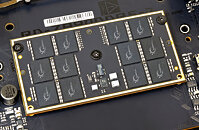
Source: CTEE
Add your own comment

196 Comments on DDR6 Memory Arrives in 2027 with 8,800-17,600 MT/s Speeds

#151
Rover4444
R-T-BIt's two kits of near identical serial 2x32GB DDR5-6000 CL30 ram. And yes I am.

I mean I might be able to push DDR5-5200, but that'd be about my limit (and it'd take tweaking beyond auto for sure) and then I'd lose the latency bonus from syncing to FCLK. Gotta be a little honest there. I didn't try too hard, lol.

As it stands, I'm happy with DDR5-4000 and tightening the crap outta the timings.
You do you. I personally wouldn't tolerate DDR4-tier speeds from a DDR5 kit though, no matter the timings. You shouldn't be 1:1 with the FCLK, either...
Posted on Reply
#152
R-T-B
Rover4444You shouldn't be 1:1 with the FCLK, either...
If I have to go as low as ~5000 anyways, why not? It certainly helps latencies quite a bit, which are a fairly big part of the performance picture.

Of course, ymmv, it all depends on what you are running, etc. Not judging just stating my logic.
Posted on Reply
#153
Rover4444
R-T-BIf I have to go as low as ~5000 anyways, why not? It certainly helps latencies quite a bit, which are a fairly big part of the performance picture.

Of course, ymmv, it all depends on what you are running, etc. Not judging just stating my logic.
Well sure if you're running at 4000, but I really think your kit's capable of more and I'd definitely notice a 25% difference in bandwidth over a 10% difference in latency. I'd try loosening your primaries and tuning your subtimings or just tuning the subtimings if you haven't already.
Posted on Reply
#154
R-T-B
Rover444410% difference in latency
Running FCLK in sync has a major impact on latency, it's probably 10% from that alone leaving aside from the tighter timings. Just no one does it because you have to clock very low.

I may mess with it later but I have doubts it will improve much. I would admitedly be much happier if I could get it to clock to like say, 5600 but I just don't think that's happening from my testing.
Posted on Reply
#155
Rover4444
R-T-BRunning FCLK in sync has a major impact on latency, it's probably 10% from that alone leaving aside from the tighter timings. Just no one does it because you have to clock very low.

I may mess with it later but I have doubts it will improve much. I would admitedly be much happier if I could get it to clock to like say, 5600 but I just don't think that's happening from my testing.
What latency are you getting right now? Did you try loosening the primaries at 5600, run the FCLK 1.5:1 or higher, and set the subtimings manually in your testing?
Posted on Reply
#156
R-T-B
Rover4444What latency are you getting right now? Did you try loosening the primaries at 5600, run the FCLK 1.5:1 or higher, and set the subtimings manually in your testing?
I'll post an AIDA64 membench shortly. They aren't great,but for 128GBs not really bad either.
Posted on Reply
#157
freeagent
Rover4444What latency are you getting right now?
What are you getting right now with 4 sticks?
Posted on Reply
#158
R-T-B
freeagentWhat are you getting right now with 4 sticks?
That sounds like a drag race!

My run:


No it's not great, but you run 128GBs (or any 4xDR combo) and get back to me with better...
Posted on Reply
#159
Rover4444
freeagentWhat are you getting right now with 4 sticks?
I'll run a benchmark in a bit, but probably nothing good. I kitted out with capacity/$ first, speed second, and latency third, AND I'm running stock.
R-T-BThat sounds like a drag race!

My run:

Oh my lord.
Posted on Reply
#160
freeagent
R-T-BMy run:
The cache performance on those CPU's are sick :rockout:

Here is mine :fear:

Posted on Reply
#161
R-T-B
Rover4444Oh my lord.
That bad ah? I may mess with it tonight then, why not beats gaming some days lol.

Bear in mind my IMC is... not the best unfortunately. But I will see what I can push and post a comparison.
Posted on Reply
#162
Rover4444
R-T-BThat bad ah? I may mess with it tonight then, why not beats gaming some days lol.

Bear in mind my IMC is... not the best unfortunately. But I will see what I can push and post a comparison.
Well, mine's certainly not that impressive. Don't really feel like experimenting with these kits too much, it feels like a miracle it actually works.

We've got the same motherboard too so I KNOW you can push faster speeds lol
Posted on Reply
#163
R-T-B
Rover4444We've got the same motherboard too so I KNOW you can push faster speeds lol
I certainly can, it's the IMC holding me back more than anything... It really hates 4 sticks.

It can do two sticks of the same 32GB DR dimms pretty well ironically. Going to just switch to this I think and dump that big compile that needs all the ram on my server system...

Posted on Reply
#164
Rover4444
My newest run lmao

Haven't checked stability though. I'll be going back to stock, games run well enough for me as it is.
Posted on Reply
#165
R-T-B
Rover4444My newest run lmao

Haven't checked stability though. I'll be going back to stock, games run well enough for me as it is.
Hey you still have more memory than me by a ways... so not bad. Just how you use it that matters. :)
Posted on Reply
#166
igormp
R-T-BNo it's not great, but you run 128GBs (or any 4xDR combo) and get back to me with better...
I'm not a fan of AIDA64 memory's test because it doesn't make much sense on AM5 platforms and its results always seem a bit exaggerated.
Given that I don't use Windows either, here are my 4x64GB results on Intel MLC in case you want to compare:
┌─[igor@Titan][~]
└─▪sudo mlc -X -Y
[sudo] password for igor:
Intel(R) Memory Latency Checker - v3.11b
Measuring idle latencies for random access (in ns)...
Numa node
Numa node 0
0 85.5

Measuring Peak Injection Memory Bandwidths for the system
Bandwidths are in MB/sec (1 MB/sec = 1,000,000 Bytes/sec)
Using only one thread from each core if Hyper-threading is enabled
Using traffic with the following read-write ratios
ALL Reads : 56980.5
3:1 Reads-Writes : 56523.6
2:1 Reads-Writes : 54611.0
1:1 Reads-Writes : 60167.2
Stream-triad like: 57402.8

Measuring Memory Bandwidths between nodes within system
Bandwidths are in MB/sec (1 MB/sec = 1,000,000 Bytes/sec)
Using only one thread from each core if Hyper-threading is enabled
Using Read-only traffic type
Numa node
Numa node 0
0 59065.9

Measuring Loaded Latencies for the system
Using only one thread from each core if Hyper-threading is enabled
Using Read-only traffic type
Inject Latency Bandwidth
Delay (ns) MB/sec
==========================
00000 196.02 59989.1
00002 194.33 60079.2
00008 195.08 60323.4
00015 194.31 60354.5
00050 193.05 60395.4
00100 193.71 60101.9
00200 192.13 59993.1
00300 191.63 59987.8
00400 191.55 59524.1
00500 188.21 59935.5
00700 136.70 55338.4
01000 114.80 39775.6
01300 110.04 31128.3
01700 106.76 24064.3
02500 103.39 16646.5
03500 98.71 12184.0
05000 97.47 8755.0
09000 96.43 5174.0
20000 96.06 2696.6

Measuring cache-to-cache transfer latency (in ns)...
Local Socket L2->L2 HIT latency 15.6
Local Socket L2->L2 HITM latency 15.7
┌─[igor@Titan][~]
└─▪sudo dmidecode -t memory | grep -i 'configured memory' | head -n1 && sudo dmidecode -t memory | grep -i 'maximum capacity' | head -n1
Configured Memory Speed: 5600 MT/s
Maximum Capacity: 256 GB

┌─[igor@Titan][~]
└─▪free -h
total used free shared buff/cache available
Mem: 249Gi 41Gi 10Gi 867Mi 199Gi 207Gi
Swap: 127Gi 16Gi 110Gi

System is totally far from idle, fwiw.
Posted on Reply
#167
R-T-B
igormpI'm not a fan of AIDA64 memory's test because it doesn't make much sense on AM5 platforms and its results always seem a bit exaggerated.
Given that I don't use Windows either, here are my 4x64GB results on Intel MLC in case you want to compare:
┌─[igor@Titan][~]
└─▪sudo mlc -X -Y
[sudo] password for igor:
Intel(R) Memory Latency Checker - v3.11b
Measuring idle latencies for random access (in ns)...
Numa node
Numa node 0
0 85.5

Measuring Peak Injection Memory Bandwidths for the system
Bandwidths are in MB/sec (1 MB/sec = 1,000,000 Bytes/sec)
Using only one thread from each core if Hyper-threading is enabled
Using traffic with the following read-write ratios
ALL Reads : 56980.5
3:1 Reads-Writes : 56523.6
2:1 Reads-Writes : 54611.0
1:1 Reads-Writes : 60167.2
Stream-triad like: 57402.8

Measuring Memory Bandwidths between nodes within system
Bandwidths are in MB/sec (1 MB/sec = 1,000,000 Bytes/sec)
Using only one thread from each core if Hyper-threading is enabled
Using Read-only traffic type
Numa node
Numa node 0
0 59065.9

Measuring Loaded Latencies for the system
Using only one thread from each core if Hyper-threading is enabled
Using Read-only traffic type
Inject Latency Bandwidth
Delay (ns) MB/sec
==========================
00000 196.02 59989.1
00002 194.33 60079.2
00008 195.08 60323.4
00015 194.31 60354.5
00050 193.05 60395.4
00100 193.71 60101.9
00200 192.13 59993.1
00300 191.63 59987.8
00400 191.55 59524.1
00500 188.21 59935.5
00700 136.70 55338.4
01000 114.80 39775.6
01300 110.04 31128.3
01700 106.76 24064.3
02500 103.39 16646.5
03500 98.71 12184.0
05000 97.47 8755.0
09000 96.43 5174.0
20000 96.06 2696.6

Measuring cache-to-cache transfer latency (in ns)...
Local Socket L2->L2 HIT latency 15.6
Local Socket L2->L2 HITM latency 15.7
┌─[igor@Titan][~]
└─▪sudo dmidecode -t memory | grep -i 'configured memory' | head -n1 && sudo dmidecode -t memory | grep -i 'maximum capacity' | head -n1
Configured Memory Speed: 5600 MT/s
Maximum Capacity: 256 GB

┌─[igor@Titan][~]
└─▪free -h
total used free shared buff/cache available
Mem: 249Gi 41Gi 10Gi 867Mi 199Gi 207Gi
Swap: 127Gi 16Gi 110Gi

System is totally far from idle, fwiw.
I pulled 2x of my 4x32GB for better mem timings... have a 128GB Server system to run that one job that needs high ram allocation on now. It's slower for that one job but better for 90% of what I do.

Hard to bench again as such... thinking of maybe selling the other sticks to a modding friend who needs ram for preshortage prices.
Posted on Reply
#168
Alfa0
Odd Channel width... 4x24bit are 96bit , 1.5 times current single Channel width. But base laptop cpu have 2 channels, strix halo has 4ch, Threadripper has 8ch. I doubt sodimm (and also dimm) waste more space than camm2. And 8ch 6400 DDR5 sport more than 400Gb/s. Does 8 camm2 fits in a motherboard ? I don't even think 2 camm2 fits in a laptop motherboard...
Posted on Reply
#169
TumbleGeorge
Alfa0Threadripper has 8 channels
Only series for workstation from 3000 Pro.
ThreadripperX(for enthusiast) still is with 4 channels from it's first series 1000 back in 2017.
Posted on Reply
#170
Alfa0
TumbleGeorgeOnly series for workstation from 3000 Pro.
ThreadripperX(for enthusiast) still is with 4 channels from it's first series 1000 back in 2017.
You can get a 5955WX (16c/32t) 8 Channel Threadripper Pro for about 600€ now. Or a brand new 9955wx for 1600€. It's not an exothic thing. That's 512bit ddr5 6400 , that's 400GB/s with DDR5. You can easily manage LLM(70-120B) without a rack of NVIDIA Power hungry GPU cards. Dimm waste very low surface cause they are vertical. Sodimm even less. Camm2 are large than a sodimm, must be installed flat and i don't think Is stackable... Other solutions are better. TDIMMs for example reach 280GB/s in a similar to sodimm form factor (with DDR5 chips).
Posted on Reply
#171
TumbleGeorge
Yes I can but I'm not interesting to make nothing that support "AI" bubble. For my home isn't relevant to place something that is power hungry and make noise like rack with Threadripper WS and tons of cards. To manage LLM why? I'm not a sick from FOMO.
Posted on Reply
#172
forman313
efikkanI know, I've had one. Practically disassembling the whole computer to change a SSD.
Just because the idea isn't new, doesn't change the fact that it's a terrible idea.
For regular use, it´s brilliant as it gives them one extra slot. One extra slot is a huge thing, as we all know from reading forums. The outrage and disappointment when a manufacturer dares release an ATX board with only one or two slots is very real.

For tinkerers, hackers and TPU´ers, it´s more like a "meh". These motherboards rarely tick the boxes when it comes to VRM, BIOS, I/O etc. anyway.

One mans poison is another mans lifesaving medicine, and not even that can be called terrible.
Posted on Reply
#173
Andrea007
TheLostSwedeIt seems like we are moving to CAMM2, so...
Unless motherboards only supports single channel CAMM2 modules, the current design only allows for a single module.
I guess CPU memory controllers could change and support two modules, maybe one on each side of the motherboard?
I have notebok with single o double sodim slot occupied and also occupied with different size ddr5 SODIMM. Never had a problem. Maybe your issues depends on the notebook or the brand of the sodimm stick...
Single channel CAMM2 modules means i have to thrash old module to put a higher one. It's quite not an upgrade unless you can put 2 camm2 modules. But they're even bigger than SODIM...
Posted on Reply
#174
TheLostSwede
News Editor
Andrea007I have notebok with single o double sodim slot occupied and also occupied with different size ddr5 SODIMM. Never had a problem. Maybe your issues depends on the notebook or the brand of the sodimm stick...
Single channel CAMM2 modules means i have to thrash old module to put a higher one. It's quite not an upgrade unless you can put 2 camm2 modules. But they're even bigger than SODIM...
I don't think you understand how CAMM2 modules work, based on your comment.
Standard CAMM2 modules are dual channel or 128-bit if you prefer, whereas your SODIMMs are 64-bit, or single channel, hence why you want to install a pair of matching modules.
Single channel CAMM2 modules are like your SODIMMs, but it's unclear if anything will support them at the moment.
CAMM2 comes in four different sizes, to date, so no, not all of them are physically bigger.
Posted on Reply
#175
Atomofvoid
TumbleGeorgeMmm, sorry but no. There have offered is shops DDR5 9600 in stock. If doubling this will have 19200.
****I don't know where you got "effectively double", because I have "almost double"...
tommo1982Too soon, too fast. I still have DDR4 motherboard, simply because DDR5 ones are expensive. Changing CPU, MB and RAM to AM5/DDR5 costs as much as 3/4 of my current setup. DDR6 is going to push the price range even further.
You are right. DDR5 was out in 2021, DDR4 in 2014, DDR3 in 2007. Though I think that DDR6 will just be for AI and if it is, then DDR5 might actually go back to normal.

I hope that this is just for AI.
If it is for AI, then we might, FINALLY, see DDR5 prices go back down. Supply still can't follow the demand, and if DDR5 supply finally isn't just for AI data centers, then it might finally satisfy the common customer demand. Now, let us hope that the CEO of NVIDIA quits and someone with an actual brain goes a bit back to us gamers and more.
Posted on Reply
Add your own comment
Nov 21st, 2026 22:10 PST change timezone

New Forum Posts

Popular Reviews

TPU on YouTube

Controversial News Posts