Thursday, September 3rd 2026

AMD Ryzen 7 7800X3D Swells and Burns Again, This Time on an ASUS Crosshair X670E Hero

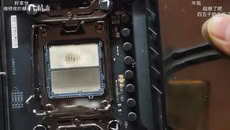
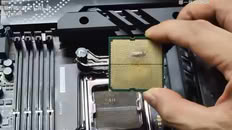
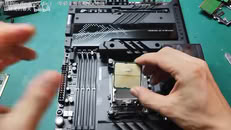
Another Ryzen 7 7800X3D has reportedly swollen and burned, while also damaging the ROG Crosshair X670E Hero motherboard in the process. UNIKO's Hardware flagged the case, citing a video posted to Bilibili as the original source. The video shows a Ryzen 7 7800X3D CPU with clear swelling on the underside where it made contact with the CPU socket. There is discoloration on both the CPU and the socket itself. Moreover, the socket pins are warped and damaged in the middle, presumably due to the pressure of the swelling. One peculiar finding is that one of the notches on the CPU socket looks slightly off. Perhaps more importantly, the board's BIOS version wasn't confirmed, which is directly relevant due to AMD's proposed fix.

This kind of failure first showed up in April 2023, when several 7800X3D and 7950X3D chips bulged and took their sockets with them on X670E boards. AMD pinned it on SoC voltage running too high and rolled out AGESA firmware that capped it at 1.30V across AM5 motherboards. This new case might be straightforward if the BIOS hadn't been updated at all. However, even after the BIOS fix, the reports never fully stopped. Just weeks ago, a 7800X3D reportedly burned out on an MSI PRO X870-P WIFI board running the latest BIOS, with EXPO enabled and nothing else touched. We have even seen reports of Ryzen 7 9800X3D CPUs burning in the exact same manner. If you're running a 7800X3D, it's probably worth checking that you're on the latest BIOS and keeping an eye on SoC voltage.
Source: UNIKO's Hardware on X
Add your own comment

160 Comments on AMD Ryzen 7 7800X3D Swells and Burns Again, This Time on an ASUS Crosshair X670E Hero

#1
TheinsanegamerN
Wow what a defective socket! AMGreeD should be ashamed for pushing a faulty design like this! We need to return to AM4!
Posted on Reply
#2
Dragam1337
1.3v is still way too high - you won't ever need to run it that high with standard memory.

Mine has been running 1.09v for 3 years.
TheinsanegamerNWow what a defective socket! AMGreeD should be ashamed for pushing a faulty design like this! We need to return to AM4!
.......
Posted on Reply
#3
john_
There is probably something to do with the way those CPUs with the X3D cache are made or something. We don't see non X3D chips having this behavior. Except if they do and we don't learn about it, which would be probably strange. Then again I don't remember seeing articles about burned Zen 3 X3D chips. Only on AM5. Something gone wrong on AM5 and X3D chips and because these are rare occasions AMD haven't found yet what it is. AMD will really need to fix this with the next X3D chips.
Posted on Reply
#4
N3utro
I've been running a 7800X3D at 5.3 ghz on the same motherboard (Asus X670E crosshair hero) for almost 3 years and it's been flawless so far.

CPU SoC on auto varies between 1.234 and 1.243v depending on load on the latest current bios 3902.

Maybe these guys shouldn't use a hammer to install the CPU in the motherboard socket?
Posted on Reply
#5
cvaldes
It's probably using the 12VHPWR/12V-6x2 connector.

:) :p :D
Posted on Reply
#6
Dragam1337
N3utroI've been running a 7800X3D at 5.3 ghz on the same motherboard (Asus X670E crosshair hero) for almost 3 years and it's been flawless so far.

CPU SoC on auto varies between 1.234 and 1.243v depending on load on the latest current bios 3902.

Maybe these guys shouldn't use a hammer to install the CPU in the motherboard socket?
They, like you, are doing overclocking and running high voltages, on a chip not designed for it. There is a reason why they locked clocks at 5.05 ghz.

Count yourself lucky that it hasn't happened to you.
Posted on Reply
#7
Hecate91
There might be something with how X3D is made or how it's placed onto the CPU, though 1.3V is too high for an X3D, along with no mention if the user had updated BIOS, and the socket notch possibly damaged.
I wonder if that was due to the CPU burning or did the user push the CPU forcefully into the socket?
Also sad bait attempt from post #2, at least read the OP first lol.
Posted on Reply
#8
Bigshrimp
I have to guess that they made some changes in how heat and voltage is handled with the new chip and socket design. This change may be causing excessive heat somehow causing the CPU to warp, like when overclocking or bursting? It's sad that BIOS updates may not be fixing the issue either.
Posted on Reply
#9
LittleBro
This sort of damage is caused by wrong placement resulting in short circuit. This creates enormous heat and melts the package of CPU.

Previous records of damaged 7800X3D due to high VSoC voltage showed significantly lower level of damage, mainly few burnt pins and contacts.

If you take a look at source post on X, that socket looks odd.

Anyway, lot of important info is missing, like:
- was this first run or months or after CPU was installed?
- what version was BIOS?
Posted on Reply
#10
N3utro
Dragam1337They, like you, are doing overclocking and running high voltages, on a chip not designed for it. There is a reason why they locked clocks at 5.05 ghz.

Count yourself lucky that it hasn't happened to you.
Thank you for this good laugh :D

As I said i'm using stock voltages in auto mode, which equals to CPU SoC 1.234v in idle and 1.243v under load. It doesn't change whether I increase the CPU frequency or not, and it's a safe range.

The crosshair hero has an external BLCK generator, it allows to overclock the CPU by only increasing its BLCK independently from anything else, so there are no voltages increase involved. The only risk is instability if you go too high.
Posted on Reply
#11
Dragam1337
N3utroThank you for this good laugh :D

As I said i'm using stock voltages in auto mode, which equals to CPU SoC 1.234v in idle and 1.243v under load. It doesn't change whether I increase the CPU frequency or not, and it's a safe range.

The crosshair hero has an external BLCK generator, it allows to overclock the CPU by only increasing its BLCK independently from anything else, so there are no voltages increase involved. The only risk is instability if you go too high.
Yes, you are using auto mode for voltages, which is the dumbest thing you can do while overclocking. And i see you are only using a 6000 cl30 kit, so you could probably run at least 100mv less.

Increasing BLCK always puts additional strain on the system, regardless of voltages being further increased or not.
Posted on Reply
#12
N3utro
Dragam1337Yes, you are using auto mode for voltages, which is the dumbest thing you can do while overclocking. And i see you are only using a 6000 cl30 kit, so you could probably run at least 100mv less.

Increasing BLCK always puts additional strain on the system, regardless of voltages being further increased or not.
Forgive me I didn't know that you knew better than Asus engineers what voltages are better than stock for my motherboard :D

Also as I explained it's an independent second BCLK which is not the same as the regular single BCLK which is linked to the system and the CPU at the same time on most motherboard like yours:


So no, it doesn't put additional strain on the system to increase it.
Posted on Reply
#13
Dragam1337
N3utroForgive me I didn't know that you knew better than Asus engineers what voltages are better than stock for my motherboard :D

Also as I explained it's an independent second BCLK which is not the same as the regular single BCLK which is linked to the system and the CPU at the same time on most motherboard like yours:


So no, it doesn't put additional strain on the system to increase it.
Are you completely new to the tech scene, or what ? Motherboards ALWAYS give more voltage than needed on auto mode.

It puts additional strain on the cpu, which is the part that is exploding...
Posted on Reply
#14
N3utro
Dragam1337Are you completely new to the tech scene, or what ? Motherboards ALWAYS give more voltage than needed on auto mode.

It puts additional strain on the cpu, which is the part that is exploding...
"Completely new" is relative so I don't know. First time i tweaked voltages for overclocking my own PC was in 1998. Did you start in 1950? In that case yes i guess I am completely new.

Also well done on using caps lock, it definitively proves your point better.

Have a good evening friend.
Posted on Reply
#15
freeagent
Seems like a good time to go back to Intel lol.
Posted on Reply
#16
AVATARAT
Dragam1337Are you completely new to the tech scene, or what ? Motherboards ALWAYS give more voltage than needed on auto mode.

It puts additional strain on the cpu, which is the part that is exploding...
Hmm, that depends heavily on what you're doing.

On my current MSI B850 motherboard, if I don’t adjust it manually, the memory profile raises the vSOC to over 1.31 V, so I have to manually lower it to 1.24 V, and with a few tweaks, I’m currently running it at 1.19 V. On my previous Asrock B650 motherboard, the same settings automatically set it to 1.20 V, and I had to manually increase it to 1.27 V.

In this situation, vSOC + Expo = CPU burning, so in most cases, Expo is the cause of the burning because people simply set up Expo and forget about it.
Posted on Reply
#17
Sol_Badguy
john_There is probably something to do with the way those CPUs with the X3D cache are made or something.
Hecate91There might be something with how X3D is made or how it's placed onto the CPU
But on the 7800X3D the V-Cache is above the CCD while on the 9800X3D it's below. Neither is safe apparently.
N3utroAs I said i'm using stock voltages in auto mode, which equals to CPU SoC 1.234v in idle and 1.243v under load. It doesn't change whether I increase the CPU frequency or not, and it's a safe range.
Dragam1337Yes, you are using auto mode for voltages, which is the dumbest thing you can do while overclocking. And i see you are only using a 6000 cl30 kit, so you could probably run at least 100mv less.
1.2V or thereabouts and 6000 memory is textbook:
At stock DDR5-4800 speeds, the BIOS runs the I/O die at a voltage of 1.025 V (VSoC). When the memory is running faster than that, SoC voltage gets ramped up to 1.2 V, regardless of the degree of the overclock. To provide additional context, I measured DDR5-4800 with a 1.2 V manual VSoC setting.
www.techpowerup.com/review/ddr5-memory-performance-scaling-with-amd-zen-5/3.html
How much lower can he drop it well he has to test and see.
But lower would help.
I managed to shave around 1°C off the temperature by lowering the SOC voltage setting, which saves roughly 10 W heat output from the SOC (memory controller etc). These 10 W get consumed by the CPU cores automatically, the processor will boost slightly higher, until it reaches the temperature limit, you get a bit of extra performance.
www.techpowerup.com/review/amd-ryzen-7-7800x3d/26.html
Posted on Reply
#18
OMDLocomotion
My bios is over 2 years old as I have severe anxiety I will not update it. I have an MSi X670E Tomahawk and the most trouble I've had was when I let someone else clean it and they messed up the repasting causing it to thermal throttle and shut down when trying to run malware bytes. Got it redone by the same guy and its been flawless ever since.

I run EXPO @1.1v soc and have never had any issue.
Posted on Reply
#19
Dragam1337
Sol_BadguyBut on the 7800X3D the V-Cache is above the CCD while on the 9800X3D it's below. Neither is safe apparently.


1.2V or thereabouts and 6000 memory is textbook:

www.techpowerup.com/review/ddr5-memory-performance-scaling-with-amd-zen-5/3.html
How much lower can he drop it well he has to test and see.
But lower would help.

www.techpowerup.com/review/amd-ryzen-7-7800x3d/26.html
I haven't seen a single system that couldn't do 1.15v with 100% stability, and most will do lower. His auto voltage is not 1.2, but 1.243v - that is very high.
AVATARATHmm, that depends heavily on what you're doing.

On my current MSI B850 motherboard, if I don’t adjust it manually, the memory profile raises the vSOC to over 1.31 V, so I have to manually lower it to 1.24 V, and with a few tweaks, I’m currently running it at 1.19 V. On my previous Asrock B650 motherboard, the same settings automatically set it to 1.20 V, and I had to manually increase it to 1.27 V.

In this situation, vSOC + Expo = CPU burning, so in most cases, Expo is the cause of the burning because people simply set up Expo and forget about it.
I would be shocked if you couldn't lower it further manually.
OMDLocomotionMy bios is over 2 years old as I have severe anxiety I will not update it. I have an MSi X670E Tomahawk and the most trouble I've had was when I let someone else clean it and they messed up the repasting causing it to thermal throttle and shut down when trying to run malware bytes. Got it redone by the same guy and its been flawless ever since.

I run EXPO @1.1v soc and have never had any issue.
The older bios revisions prior to 9000 series release works better for 7000 series anyways - you aren't missing out.
Posted on Reply
#20
JustBenching
john_There is probably something to do with the way those CPUs with the X3D cache are made or something. We don't see non X3D chips having this behavior. Except if they do and we don't learn about it, which would be probably strange. Then again I don't remember seeing articles about burned Zen 3 X3D chips. Only on AM5. Something gone wrong on AM5 and X3D chips and because these are rare occasions AMD haven't found yet what it is. AMD will really need to fix this with the next X3D chips.
Higher sales?
Dragam1337I haven't seen a single system that couldn't do 1.15v with 100% stability, and most will do lower. His auto voltage is not 1.2, but 1.243v - that is very high.


I would be shocked if you couldn't lower it further manually.


The older bios revisions prior to 9000 series release works better for 7000 series anyways - you aren't missing out.
My 9800x3d was running 1.35v soc. Wasn't stable lower than that. On an asrock board that is. No burning
Posted on Reply
#21
MikOnTopGG
The only cause can either be failing voltage regulator, or to high voltage. Still, is there a warranty for this?
Posted on Reply
#22
AVATARAT
Dragam1337I would be shocked if you couldn't lower it further manually.
I can, but that's other story.

CPU auto voltage sometimes can be really good, again it depend.
Posted on Reply
#23
Dragam1337
AVATARATI can, but that's other story.

CPU auto voltage sometimes can be really good, again it depend.
The only time you should use auto voltage is if you are running your system bone stock. As soon as you enable expo, or do more advanced overclocking, you should manually set the voltage.
Posted on Reply
#24
AVATARAT
Dragam1337The only time you should use auto voltage is if you are running your system bone stock. As soon as you enable expo, or do more advanced overclocking, you should manually set the voltage.
That's really not true.
Posted on Reply
#25
Tek-Check
john_Something gone wrong on AM5 and X3D chips and because these are rare occasions AMD haven't found yet what it is. AMD will really need to fix this with the next X3D chips.
Among dozens of millions of CPUs and motherboards sold, there will always be a few thousand with some defects or lower tolerance. Nothing unusual in this industry. The most important thing is to retain a healthy sense of proportion and distance from media preference towards negative stories.

It'd be super boring to report that more than 99.99% of CPUs work just fine. Who would ever want to read that...

Let's say ~20,000,000 CPUs are sold each quarter. If 2,000 fail, that's 0.0001% of products. The mega thread on reddit documented around 200 CPUs. Let's say in real life it's 10x more. Here is your 2,000 CPUs, in other words 0.0001%

However, there is more chance of my CPU dying than me colonising Mars with Elon's space ships 🤣
Posted on Reply
Add your own comment
Nov 20th, 2026 13:21 PST change timezone

New Forum Posts

Popular Reviews

TPU on YouTube

Controversial News Posts