Thursday, September 3rd 2026

AMD Ryzen 7 7800X3D Swells and Burns Again, This Time on an ASUS Crosshair X670E Hero

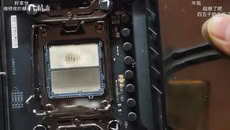
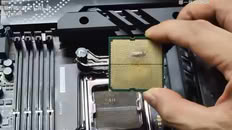
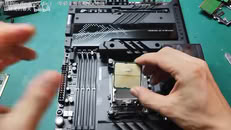
Another Ryzen 7 7800X3D has reportedly swollen and burned, while also damaging the ROG Crosshair X670E Hero motherboard in the process. UNIKO's Hardware flagged the case, citing a video posted to Bilibili as the original source. The video shows a Ryzen 7 7800X3D CPU with clear swelling on the underside where it made contact with the CPU socket. There is discoloration on both the CPU and the socket itself. Moreover, the socket pins are warped and damaged in the middle, presumably due to the pressure of the swelling. One peculiar finding is that one of the notches on the CPU socket looks slightly off. Perhaps more importantly, the board's BIOS version wasn't confirmed, which is directly relevant due to AMD's proposed fix.

This kind of failure first showed up in April 2023, when several 7800X3D and 7950X3D chips bulged and took their sockets with them on X670E boards. AMD pinned it on SoC voltage running too high and rolled out AGESA firmware that capped it at 1.30V across AM5 motherboards. This new case might be straightforward if the BIOS hadn't been updated at all. However, even after the BIOS fix, the reports never fully stopped. Just weeks ago, a 7800X3D reportedly burned out on an MSI PRO X870-P WIFI board running the latest BIOS, with EXPO enabled and nothing else touched. We have even seen reports of Ryzen 7 9800X3D CPUs burning in the exact same manner. If you're running a 7800X3D, it's probably worth checking that you're on the latest BIOS and keeping an eye on SoC voltage.
Source: UNIKO's Hardware on X
Add your own comment

160 Comments on AMD Ryzen 7 7800X3D Swells and Burns Again, This Time on an ASUS Crosshair X670E Hero

#26
freeagent
I am running 1.25v with LLC on auto, should be off, I see ~1.24vsoc. It wont run EXPO with 1.2v so not sure what to say.. it is running 2200FCLK at the moment.

I have zero trust in AMD right now.

If this CPU dies, I will never buy another AMD again. I said that before and I meant it too.. but had to give em a shot in 2020.

AM4 has been really solid for me, AM5 not so much.

Edit:

Its also been almost 2 weeks since I requested RMA on my 9900X, haven't heard anything yet. Kind of a waste of 600 bucks.
Posted on Reply
#28
droopyRO
OMDLocomotionMy bios is over 2 years old as I have severe anxiety I will not update it.
What, why ? Even if the power cuts off, your board has BIOS Flashback, you can update it that way even if it's corrupted.
Posted on Reply
#29
Dragam1337
freeagentI am running 1.25v with LLC on auto, should be off, I see ~1.24vsoc. It wont run EXPO with 1.2v so not sure what to say.. it is running 2200FCLK at the moment.

I have zero trust in AMD right now.

If this CPU dies, I will never buy another AMD again. I said that before and I meant it too.. but had to give em a shot in 2020.

AM4 has been really solid for me, AM5 not so much.

Edit:

Its also been almost 2 weeks since I requested RMA on my 9900X, haven't heard anything yet. Kind of a waste of 600 bucks.
Ofc it won't run lower with fclk at 2200... why are you even doing that ? Hardly changes anything on 7800x3d...
Posted on Reply
#30
OMDLocomotion
droopyROWhat, why ? Even if the power cuts off, your board has BIOS Flashback, you can update it that way even if it's corrupted.
It's a mental health thing. I overly panic at things a "normal" person would laugh at.
Posted on Reply
#31
freeagent
Dragam1337Ofc it won't run lower with fclk at 2200... why are you even doing that ? Hardly changes anything on 7800x3d...
I said it wouldn't run EXPO with 1.2v. That would be 2000fclk.
Posted on Reply
#32
Dragam1337
freeagentI said it wouldn't run EXPO with 1.2v. That would be 2000fclk.
Is that running 4 sticks as your specs say ?
Posted on Reply
#33
freeagent
Dragam1337Is that running 4 sticks as your specs say ?
Nope. But just to make sure I am not full of shit, I am back at EXPO with 2000FCLK and I am going to try it again. I haven't bothered since the last time I tried just after I installed it. I think I started at 1.15 and she was glitchy in UEFI.

OK, so 1.2v is good now.. :laugh:

I wonder if it can do 4 with 1.2 :laugh:
Posted on Reply
#34
rv8000
Dragam1337Ofc it won't run lower with fclk at 2200... why are you even doing that ? Hardly changes anything on 7800x3d...
Higher VSOC generally has negative impacts when pushing higher FCLK (generally lower is better/more stable). IMC/uclk/memory overclocking is what generally requires higher vsoc; 4 dimms is also much harder on the IMC.

There’s still performance to gain from memory/IF overclocking on X3D chips.
Posted on Reply
#35
freeagent
In Aida it lowers latency a cunny hair or two.
Posted on Reply
#36
AVATARAT
Dragam1337Ofc it won't run lower with fclk at 2200... why are you even doing that ? Hardly changes anything on 7800x3d...
I had 2 7000 and 2 9000 processors, only one of them couldn’t run at an FCLK of 2200, so I ran it at 2167, but it performed very well in memory overclocking. You just need to stabilize them to run at 2200—for me, the extra performance is always welcome.
Posted on Reply
#37
Darmok N Jalad
TheinsanegamerNWow what a defective socket! AMGreeD should be ashamed for pushing a faulty design like this! We need to return to AM4!
I don’t know about the socket, but I do wonder about the combo of motherboard bios settings and the X3D chips. I’ve been curious about owning an X3D, but I do worry a bit on it burning up because of the fragile nature of the chip in terms of voltage and motherboard manufacturers overdoing the voltage. In some ways it is quite similar to those power connectors. Standards are only as good as the designs that follow them.
Posted on Reply
#38
Dr. Dro
freeagentI am running 1.25v with LLC on auto, should be off, I see ~1.24vsoc. It wont run EXPO with 1.2v so not sure what to say.. it is running 2200FCLK at the moment.

I have zero trust in AMD right now.

If this CPU dies, I will never buy another AMD again. I said that before and I meant it too.. but had to give em a shot in 2020.

AM4 has been really solid for me, AM5 not so much.

Edit:

Its also been almost 2 weeks since I requested RMA on my 9900X, haven't heard anything yet. Kind of a waste of 600 bucks.
Damn, I expected AMD to have much better RMA service in Canada of all places.

Ryzen is alright, despite the fact AGESA is to be considered alpha for at least a year after launch - basically never buy their first CPU on a socket, and wait the second architectural family to mature at least a little before you buy one. By the time the third architecture comes out, you're pretty much guaranteed a smooth experience, unless something obscure comes up. I am having a positive experience with the 9850X3D thus far, peppered up CPU this one. Olympic Ridge is going to be nuts.

Radeon on the other hand is a lost cause, take it out back and put it out of its misery.
Posted on Reply
#39
Dragam1337
freeagentNope. But just to make sure I am not full of shit, I am back at EXPO with 2000FCLK and I am going to try it again. I haven't bothered since the last time I tried just after I installed it. I think I started at 1.15 and she was glitchy in UEFI.

OK, so 1.2v is good now.. :laugh:

I wonder if it can do 4 with 1.2 :laugh:
Surely you can do better than 1.2v with 2 sticks.

Posted on Reply
#40
Dr. Dro
Tek-CheckAmong dozens of millions of CPUs and motherboards sold, there will always be a few thousand with some defects or lower tolerance. Nothing unusual in this industry. The most important thing is to retain a healthy sense of proportion and distance from media preference towards negative stories.

It'd be super boring to report that more than 99.99% of CPUs work just fine. Who would ever want to read that...

Let's say ~20,000,000 CPUs are sold each quarter. If 2,000 fail, that's 0.0001% of products. The mega thread on reddit documented around 200 CPUs. Let's say in real life it's 10x more. Here is your 2,000 CPUs, in other words 0.0001%

However, there is more chance of my CPU dying than me colonising Mars with Elon's space ships 🤣
Unless it's Raptor Lake, then it's the end of the world, any and all CPUs are inherently defective and doomed to die!
Dragam1337Surely you can do better than 1.2v with 2 sticks.

How's your VDDGs? Seems similar to mine, but my garbage motherboard doesn't help :( Do you see anything that I can improve low effort?

Posted on Reply
#41
evernessince
Dragam13371.3v is still way too high - you won't ever need to run it that high with standard memory.

Mine has been running 1.09v for 3 years.


.......
User were reporting SOC voltage up to 1.42v on earlier ASUS revisions.

Certainly a potential failure mode.
LittleBroThis sort of damage is caused by wrong placement resulting in short circuit. This creates enormous heat and melts the package of CPU.

Previous records of damaged 7800X3D due to high VSoC voltage showed significantly lower level of damage, mainly few burnt pins and contacts.

If you take a look at source post on X, that socket looks odd.

Anyway, lot of important info is missing, like:
- was this first run or months or after CPU was installed?
- what version was BIOS?
Shouldn't be possible to place the CPU incorrectly in the socket as it's keyed. If there's some mode in which users are finding a way, and the system still boots and functions, that'd still be on AMD for allowing that failure mode.
OMDLocomotionMy bios is over 2 years old as I have severe anxiety I will not update it. I have an MSi X670E Tomahawk and the most trouble I've had was when I let someone else clean it and they messed up the repasting causing it to thermal throttle and shut down when trying to run malware bytes. Got it redone by the same guy and its been flawless ever since.

I run EXPO @1.1v soc and have never had any issue.
The last 2 times I've updated my BIOS I've had nothing but headaches getting my memory's EXPO profile to work. My advice is to not bother unless you are forced to.
Dragam1337The only time you should use auto voltage is if you are running your system bone stock. As soon as you enable expo, or do more advanced overclocking, you should manually set the voltage.
I wouldn't keep this as a hard rule. If the auto voltage is fine leave it alone. Most motherboards let you see the applied voltage so you are free to judge.
freeagentI said it wouldn't run EXPO with 1.2v. That would be 2000fclk.
Is this the lastest BIOS? I swear every BIOS version memory stability changes.
Posted on Reply
#42
Dragam1337
Dr. DroUnless it's Raptor Lake, then it's the end of the world, any and all CPUs are inherently defective and doomed to die!


How's your VDDGs? Seems similar to mine, but my garbage motherboard doesn't help :( Do you see anything that I can improve low effort?

I have vddg on default.

You already got trefi at 30k, which is the only completely safe optimization that actually improves performance. Everything else is alot of effort for very little gains, in my experience.

You could probably lower your mem vddq though - it usually doesn't need to be as high as mem vdd :)
evernessinceUser were reporting SOC voltage up to 1.42v on earlier ASUS revisions.

Certainly a potential failure mode.


Shouldn't be possible to place the CPU incorrectly in the socket as it's keyed. If there's some mode in which users are finding a way, and the system still boots and functions, that'd still be on AMD for allowing that failure mode.


The last 2 times I've updated my BIOS I've had nothing but headaches getting my memory's EXPO profile to work. My advice is to not bother unless you are forced to.


I wouldn't keep this as a hard rule. If the auto voltage is fine leave it alone. Most motherboards let you see the applied voltage so you are free to judge.


Is this the lastest BIOS? I swear every BIOS version memory stability changes.
When i say earlier revisions, i mean the ones just prior to 9000 series bios update - those will be 2 years old now. And yes, they have all the fixes.
Posted on Reply
#44
ISSEnterprise
If my remember correctly, current chip design tools only simulate chip in 2D. Burning and swelling problems would likely continue to happen on any 3D structure high performance chips like CPUs or GPUs, until a new engineering method to solve it.
Posted on Reply
#45
freeagent
evernessinceIs this the lastest BIOS? I swear every BIOS version memory stability changes.
No it was from a few revisions back. I kind of feel like a schmuck because this version is actually pretty decent.

Dragam1337Surely you can do better than 1.2v with 2 sticks.

I have it running at 1.2v with 4 sticks and tight timings, I will try a little lower..

Edit:

VDD and VDDQ are indeed 1.45v weird how it did that lol..
Posted on Reply
#46
csendesmark
Why TPU posting articles like this?
This is not a widespread thing...
Some OCer guy pushed his rig over the limit. Bad luck I guess, but still not news-worthy.
Posted on Reply
#47
Dr. Dro
csendesmarkWhy TPU posting articles like this?
This is not a widespread thing...
Some OCer guy pushed his rig over the limit. Bad luck I guess, but still not news-worthy.
Not even if the guy was pumping 2 volts on every pin here a CPU should puff up and belch like this, come on. It's a pretty well-known fault with these CPUs and several updates to AGESA have been issued in an attempt to mitigate it. They'll get it right sometime, for now, it's good to be mindful that it is very rare, but can happen.
Posted on Reply
#48
csendesmark
Dr. DroNot even if the guy was pumping 2 volts on every pin here a CPU should puff up and belch like this, come on. It's a pretty well-known fault with these CPUs and several updates to AGESA have been issued in an attempt to mitigate it. They'll get it right sometime, for now, it's good to be mindful that it is very rare, but can happen.
Maybe, but this is still rare, and AMD does give RMA it.
Posted on Reply
#49
kazuviking
ISSEnterpriseIf my remember correctly, current chip design tools only simulate chip in 2D.
Maybe there is a reason intel went with 2d cache for the new novalake and not on top of the silicon.
Posted on Reply
#50
john_
Tek-CheckHowever, there is more chance of my CPU dying than me colonising Mars with Elon's space ships 🤣
I forwarded this comment to Elon. He will contact you shortly. :p :p:p:p:p:p:p:p:laugh:
Posted on Reply
Add your own comment
Nov 20th, 2026 13:09 PST change timezone

New Forum Posts

Popular Reviews

TPU on YouTube

Controversial News Posts