Thursday, September 3rd 2026

AMD Ryzen 7 7800X3D Swells and Burns Again, This Time on an ASUS Crosshair X670E Hero

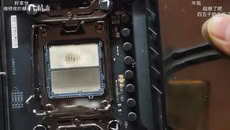
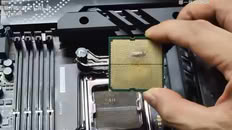
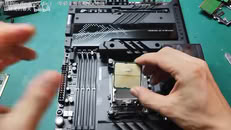
Another Ryzen 7 7800X3D has reportedly swollen and burned, while also damaging the ROG Crosshair X670E Hero motherboard in the process. UNIKO's Hardware flagged the case, citing a video posted to Bilibili as the original source. The video shows a Ryzen 7 7800X3D CPU with clear swelling on the underside where it made contact with the CPU socket. There is discoloration on both the CPU and the socket itself. Moreover, the socket pins are warped and damaged in the middle, presumably due to the pressure of the swelling. One peculiar finding is that one of the notches on the CPU socket looks slightly off. Perhaps more importantly, the board's BIOS version wasn't confirmed, which is directly relevant due to AMD's proposed fix.

This kind of failure first showed up in April 2023, when several 7800X3D and 7950X3D chips bulged and took their sockets with them on X670E boards. AMD pinned it on SoC voltage running too high and rolled out AGESA firmware that capped it at 1.30V across AM5 motherboards. This new case might be straightforward if the BIOS hadn't been updated at all. However, even after the BIOS fix, the reports never fully stopped. Just weeks ago, a 7800X3D reportedly burned out on an MSI PRO X870-P WIFI board running the latest BIOS, with EXPO enabled and nothing else touched. We have even seen reports of Ryzen 7 9800X3D CPUs burning in the exact same manner. If you're running a 7800X3D, it's probably worth checking that you're on the latest BIOS and keeping an eye on SoC voltage.
Source: UNIKO's Hardware on X
Add your own comment

160 Comments on AMD Ryzen 7 7800X3D Swells and Burns Again, This Time on an ASUS Crosshair X670E Hero

#151
freeagent
Dragam1337Cause you are using expo and auto voltages with a 1.45v kit, which is precisly what you shouldn't do, as has been repeated maaaany times at this point...

But dude do as you wanna, im sure your 7800x3d will last alot longer than your 9900x, lol.
Well, we were partially conversing while I was at work, might have forgotten some things. I have been working with you, so I am down to 1.25v right now. I tried lower but it wont run.

I have noticed your undertone during our conversation.

No need to be a dick about things.

All good man, keep up with your elitist attitude.

And thanks for the help.
Posted on Reply
#152
Dragam1337
freeagentWell, we were partially conversing while I was at work, might have forgotten some things. I have been working with you, so I am down to 1.25v right now. I tried lower but it wont run.

I have noticed your undertone during our conversation.

No need to be a dick about things.

All good man, keep up with your elitist attitude.

And thanks for the help.
Vddio at 1.25v ? That's much better. But no, you probably won't get it lower with cl26 at 6000 m/t.

I was being sarcastic, cause you implied that because you have been running these high voltages the entire time then you didn't see the need to change it - and it's no doubt what killed your 9900x.

You're welcome. If you want your memory to last longer (they after after all very expensive at this point), you can lower mem vddq, which supplies voltage to the controller on the ram sticks.
Posted on Reply
#153
freeagent
Dragam1337Vddio at 1.25v ? That's much better. But no, you probably won't get it lower with cl26 at 6000 m/t.

I was being sarcastic, cause you implied that because you have been running these high voltages the entire time then you didn't see the need to change it - and it's no doubt what killed your 9900x.

You're welcome. If you want your memory to last longer (they after after all very expensive at this point), you can lower mem vddq, which supplies voltage to the controller on the ram sticks.
I implied that because it was normal to me lol. I had no idea.

Dammit Asus. And that is what I get for being ignorant.

That is 1.25 with 4 sticks, so it might go lower with 2.

And thank you, I am pretty sure that is what killed my beloved.

Lessons learned.
Posted on Reply
#154
Dragam1337
freeagentI implied that because it was normal to me lol. I had no idea.

Dammit Asus. And that is what I get for being ignorant.

That is 1.25 with 4 sticks, so it might go lower with 2.

And thank you, I am pretty sure that is what killed my beloved.

Lessons learned.
Honestly it's on amd rather than the board partners - expo is defined by amd. And vddio voltage deffo should not by in sync with memory voltage - i haven't seen a cpu needing anywhere near as much vddio voltage as memory voltage for a given speed. So expo essentially just fries the memory controller for no reason, especially with 1.45v kits.

Yeah that's possible :)
Posted on Reply
#155
kazuviking
Dragam1337expo is defined by amd
Its not even that. Amd doesn't even know what EXPO profiles the oems are using as you can just slap the label on top. Atleast intel requires them to send the sticks to intel for XMP validation.
Posted on Reply
#156
evernessince
freeagentNo it was from a few revisions back. I kind of feel like a schmuck because this version is actually pretty decent.


I have it running at 1.2v with 4 sticks and tight timings, I will try a little lower..

Edit:

VDD and VDDQ are indeed 1.45v weird how it did that lol..
Pretty darn good for 4 sticks.
LittleBroWhat's supposed to be possible and impossible?

One of my university professors managed to put USB A flash drive to HDMI slot, which means it's physically possible if enough force is applied.

Look at the socket clamp of that dude who got their CPU fried due to short-circuit:


That right side looks bent upwards to me.
It's like the dumbass tried to push the lever at all costs to secure it, while the clamp bent upwards due to CPU being not properly seated.

I admit, though, AMD's socket mechanism is inferior to Intel's and always has been. There's like 0.2 mm space to shift CPU when inserted into socket.
Normally, this does not matter, as contacts on CPU are large enough to compensate this shifting. But still, I haven't experienced this on Intel sockets.

Btw, mine 9800X3D runs SoC Vcore at 1.225 mV on Auto, I reduced it to 1.175 mV on manual.
That is user error or a factory defect. This is not the kind of cases I was referring to that AMD should be responsible for.
Posted on Reply
#157
OMDLocomotion
Dragam1337Your call, but trefi is the only memory setting that actually gives a performance bump worth mentioning.

Vddp above 1.0v is unsafe though, and yours is at 1.05v.
I set the trefi to 30K and the vddp to 1.0v. Thank you for the advice.
Posted on Reply
#158
LittleBro
OMDLocomotionI set the trefi to 30K and the vddp to 1.0v. Thank you for the advice.
You can set tREFI to 50k and more, but it's not usable with high voltage, as tREFI is kind of sensitive to high temps.
Posted on Reply
#159
Dragam1337
LittleBroYou can set tREFI to 50k and more, but it's not usable with high voltage, as tREFI is kind of sensitive to high temps.
The performance from increasing trefi beyond 30k is diminishing returns. At 30k you get 80% of the performance of 65k, and without any risk, unlike the higher trefi values - which can lead to memory corruption etc.
Posted on Reply
#160
droopyRO
OMDLocomotionIt's a mental health thing. I overly panic at things a "normal" person would laugh at.
You can take it to a local repair shop and have them do it. It's a nothingburger ;)
Posted on Reply
Add your own comment
Nov 20th, 2026 13:09 PST change timezone

New Forum Posts

Popular Reviews

TPU on YouTube

Controversial News Posts