Thursday, September 3rd 2026

AMD Ryzen 7 7800X3D Swells and Burns Again, This Time on an ASUS Crosshair X670E Hero
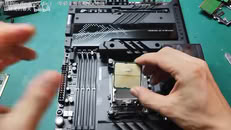
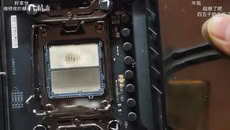
Another Ryzen 7 7800X3D has reportedly swollen and burned, while also damaging the ROG Crosshair X670E Hero motherboard in the process. UNIKO's Hardware flagged the case, citing a video posted to Bilibili as the original source. The video shows a Ryzen 7 7800X3D CPU with clear swelling on the underside where it made contact with the CPU socket. There is discoloration on both the CPU and the socket itself. Moreover, the socket pins are warped and damaged in the middle, presumably due to the pressure of the swelling. One peculiar finding is that one of the notches on the CPU socket looks slightly off. Perhaps more importantly, the board's BIOS version wasn't confirmed, which is directly relevant due to AMD's proposed fix.
This kind of failure first showed up in April 2023, when several 7800X3D and 7950X3D chips bulged and took their sockets with them on X670E boards. AMD pinned it on SoC voltage running too high and rolled out AGESA firmware that capped it at 1.30V across AM5 motherboards. This new case might be straightforward if the BIOS hadn't been updated at all. However, even after the BIOS fix, the reports never fully stopped. Just weeks ago, a 7800X3D reportedly burned out on an MSI PRO X870-P WIFI board running the latest BIOS, with EXPO enabled and nothing else touched. We have even seen reports of Ryzen 7 9800X3D CPUs burning in the exact same manner. If you're running a 7800X3D, it's probably worth checking that you're on the latest BIOS and keeping an eye on SoC voltage.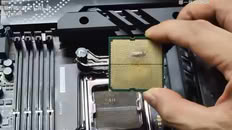
Source:
UNIKO's Hardware on X
This kind of failure first showed up in April 2023, when several 7800X3D and 7950X3D chips bulged and took their sockets with them on X670E boards. AMD pinned it on SoC voltage running too high and rolled out AGESA firmware that capped it at 1.30V across AM5 motherboards. This new case might be straightforward if the BIOS hadn't been updated at all. However, even after the BIOS fix, the reports never fully stopped. Just weeks ago, a 7800X3D reportedly burned out on an MSI PRO X870-P WIFI board running the latest BIOS, with EXPO enabled and nothing else touched. We have even seen reports of Ryzen 7 9800X3D CPUs burning in the exact same manner. If you're running a 7800X3D, it's probably worth checking that you're on the latest BIOS and keeping an eye on SoC voltage.


160 Comments on AMD Ryzen 7 7800X3D Swells and Burns Again, This Time on an ASUS Crosshair X670E Hero
I am saying that the degradation purely depends on the voltage - clocks have nothing to do with it. That higher clocks need more voltage is besides the point.
But since nobody runs high voltages without high memory clocks, I'd be interested at what voltage (and corresponding memory clock) range degradation really becomes an issue.
I actually bought myself one of those tiny Noctua fans recently to blow air across mine (still run toasty)
One of my university professors managed to put USB A flash drive to HDMI slot, which means it's physically possible if enough force is applied.
Look at the socket clamp of that dude who got their CPU fried due to short-circuit:
That right side looks bent upwards to me.
It's like the dumbass tried to push the lever at all costs to secure it, while the clamp bent upwards due to CPU being not properly seated.
I admit, though, AMD's socket mechanism is inferior to Intel's and always has been. There's like 0.2 mm space to shift CPU when inserted into socket.
Normally, this does not matter, as contacts on CPU are large enough to compensate this shifting. But still, I haven't experienced this on Intel sockets.
Btw, mine 9800X3D runs SoC Vcore at 1.225 mV on Auto, I reduced it to 1.175 mV on manual.
Stock vddio is 1.1v and there is no way you will be able to run 6000 m/t at less than stock voltage.
That's nearly 1.5 freaking volts ! MC is vddio fyi.
Since I first stepped foot into AM5..
I thought you were talking about VDDG IOD lol
But dude do as you wanna, im sure your 7800x3d will last alot longer than your 9900x, lol.