Thursday, September 3rd 2026

AMD Ryzen 7 7800X3D Swells and Burns Again, This Time on an ASUS Crosshair X670E Hero
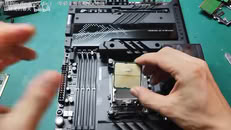
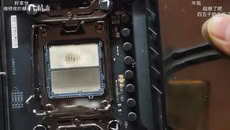
Another Ryzen 7 7800X3D has reportedly swollen and burned, while also damaging the ROG Crosshair X670E Hero motherboard in the process. UNIKO's Hardware flagged the case, citing a video posted to Bilibili as the original source. The video shows a Ryzen 7 7800X3D CPU with clear swelling on the underside where it made contact with the CPU socket. There is discoloration on both the CPU and the socket itself. Moreover, the socket pins are warped and damaged in the middle, presumably due to the pressure of the swelling. One peculiar finding is that one of the notches on the CPU socket looks slightly off. Perhaps more importantly, the board's BIOS version wasn't confirmed, which is directly relevant due to AMD's proposed fix.
This kind of failure first showed up in April 2023, when several 7800X3D and 7950X3D chips bulged and took their sockets with them on X670E boards. AMD pinned it on SoC voltage running too high and rolled out AGESA firmware that capped it at 1.30V across AM5 motherboards. This new case might be straightforward if the BIOS hadn't been updated at all. However, even after the BIOS fix, the reports never fully stopped. Just weeks ago, a 7800X3D reportedly burned out on an MSI PRO X870-P WIFI board running the latest BIOS, with EXPO enabled and nothing else touched. We have even seen reports of Ryzen 7 9800X3D CPUs burning in the exact same manner. If you're running a 7800X3D, it's probably worth checking that you're on the latest BIOS and keeping an eye on SoC voltage.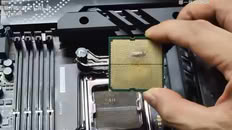
Source:
UNIKO's Hardware on X
This kind of failure first showed up in April 2023, when several 7800X3D and 7950X3D chips bulged and took their sockets with them on X670E boards. AMD pinned it on SoC voltage running too high and rolled out AGESA firmware that capped it at 1.30V across AM5 motherboards. This new case might be straightforward if the BIOS hadn't been updated at all. However, even after the BIOS fix, the reports never fully stopped. Just weeks ago, a 7800X3D reportedly burned out on an MSI PRO X870-P WIFI board running the latest BIOS, with EXPO enabled and nothing else touched. We have even seen reports of Ryzen 7 9800X3D CPUs burning in the exact same manner. If you're running a 7800X3D, it's probably worth checking that you're on the latest BIOS and keeping an eye on SoC voltage.


160 Comments on AMD Ryzen 7 7800X3D Swells and Burns Again, This Time on an ASUS Crosshair X670E Hero
Your vddp is critically high btw - it should not be higher than 1.00v
I run nearly stock vsoc voltage, only 40mv over stock. But vddio needs to be increased a fair bit
I have VSOC at 1.15v right now with 4 sticks, I will hit the go button and see what it does while I am in the shower.
Pretty sure I ran CLDO at 1.15 on AM4 too.. I would have to check one of the machines.
That you haven't fixed your voltages with your 9900x doesn't mean that you shouldn't with your 7800x3d ;)
Most people on AMD CPU will keep their RAM at 1.35V 6000 CL30, and generally it won't go higher than that in 1/1 ratio. People running their AMD CPU in 1/2 ratio can run at 8000 but that's pretty much the only solution to reach such frequencies.
I just had a look, my system defaults to 1.2 VSOC, 1.4 V RAM, VDDQ and VDDIO, 1.85 VPP, and 1.8 V CPU 1C2 or something. I don't know what half of these mean, but I guess they're... fine?
Edit: Since these are all written in the EXPO profile, but affect the CPU, maybe that's the reason for these X3Ds blowing up? Maybe the user is trying to run too high EXPO with them?
You won the imc lottery, I cannot run 2000/6000 with less than 1.15v or I get freezing in UEFI.
But at the same time my timings are much tighter, so maybe that has something to do with it.
I will revisit at a different time.
But my -40 is 100% stable, so not a total loss.
The important voltages to check there in our case are CPU Core and/or SoC Voltage/SA Voltage, CPU VR Voltage Limit and CPU/MEM VDDQ/VDDIO.
I don't know how it works exactly on AMD, but Intel allows you to set CPU VDDQ/VDD2 independently of DRAM VDDQ/VDD2/VDDIO and you want it to be equal or lower on the CPU side than it is on the RAM side. If you can run your RAM sticks at 1.35V, you should try running your CPU VDDQ/VDDIO below that point.
SoC/SA Voltage below 1.2V is good on both Intel and AMD (that's how Intel idle below 10-15W on a web browser playing multiple YT videos and running 50+ active tabs with Memory savings disabled).
VR Voltage Limit (or whatever name it might be on AMD platforms) is the voltage supplied to the whole CPU and you want it at 1.400 or below on 14th gen Intel, though with latest BIOS I think 1.450 is negociable with good cooling solutions (my 14700KF is at 1.375-1.380).
Stock vsoc is 1.05, stock vddio is 1.1.
And yes, people running kits that requests 1.45v with their expo profile is an issue.Your timings do indeed put additional pressure on the memory controller, for very little additional performance with the 3d chips.
As for your very high voltages, it's usually only mem vdd, which supplies the voltage to the ram chips, that needs to be high. Mem vddq, which supplies the ram controller, can usually be lowered quite a bit. Vddio, which supplies the cpu's memory controller, can be lowered quite a bit aswell. Like im running vddq and vddio at 1.25.
Are you using 2 or 4 sticks ? Using 4 requires alot more voltage for vsoc and vddio.
But your vddp straight up shouldn't be above 1.1 - you are running it in "blow my chip up" territory. Ideally you have it below 1.0v - like im running mine at 0.95v.Intel and amd are very different when it comes to voltages, especially the 3d chips - much tighter tolerances.
No wonder AMD states 5200 with 7000 and 5600 MHz with 9000 series Ryzen as the max officially supported RAM speed.It would be interesting to know if that's what blew up that 7800X3D in the article.
You can use 6000 mem speeds, but imo you should never just use auto voltage - it is nearly always way too high.
1.2 VSOC is pretty much the norm with 6000 mem speed, anything below 1.15 leads to freezes and crashes, just like on freeagent's system. VDDIO and VDDQ are in sync with RAM voltage, right?
A properly configured system can do 1.1v vsoc with 6000 mem.
Vddio and vddq are in sync with mem vdd if you use expo auto voltage - which you shouldn't. They can be lowered alot from what expo auto voltage sets them to, as you can see on the screenshot i posted.
If it's too high, then what? I don't think that the vast majority of AM5 owners do anything other than set SOC to 1.2 V and call it a day. Are we all in danger of exploding CPUs now?
You keep telling us that the house is on fire, but we don't know how to put it out, and I don't see any smoke anyway.
I really wonder why ti is always teh high end part and not low end trash, like the cheapest cpu i could buy in may 2023, a ryzen 7600x?
It smells like Overclock Error to myself still after those multiple events. For some reason, this topic i did not saw last week.
for sure you can go to intel, why not. Still this error mode is 100% more to my liking as oxidation in the silicion itself. this is a heat issue afaik caused by Overclock or other means of heat source. Or chemicals.
time to check what these times the claims are, most likely another reddit source post.
First guess verified, Overclocker board, heavily overpriced ASUS overclocker motherboard. Most user buy a hero board for what, abusing hardware -> " ROG Crosshair X670E Hero motherboard "** am5 users keep an eye on reasonable values in uefi for everything. not only soc voltage!
Blaming it only on SOC Voltage with ignoring all the other OVerclock options is far too simple
Ryzen Master on windows 10 pro and 11 pro did ignore my uefi values and overwrote those. not a single word about ryzen master in the post! or other software which does the same.
--
I was testing my Arctic 420 aio and was checking if pwm values are respected. i set pump to 0% pwm and the ryzen 7700x was for quite while on 100°C. My fault a few days ago, after a while the uefi went laggy, but no harm can be identified. Whaboutism ^2 = am5 is not that fragile, and the ryzen 7700x still continue to operate in uefi when i set back a small value for pwm.
I did run, i did not consider, that the cpu will hit so fast 100°C. I saw it in the left corner of the msi uefi and than changed the value without haste. Your cpu is not instantly dead, at least a ryzen 7700x with a msi x670e gaming plus wifi with an arctic liquid freezer III Pro 420 aio with black, no rgb p14 pro fans.
Basic ryzen 7000 silicion is not bad, and am5 is not that fragile. What asus and gigabyte do with the x3d chips is on another page, for 5000 & 7000 and 9000 x3d chips. Msi had very low reports of destroyed x3d cpus as far as i know.You should use zentimings for windows or other means, screenshot in uefi, write down the values
and do everything. not only the voltages.
or keep it at 4800 mt/s default for am5.
MSI and ASUS x670 / x670E tend to set far too much voltages and far too high values. msi had that issue on various board also on am4.
Look for the sane users who share their zentimings screenshot and than apply only 60% below as a safe value. 60% in teh safe direction for each field. Than stable test. And before you start, stable test at 4800 mt/s for at least two weeks.Are you really sure? how comes my msi x670e gaming plus wifi and the asus prime x670-p motherboard told me on every uefi flash not to cut power?
when you cut power during the flash the board may not recover from it. than you need a dedicated programmer.
I assume MSI and I are wronng, or you are wrong. Because something does not add up.
-- edit some boards are trash and some boards clock better with the same cpu, dram, gpu, storage, operatig systems(s - more than one)
-- edit silicion matters. my ryzen 7600x from may 2023 has much better silicion than the december 2025 ryzen 7700x.
editWe had dead ryzen 5800x3d. I remember those quite well. Root cause in my biased - very biased - point of view - overclocking newbie.
I do not set more than 1.35V DC, i try to keep 1.30V DC for the DRAM, I am well aware of hynix a die was sold later with 1.45V DC default voltages. my ryzen 7700x is trash silicion and wants more voltage for less performance
CL26 6000mt/s is also very high end overclocking with 1.45V DC on the dram - i would not recommend it for the average user.
I am sure when ryzen master would not work anymore in microsoft windows, auto mode would be disabled in uefi with those auto overclocking nonsense in uefi, I most likelywould see less dead hardware posts. people would need to type every value by hand and read guides than. One button overclock, those overclocking window scripts do invite some users to abuse their hardware without checking waht is set in uefi, waht values are used during windows.I got the impression form guides
TRC = TRAS + TRP
146 = 96 + 36
I see what you did here -> increase if unstable (CL 26)
www.overclock.net/attachments/ram-timings-pdf.2688509/
It seems i learnt something, Increase if unstableCheck what your uefi changes when you actiavte EXPO. I refer to the uefi, what msi changes to red
AFAIK VSOC + VDDQ/VDDIO are set too high automatically when i activated 6000 mt/s on am5.
i believe vddio can a bit lower as vddq, e.g. 0.05V DC lower. sometimes 0.1V DC.
-- the 1.8V i tried lowering it, bad idea.
At some point load line calibration also matters + i bump up the default frequencies of the onboard voltage converters, not the highest but around 800 khz (i think it was khz, whatever check your board you will see the values anyway) , i also disable spread spectrum
too high negative curve optimiser may point to bad base values. i have to test that later this year. i am not willing ot heat my room when it is not winter. In winter it does not matter when i heat my room when i test values and their impacts.4800 mt/s are teh base values
i peronally draw the line with 1.30V DC or 1.35V DC for VDDQ/VDDIO
i do not care that others run 1.45V DC or that hynix a die kits are sold with those values.
my claim, normal 1.35V DC VDDQ/VDDIO + around 1.10 V DC for vsoc
Note: I restrict my claim for ryzen 7600x / 7700x and hynix a die dram. (the type of dram which is soldered on your dram, not the dram brand or dram module name etc)
Note: Curse myself for stating values which I should never do in an overclocking topic.