Tuesday, September 8th 2026

Redditor's AMD Ryzen 9 9950X3D Reportedly Dies Shortly After Changing Motherboards
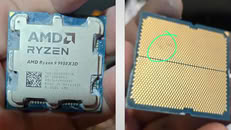
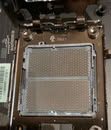
A Ryzen 9 9950X3D has reportedly died just an hour after being moved into an ASUS ROG Crosshair X670E Hero motherboard. According to Reddit user SpecialistConcept423, posting in r/GamersNexus, the chip had been running fine for about a year and a half in an ASRock X670E Taichi Carrara before the swap. After switching to the new board, no manual overclocking or voltage tweaks were applied; only one of the board's built-in memory presets was enabled for a set of SK hynix 6200 MHz modules. After saving that setting and rebooting, the board threw a "00" Q-Code and refused to post. Pulling the CPU and inspecting it revealed two brown marks on its contacts, which all but confirmed the catastrophic failure.
Things got stranger when the user resorted to an older Ryzen 5 8500G that had previously worked fine on the same board. That chip apparently now throws a "4D" code too, pointing at the motherboard itself as the culprit, not just the CPU. There's no confirmation yet on whether a faulty BIOS, a bad batch of boards, or something else is to blame, and ASUS hasn't commented on this specific case. It is worth noting that the ASUS board was not new, and it had undergone USB-related repairs and a BIOS rewrite. The user has since contacted AMD in Brazil for an RMA, but has shared no updates yet.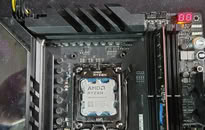
 Interestingly, this isn't the first CPU failure tied to this exact board either. We covered a Ryzen 7 7800X3D that swelled and burned on the same ROG Crosshair X670E Hero model just days ago, and last year ASRock also admitted that overly aggressive PBO current limits fried a wave of Ryzen 9000 chips on its own boards. It's too early to say if these share a root cause, but there is certainly a pattern here. In this particular case, the X670E Hero claimed not one but two CPUs, and it only needed a single setting change to do so.
Source:
Reddit
Things got stranger when the user resorted to an older Ryzen 5 8500G that had previously worked fine on the same board. That chip apparently now throws a "4D" code too, pointing at the motherboard itself as the culprit, not just the CPU. There's no confirmation yet on whether a faulty BIOS, a bad batch of boards, or something else is to blame, and ASUS hasn't commented on this specific case. It is worth noting that the ASUS board was not new, and it had undergone USB-related repairs and a BIOS rewrite. The user has since contacted AMD in Brazil for an RMA, but has shared no updates yet.


207 Comments on Redditor's AMD Ryzen 9 9950X3D Reportedly Dies Shortly After Changing Motherboards
- Overclocker, very expensive motherboard -> ASUS Hero - 800€ or more expensive motherboard
- SK Hynix 6200 MHz modules -> Overclocker
- ** beginner ** user error - using a predefined uefi memory profile without checking online for safe values, adapting those, and without stating which values were set for the hole cpu (only 30 values as can be seen by the windows software called zentimings - as can be seen in DRAM and cpu sections of ASUS and MSI motherboards) -> board's built-in memory presets
- I used over 2 years a asus prime x670-p motherboard, loading xmp for 6000 mt/s put all values far too high in the red for the ryzen 7600x. That is a fact
- When Something is highlited red- it means problematic - danger, as can be seen and known from traffic light - traffic signs etc.
- Several asus products gave me a headache recently. Quality and firmware is not the best for asus.
- User set values, values went red and than complains. Why should it be different on an asus hero when the asus prime x670 and msi x670e behaves the same for my samples of hynix-a die and rzyne 7600x and ryzen 7700x?
- The user has no money for an aftermarket socket in the range of 6€ or noctua or other brand 20 or 25€ injection molding plastic to keep thermal paste away from the cpu pcb. Could be also electrive conductive thermal paste which got on the cpu die.
- edit: It is worth noting that the ASUS board was not new, and it had undergone USB-related repairs and a BIOS rewrite.
- When you read most motherboards review there is a block diagramm. Is it an usb header directly wired to the cpu? If so than it matters. If not it does not. when the usb is wired to the chipset it should not matter. But!! Bad solder job? PCB Scratched? traces shortened? Was that board ever in a working condition after the repair? Any powerlines shorted with datalines which caused overvoltages? Which area was repaired? Why is usb broken in the first place?
- When you repair USB you do not have to flash the firmware after a repair! Was the novuton chip botched - fucked up? Was the eeprom for the novuton chip fucked up? if so it points more to overvoltage on the board which ruined the board before the "poster claimed only" usb related reapirs.
- Why the firmware flash needed after usb repair? It is not the eeprom related! it is not novouton related! The board can run without a few defective usb. Something does not add up, with the need for a flash
- 'Who gurantees the flash was correctly done? the contents of the eeproms were correct? does asus even publically give away those flash images? Was it done correctly or by someone who hardly does firmware flashes with a hardware programmer? Was the board ever working correctly for at least two weeks with a processor before teh user ruined the x3d chip?
- hmm why does a user have ryzen 8500 lying around?
- Overclocking board, most expensivest cpu and than an overclocking apu. The ryzen 8500 cpu, an apu, points that the user is doing memory overclocking runs, ryzen 8500 clock much higher the dram as any ryzen 7000 or ryzen 9000 silicion.
Did a toddler play with clay? (Clay = thermal paste)Why is there red chewing gum in the corner of the cpu socket?
Far too much thermal paste used which was put below on the pcb.
Invest in aftermarket socket in aluminum or injection molding material so you prevent that. 100% is never the case but you will have less issues. the cpu will be also properly mounted and can not tilt, which some newbies do. the stock socket is not the best idea. the pop marks again, point to a possible not correctly inserted cpu in the socket, the same area as always is defective on this chip. Why is not a corner? why is it always this area of am5 socket? why is it always a newbie on a overclcoker board which sets profile, saves and reboots?
Asus is known for setting too high uefi values for stuff, since the ryzen 5800x3d. (edit - forgot x3d)
That is how it looked like below the cpu tower cooler, before cleaning form ~12/2025 to ~08/2026 with the be quiet thermal paste.
edit, checked a bit the text, maybe made a few passages friendlier, e.g beginner and not the other word
Sorry for the gross pictures from the IHS, there's a lot of paste because I switched from TT aio to another aio and the mess happened but this was 3 weeks before the incident, obviously I cleaned my hands to swap the boards but those pics are after the CPU fried and I got the pic to save the batch and serial of the CPU soon I removed from socket
The paste I used was NT-H2 from noctua, not conductive
As far as I know you need to flip the cpu pinout. 90% sure about that. The dead area seems DRAM related.
I need physically OGP + board + cpu + dram + psu+ hardware tools to readout eeprom.
I only researched my motherboard and where the sensors line go. AFAIK - disclaimer no access to the faulty hardware, it is related to the power and it is not related to the DRAM io lines.
It may be plausible too much power set for the DRAM. It may be plausible cpu was not proper in the socket and GND shorted the power lines in that area. Possible error modes. note: ishikawa you list all possiblke errors, make the fish, than start to determine which error mode is more likely.Setting 6200 mt/s is overclocking. These are not the default values
-- It does not matter anyway. We see a single post. I hardly saw any follow up information or conclusion.
4800mt/s for the dram. you will see how low some values are. than compare it with 5200mt/s - the ryzen 7000 series specification or the 5600mt/s - the ryzen 9000 specification for dram.
You can overclock / set values later anyway. Checking for at least two weeks tells me if the hardware does not show obvious faults. Two weeks are here the return period for most online purchases
-- the common factor are ASUS hero motherboards and very expensive x3d chips.
-- VSS is a ground pin -> yes VSS are GND pins
-- OC hardly matters but the voltages do. When you can oc your board with the default values for 4800mt/s or 5200mt/s. The board puts sevearl values in red, you shoudl at least see red and white. RED = problematic.
-- Is it a AMD problem. Yes. But IT is also a X3d issue. Just becuase some values are safer on non X3D or intel chips do not imply they are safe on amd x3d chips. That stuff was common known since the ryzen 5800x3d ones. Is AMD to blame? no. ASUS makes the board, ASUS sets the default values. Asus could leave the fields empty.
When asus does not leave a field empty and sets values, than it is asus fault. asus could set the field at the lowest range for the field and than the board most likely will not post (power on selft test)
I will not accept such a cheap Excuse to blame AMD. ASUS board and Asus firmware values.
EXPO does not contain all fields. The board or someone else set all the other fields which are cpu related, etc.
ASUS is at fault to have such predefined settings.
set .g. safe 1.1V DRAM voltage and the user has to bump it up to the red at 1.25V DC or higher. Than it would be automatically the user fault.
Both my asus and msi boards show me a summary table when saving and exiting. Are you sure. Are you really sure that you want to reboot? I do not care - accepting means - it is Asus fault, right?
-- Load defallt values, i am on an older uefi version
When you see a red value you should start to think before you safe and reboot!
I am well aware of, some people here run 1.65V DC or 1.50V DC for the DRAM. That is not the scope. The scope is, fields are red after setting a MSI recommendation.
My dim run safe with other uefi version wiht 1.30V DC for that setting. SOC Value far too high.
-- random screenshot on my disc. Do not ask me - I have no idea as of now. I have to start from scratch anyway because I changed the cooler. Do not use any red values. If you do, you know what you are doing. And negative not positive. reduce it if possible. (edit I hardly use any red values, yet, and that is since may 2023 when i switched to am5. - now even more, as my dram kit 2x32gib is around 1200€ worth quite often, when cheap 800€)
When you look in detail, different date, different cpu, two DRAM sticks, i removed one DRAM stick recently.
When you are new to the field or you do not want to bother, buy DRAM sticks with the official specifications. 5200 mt/s for the ryzen 7600x as an example.
ryzen x3d chip have a big cache, dram matter not so much in most cases. Of course a few percent can be gained with overclocking.
When you safe values and reboot, you know what you are doing, hopefully.
-- When you have such asus x670E whatever hero motherboard and hynix a die, you may share how many fields are red. and waht the default values are, you do not need to safe the values! Just make screenshots with the build in feature in your uefi. I really want to see what is marked red and what not with the claimed uefi version. Or share the windows zentimings screenshot of tha tmotherboard with that uefi version and that cpu and dram combination.
boht msi and asus, the fields turn red when you increase the fields. that should be enough information to think before saving.
-- edit. i am very sad about the hardware :(
I am sure someone will show up and explain 6200Mt/s are kinda safe, etc.
The same people that in the nvidia thread keep insisting that it's not user error are adamant about this being user error. Makes you wonder why that is. It's a mystery. Nobody will figure it out.
Just out of curiosity, do you use motherboard predefined RAM overclocking profiles? Why not?If that's a jab at me, then you should note that I never pointed at user error in any blown up X3D CPU thread until there was an indication of possible user error (that is, now).
Can we please stop making things personal?
Those try it profiles have been around for decades btw. CPUs weren't melting. Degrading - yes, that's normal. Burning and killing their mobos, no, that's not normal.
Also, have you heard about 7800X3Ds burning in mainly ASRock motherboards due to high SoC voltage, that AMD issued a limit for in an AGESA update? I'm sure you have.Then you were lucky or had a good chip. X3D has a notoriously low tolerance towards overclocking.I don't mean memory voltage directly. There's many things memory overclocking affects on an AM5 CPU. The IF and MC clocks, SoC voltage, VDDQ/VDDIO, etc.
Electromigration can cause a short in extreme cases, which does melt the freaking chip and mobo. I agree that the built in temp protection should kick in, but it apparently doesn't. Maybe there's no sensor where the burn happens? Or maybe OTP is faulty in some CPUs? Who knows.
I was just lazy enough to no try manual setup, I just thinking: if there's already a preset for my memory, let me try, so the incident happened
Maybe if I tried manual with 1.15vsoc led the same result or not, I don't know
My sticks isn't on qvl so I knew they aren't working xmp profiles so I never used it
Those pics are weeks before the swap and why the CPU had many thermalpaste (the dead pump from TT) 😅
I'm saying this SHOULDN'T happen and you are saying "well it happens, so it should". Just because it happens doesn't mean it should, that's why it's an issue, cause it shouldn't be happening.
Watched the first 5 minutes of that video and he says exactly that, that the protections didn't work resulting in the chip frying itself. Which is exactly my point, excessive voltage would not lead to burning cause the CPU has protections to prevent that.
AMD accepted the RMA, I lost the money of both boards and I already accepted this fate
If Asus or ASRock or any YouTube channel want to get both boards to analyze feel free to ask, I bought a Intel kit, I'm not core ultra fan (I came from 14700k before the Am5) but I'll give Intel a chance
All I said was that a CPU can indeed
meltburn due to electromigration which you seemed to deny.I do agree, however, that protections should kick in. God knows why they don't. That deserves an entire separate investigation altogether.
Edit: Apologies, my wording isn't great, either. CPUs don't melt. They burn. Just to be on the same page. :)
skatterbencher.com/2025/03/11/skatterbencher-85-ryzen-9-9950x3d-overclocked-to-5900-mhz/
This is a Hynix memory preset on my system
*That thermal paste application is also going to give me nightmares...*
Edit: You phrased your question wrong. Burning and melting are not the same thing. GN burned their CPU at around 200 degrees, which is way below the melting point of silicon (as indicated in the answer AI gave you).
just power down, let everything discharge for 5 minutes and try powering up again. if it still fails, then do the cmos clear button thing.
- no that is just dirt or thermal interface material.
- again no, that just dust and dirt.
- indeed. The CPU and motherboard are manky. I personally would have cleaned both, before before posting photos online.
- <sigh> seriously? That TIM is the regular blue/gray type that is NOT electrically conductive.
The only thing you can say about this user is that they don't clean thier CPU and motherboard (and didn't think the internet wouldn't comment on it). So if I may suggest, please use your eyes and come critical thinking before coming out with wildly inaccurate and unproductive comments..