Tuesday, September 8th 2026

Redditor's AMD Ryzen 9 9950X3D Reportedly Dies Shortly After Changing Motherboards
A Ryzen 9 9950X3D has reportedly died just an hour after being moved into an ASUS ROG Crosshair X670E Hero motherboard. According to Reddit user SpecialistConcept423, posting in r/GamersNexus, the chip had been running fine for about a year and a half in an ASRock X670E Taichi Carrara before the swap. After switching to the new board, no manual overclocking or voltage tweaks were applied; only one of the board's built-in memory presets was enabled for a set of SK hynix 6200 MHz modules. After saving that setting and rebooting, the board threw a "00" Q-Code and refused to post. Pulling the CPU and inspecting it revealed two brown marks on its contacts, which all but confirmed the catastrophic failure.
Things got stranger when the user resorted to an older Ryzen 5 8500G that had previously worked fine on the same board. That chip apparently now throws a "4D" code too, pointing at the motherboard itself as the culprit, not just the CPU. There's no confirmation yet on whether a faulty BIOS, a bad batch of boards, or something else is to blame, and ASUS hasn't commented on this specific case. It is worth noting that the ASUS board was not new, and it had undergone USB-related repairs and a BIOS rewrite. The user has since contacted AMD in Brazil for an RMA, but has shared no updates yet.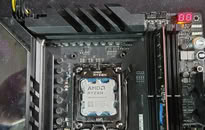
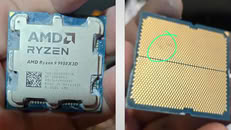
 Interestingly, this isn't the first CPU failure tied to this exact board either. We covered a Ryzen 7 7800X3D that swelled and burned on the same ROG Crosshair X670E Hero model just days ago, and last year ASRock also admitted that overly aggressive PBO current limits fried a wave of Ryzen 9000 chips on its own boards. It's too early to say if these share a root cause, but there is certainly a pattern here. In this particular case, the X670E Hero claimed not one but two CPUs, and it only needed a single setting change to do so.
Source:
Reddit
Things got stranger when the user resorted to an older Ryzen 5 8500G that had previously worked fine on the same board. That chip apparently now throws a "4D" code too, pointing at the motherboard itself as the culprit, not just the CPU. There's no confirmation yet on whether a faulty BIOS, a bad batch of boards, or something else is to blame, and ASUS hasn't commented on this specific case. It is worth noting that the ASUS board was not new, and it had undergone USB-related repairs and a BIOS rewrite. The user has since contacted AMD in Brazil for an RMA, but has shared no updates yet.


207 Comments on Redditor's AMD Ryzen 9 9950X3D Reportedly Dies Shortly After Changing Motherboards
1. Motherboard RAM profiles set idiotic values that are dangerous to your CPU.
2. CPU safeties don't kick in before catastrophic failure for some reason. Sensor placement problem? Manufacturing defect? Or does the motherboard disable them with the OC settings? This is the million dollar question.
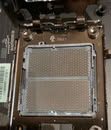
These pictures need to be considered together, see the corner triangle and notch placement.
The two notches, north - south, which are offset relative to the middle of the socket, horizontally the portion toward the rear I/O is shorter than the portion toward the DIMMs.
Therefore the three scorched pins on the back of the CPU are closer to the DIMMs.From what I can understand that pinout picture refers to the socket not the back of the CPU like this picture:
See the corner triangle and notch placement and compare with OP's CPU bottom view picture.
Therefore your interpretation of P12, P13 and T9 is incorrect as those pins would be closer to the rear I/O and not the DIMMs.
Thus on that socket pinout picture the three pins are actually:
P28 - VDDIO_MEM_S3
P29 - Test41
T32 - VSS
Anyway, two things are interesting:
- 2 CPUs died recently on the same board
- this particular ASUS board has experienced some serious repairs
Still, more info would be useful.
I suspect ASUS from releasing a piece of shit BIOS for this board. If you take a look at ASUS' support page,
you'll see this board gets BIOS update like every damn week. Every week there's a fix for some issue.
What the hell? No testiong prior to releasing new BIOS?
And F Steve Burke for challenging me on that commonsensical reality!
It's of course the image we're not seeing that proves this!
:D Sorry guys, I couldn't help myself...
And that was actually an excellent critique @_roman_ !
No one can say for sure but the user admitted to: sticks not being on qvl, being lazy, and using a memory profile not made for their kit as well as it likely being designed for a higher quality hynix kit. 1.55vdd/q is A LOT, and with no additional cooling, is asking for problems. I wouldn’t be surprised if that same profile had 1:1:1 settings for vddio/vdd/vddq.
The damage could have certainly been pre-existing, but the user seems to have no idea what they were doing with specific memory and bios settings.
USB dropouts and other onboard failures are general signs of instability, many times related to vsoc/fclk. Again it could have been a bad CPU, but the users recollection and explanations aren’t painting a good picture.
My memory voltage point (DIMMs themselves) is 1.4 because it's air cooled. If just this was enough to damage a processor to the point of swelling AMD would not issue EXPO certifications for any kit in this frequency range.Please read the post, and no, 00 means "no CPU detected", not a simple overclocking failure. You should never see a code 00, it's the worst kind of bad news.
The CMOS clear is the first thing anyone does when a computer doesn't POST after setting, there is clear hardware damage involved.The X670 and X870 are physically the same chip, those with an E designation contain two chips. Technically doesn't matter, it's downstream I/O - since Ryzen is a system-on-a-chip it can operate without a chipset.
Would you be surprised they do the same to get that extra 200MHz the user reports? I would not.
My condolences on your timeframe. Chaotic neutral: If you want to speed it up, just tell them you are a mod here, lol.
A motherboard maker being irresponsible with their buli-in profiles is not surprising, imo.
The pre built setup of rog extreme tweaker are based on RAM IC, my ICS are Hynix A-Die as you can see in this picture (I took this picture in march 2025, few months before the 9950x3d arrival)
I admit I was lazy to use the rog preset but this doesn't mean I wanst unaware the situation about the CPU/motherboard, that's why I tested both boards for 2 months and I knew my CPU could be damaged or the Asus could kill the chip, that's why I always stated the CPU died after the swap and the ASRock board shows no signs of life anymore, this board only had 2 CPU in that socket, a 9950x who died in 5 months after purchase with PCIE erros and tons of corrupted files and buggy temp reading and the 9950x3d who's sitting in that socket since may/June 2025 till this Sunday (9/6/2026)
The paste was gross, I knew but this was after the CPU removal, I didn't cleaned anything because I was testing both CPUs in both boards after the incident, now both are cleaned and AMD accepted the RMA, I sent them the same photos you saw on redditIsn't a stupid question, the reason was 2
First I already owned the hero board but after a bios update failure and a USB issue I sent to repair shop
Second the x670 and x870 are the same except for one more PCIE 5.0 and I'm not using any nvme 5.0 so there's no reason for me
Lesson learned, better stay away from built in memory profiles. They are irresponsible and dangerous.That's good news! I wish you good luck, and thank you for sharing your story. :)
Intel's recent 13-14th green degradation fiasco wasn't about dangerously high voltages, either, as far as I recall.
Raptor Lake was degrading for a similar reason, high volts + high current = dielectric breakdown, accelerated electromigration, dead CPU, but even then, they did not combust like this
Both boards will remain stored till i'll decide what to do with them, maybe i'll buy another CPU with x3d cache to test again the X670E Crosshair Hero, but first i'll send them to a repair shop to check if nothing happened to both board since the ASROCK is dead solid after the removal of the 9950x3d