Tuesday, September 8th 2026

Redditor's AMD Ryzen 9 9950X3D Reportedly Dies Shortly After Changing Motherboards

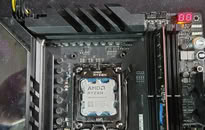
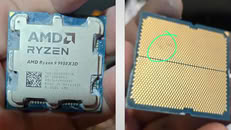
A Ryzen 9 9950X3D has reportedly died just an hour after being moved into an ASUS ROG Crosshair X670E Hero motherboard. According to Reddit user SpecialistConcept423, posting in r/GamersNexus, the chip had been running fine for about a year and a half in an ASRock X670E Taichi Carrara before the swap. After switching to the new board, no manual overclocking or voltage tweaks were applied; only one of the board's built-in memory presets was enabled for a set of SK hynix 6200 MHz modules. After saving that setting and rebooting, the board threw a "00" Q-Code and refused to post. Pulling the CPU and inspecting it revealed two brown marks on its contacts, which all but confirmed the catastrophic failure.

Things got stranger when the user resorted to an older Ryzen 5 8500G that had previously worked fine on the same board. That chip apparently now throws a "4D" code too, pointing at the motherboard itself as the culprit, not just the CPU. There's no confirmation yet on whether a faulty BIOS, a bad batch of boards, or something else is to blame, and ASUS hasn't commented on this specific case. It is worth noting that the ASUS board was not new, and it had undergone USB-related repairs and a BIOS rewrite. The user has since contacted AMD in Brazil for an RMA, but has shared no updates yet.
Interestingly, this isn't the first CPU failure tied to this exact board either. We covered a Ryzen 7 7800X3D that swelled and burned on the same ROG Crosshair X670E Hero model just days ago, and last year ASRock also admitted that overly aggressive PBO current limits fried a wave of Ryzen 9000 chips on its own boards. It's too early to say if these share a root cause, but there is certainly a pattern here. In this particular case, the X670E Hero claimed not one but two CPUs, and it only needed a single setting change to do so.
Source: Reddit
Add your own comment

207 Comments on Redditor's AMD Ryzen 9 9950X3D Reportedly Dies Shortly After Changing Motherboards

#151
JustBenching
LittleBroI'd say Intel's case is a bit different, as high voltage was intended use to achieve 6 GHz clocks, which were part of the marketing.
Their 13th and 14th gen CPUs came out from their factory this way (part of the design to achieve 6 GHz).

As for AMD, I have serious doubt that ramping up VSoC voltage was part of the design. It's an absolutely unnecessary step to do to guarantee officially recommended 3:2:2 6000/3000/3000 memory setting.
There's no real reason why AMD would do this themselves, as for 99% Zen 4/5 CPUs, 2000 FCLK is perfectly doable at <1.2V VSoC and rest will need default 1.25V, which is absolutely safe.
Besides, if you do RAM OC manually (you apply timings, memory frequency and VDIMM voltage), VSoC won't go past 1.25V.

I own Assuss mobo with some integrated memory tuning profiles/presets (apart from EXPO ones) in BIOS. It's a damn stupid thing to include this in BIOS.
There are like 7 Hynix A, B profiles. There is no guarantee that user's particular Hynix A chips can do what other users achieved with them.
I once tried to apply such setting, just out of curiosity. No warning whatsoever. I still think, that kind of this presets and wrong implementation of EXPO logic fucked up 7800X3Ds back then.
I also found it a just a bit strange that 2 X3D CPUs died on the same board (same model) within a week or two.
Assuss releases BIOS for this board once per week, always fixing something as poor Dell does on my company laptop (man, BIOS and driver updates very week).
This deployment frequency of fixes/patches does say something about it.

To wrap it up, we have different opinions and I won't change mine and I think you won't change yours.
When more information about this case emerges, we might come back and discuss it further.
For know, I think there's no reason to talk about it anymore, as we're both stubborn as f*ck. :laugh:
My 9800x 3d needed 1.35 vsoc though.
Posted on Reply
#152
Dr. Dro
LittleBroI'd say Intel's case is a bit different, as high voltage was intended use to achieve 6 GHz clocks, which were part of the marketing.
Their 13th and 14th gen CPUs came out from their factory this way (part of the design to achieve 6 GHz).

As for AMD, I have serious doubt that ramping up VSoC voltage was part of the design. It's an absolutely unnecessary step to do to guarantee officially recommended 3:2:2 6000/3000/3000 memory setting.
There's no real reason why AMD would do this themselves, as for 99% Zen 4/5 CPUs, 2000 FCLK is perfectly doable at <1.2V VSoC and rest will need default 1.25V, which is absolutely safe.
Besides, if you do RAM OC manually (you apply timings, memory frequency and VDIMM voltage), VSoC won't go past 1.25V.

I own Assuss mobo with some integrated memory tuning profiles/presets (apart from EXPO ones) in BIOS. It's a damn stupid thing to include this in BIOS.
There are like 7 Hynix A, B profiles. There is no guarantee that user's particular Hynix A chips can do what other users achieved with them.
I once tried to apply such setting, just out of curiosity. No warning whatsoever. I still think, that kind of this presets and wrong implementation of EXPO logic fucked up 7800X3Ds back then.
I also found it a just a bit strange that 2 X3D CPUs died on the same board (same model) within a week or two.
Assuss releases BIOS for this board once per week, always fixing something as poor Dell does on my company laptop (man, BIOS and driver updates very week).
This deployment frequency of fixes/patches does say something about it.

To wrap it up, we have different opinions and I won't change mine and I think you won't change yours.
When more information about this case emerges, we might come back and discuss it further.
For know, I think there's no reason to talk about it anymore, as we're both stubborn as f*ck. :laugh:
It isn't different at all, the problem is exactly identical in nature, overcurrent damaging the CPU and the microcode doing nothing to stop it (or actively making it worse). The only CPUs that reach 6 GHz (briefly) are the 13900KS, 14900K and 14900KS CPUs. The others, such as the 13900K and 14700K, were also affected. Even some i5's croaked and those don't get anywhere near 6 GHz - the common factor was Raptor Lake B0 silicon, irrespective of cut. None of these CPUs had bulged substrate or left any damage in the LGA, and they were operating at much higher voltage and much higher current figures as well.

Disagree on the availability of profiles being stupid, these are extremely useful to serve as a baseline for memory tweaking, as usual, the operator needs to RTFM and understand what they are doing. I was surprised even my Prime A620A has them, I thought these were usually reserved for the ROG Maximus and Crosshair motherboards. It's not a problem, most people will not activate these - and if EXPO is enough to cause this level of damage, then AMD needs to stop certifying EXPO kits that need VSOC adjustments (aka entirely discontinue and withdraw the ULL program and revoke EXPO certification for every kit rated above 5600 C36)
_roman_I disagree with that E statement. nope

without x670 and X670e i agree on your statement. i have both, 2x amd chipsets, X670E is only pcie 5 on the gpu slot what my X670 only have Pcie 4 on the graphic card slot.
What is there to disagree? It is common knowledge that the X670E and X870E are simply a dual chipset pair of Promontory 21 chips. There are no physical differences between X670E and X870E, however, AMD made it mandatory to include USB 4 support on X870E branded motherboards, which means that an USB chipset must be included (usually an AsMedia chip like the ASM4242), which results in a reduction of 4 lanes vs. what can be potentially available on a X670E motherboard.
Posted on Reply
#153
rv8000
Dr. DroIt isn't different at all, the problem is exactly identical in nature, overcurrent damaging the CPU and the microcode doing nothing to stop it (or actively making it worse). The only CPUs that reach 6 GHz (briefly) are the 13900KS, 14900K and 14900KS CPUs. The others, such as the 13900K and 14700K, were also affected. Even some i5's croaked and those don't get anywhere near 6 GHz - the common factor was Raptor Lake B0 silicon, irrespective of cut. None of these CPUs had bulged substrate or left any damage in the LGA, and they were operating at much higher voltage and much higher current figures as well.

Disagree on the availability of profiles being stupid, these are extremely useful to serve as a baseline for memory tweaking, as usual, the operator needs to RTFM and understand what they are doing. I was surprised even my Prime A620A has them, I thought these were usually reserved for the ROG Maximus and Crosshair motherboards. It's not a problem, most people will not activate these - and if EXPO is enough to cause this level of damage, then AMD needs to stop certifying EXPO kits that need VSOC adjustments (aka entirely discontinue and withdraw the ULL program and revoke EXPO certification for every kit rated above 5600 C36)


What is there to disagree? It is common knowledge that the X670E and X870E are simply a dual chipset pair of Promontory 21 chips. There are no physical differences between X670E and X870E, however, AMD made it mandatory to include USB 4 support on X870E branded motherboards, which means that an USB chipset must be included (usually an AsMedia chip like the ASM4242), which results in a reduction of 4 lanes vs. what can be potentially available on a X670E motherboard.
Regarding the memory profiles, I disagree. They should really only be an option on strictly OC oriented boards, even then it just seems like a terrible idea.

There are too many variables between the kits themselves, imc/cpu quality, and cooling. Someone posted the perfect example of a 4800 profile that was on their ASUS bios that pumped 1.55vdd/vddq/vddio into the kit, which is quite frankly idiotic, especially if you dont have any idea what you’re doing. 1.55vddio is wildly high for 4800 let alone 6000/6200, and seeing as how one of the burned pad/pins was likely associated with vddio, absolutely brings into question what was set when the op just randomly chose to use one of the built in profiles on their board.

Moral being if you don’t have any idea what youre doing, enable expo and tune voltages downward while checking stability. Don’t randomly enable profiles never tested with your memory kit or cpu.
Posted on Reply
#154
Dr. Dro
rv8000Regarding the memory profiles, I disagree. They should really only be an option on strictly OC oriented boards, even then it just seems like a terrible idea.

There are too many variables between the kits themselves, imc/cpu quality, and cooling. Someone posted the perfect example of a 4800 profile that was on their ASUS bios that pumped 1.55vdd/vddq/vddio into the kit, which is quite frankly idiotic, especially if you dont have any idea what you’re doing. 1.55vddio is wildly high for 4800 let alone 6000/6200, and seeing as how one of the burned pad/pins was likely associated with vddio, absolutely brings into question what was set when the op just randomly chose to use one of the built in profiles on their board.

Moral being if you don’t have any idea what youre doing, enable expo and tune voltages downward while checking stability. Don’t randomly enable profiles never tested with your memory kit or cpu.
That is how it works today. fwiw most high-end kits will not operate at their rated specifications by simply toggling EXPO with the default VSOC and VDD settings. And it's not like the memory profiles on ASUS boards aren't tucked into a very aptly named "Tweaker's Paradise" section, following that logic, let's do away with the unlocked processor ;)
Posted on Reply
#155
rv8000
Dr. DroThat is how it works today. fwiw most high-end kits will not operate at their rated specifications by simply toggling EXPO with the default VSOC and VDD settings. And it's not like the memory profiles on ASUS boards aren't tucked into a very aptly named "Tweaker's Paradise" section, following that logic, let's do away with the unlocked processor ;)
Didnt realize your 620A ASUS board was fully designed for LN2.

Entirely different scenario regarding unlocked cpus as there aren’t any built in OC profiles for CPU outside of using the dissimilar auto/ai OC tools.

Memory kits vary wildly with many layers of additional variables within timings on top of different ICs.
Posted on Reply
#156
AusWolf
Dr. DroIt isn't different at all, the problem is exactly identical in nature, overcurrent damaging the CPU and the microcode doing nothing to stop it (or actively making it worse). The only CPUs that reach 6 GHz (briefly) are the 13900KS, 14900K and 14900KS CPUs. The others, such as the 13900K and 14700K, were also affected. Even some i5's croaked and those don't get anywhere near 6 GHz - the common factor was Raptor Lake B0 silicon, irrespective of cut. None of these CPUs had bulged substrate or left any damage in the LGA, and they were operating at much higher voltage and much higher current figures as well.

Disagree on the availability of profiles being stupid, these are extremely useful to serve as a baseline for memory tweaking, as usual, the operator needs to RTFM and understand what they are doing. I was surprised even my Prime A620A has them, I thought these were usually reserved for the ROG Maximus and Crosshair motherboards. It's not a problem, most people will not activate these - and if EXPO is enough to cause this level of damage, then AMD needs to stop certifying EXPO kits that need VSOC adjustments (aka entirely discontinue and withdraw the ULL program and revoke EXPO certification for every kit rated above 5600 C36)
So you're blaming AMD for not making their tuning options idiot-proof while denying responsibility of the user wreaking havoc within those settings. Interesting take.
Dr. DroWhat is there to disagree? It is common knowledge that the X670E and X870E are simply a dual chipset pair of Promontory 21 chips. There are no physical differences between X670E and X870E, however, AMD made it mandatory to include USB 4 support on X870E branded motherboards, which means that an USB chipset must be included (usually an AsMedia chip like the ASM4242), which results in a reduction of 4 lanes vs. what can be potentially available on a X670E motherboard.
It's just that x70 means dual chip, not the "E" in the end. "E" means more pci-e 5.0 lanes instead of 4.0.
Posted on Reply
#157
Dr. Dro
AusWolfSo you're blaming AMD for not making their tuning options idiot-proof while denying responsibility of the user wreaking havoc within those settings. Interesting take.
Always the need to play devil's advocate, in the meantime, look at the AIDA64 score thread, a dude posted a 9950X3D2 doing 1.7 VDDIO on an Apex motherboard, and the chip survived even after hours of Karhu. This is clearly a microcode level failure.
AusWolfIt's just that x70 means dual chip, not the "E" in the end. "E" means more pci-e 5.0 lanes instead of 4.0.
No, X670 and X870 have only a single chipset. B650E is the exception to this rule (and notice that there is no B850E available) - only 36 lanes like X670, but mandates PCIe 5.0 for graphics. X670 does not mandate it, these are arbitrary choices and not technical limitations. AMD has much more control over this than you realize.

X670E is identical, except the USB 4 controller is not mandatory and can be vacant.

Posted on Reply
#158
Visible Noise
AusWolfSo you're blaming AMD for not making their tuning options idiot-proof
I do.

But that would deny them the income from the replacements of all those burned up cpus that they would be on the hook for replacing under warranty instead.
Posted on Reply
#159
AusWolf
Dr. DroAlways the need to play devil's advocate, in the meantime, look at the AIDA64 score thread, a dude posted a 9950X3D2 doing 1.7 VDDIO on an Apex motherboard, and the chip survived even after hours of Karhu. This is clearly a microcode level failure.
Not all chips are made equal.
Dr. DroNo, X670 and X870 have only a single chipset.
No. Have a look:
www.techpowerup.com/review/amd-ryzen-7-7700x/3.html
Visible NoiseI do.
What a surprise.
Visible NoiseBut that would deny them the income from the replacements of all those burned up cpus that they would be on the hook for replacing under warranty instead.
OP successfully RMA'd her CPU. I'm sure AMD is making lots of profit from sending out a replacement for free (or a refund).
Posted on Reply
#160
Visible Noise
AusWolfWhat a surprise.
You’re surprised that I expect a product to be robust enough to be used as intended without failing?

Why would you expect anything different? You must have very low expectations of who you give your money to.
Posted on Reply
#161
AusWolf
Visible NoiseYou’re surprised that I expect a product to be robust enough to be used as intended without failing?

Why would you expect anything different? You must have very low expectations of who you give your money to.
Define "as intended". Keep in mind, official RAM speed support is up to 5200 MHz on 7000 and 5600 MHz on 9000 series Ryzen.
Posted on Reply
#162
Visible Noise
AusWolfDefine "as intended". Keep in mind, official RAM speed support is up to 5200 MHz on 7000 and 5600 MHz on 9000 series Ryzen.
Can you set registers in the CPU that will cause it to self destruct?

If yes, that is a defective product.
Posted on Reply
#163
AusWolf
Visible NoiseCan you set registers in the CPU that will cause it to self destruct?

If yes, that is a defective product.
Can you insert a screwdriver into your wall plug? Yes. Therefore, your wall plug is defective.

You seem to have not read the second part of my post.
Posted on Reply
#164
Visible Noise
AusWolfCan you insert a screwdriver into your wall plug? Yes. Therefore, your wall plug is defective.
Since when is sticking a screwdriver into a wall plug “used as intended”?

Derp.
Posted on Reply
#165
Dr. Dro
AusWolfNot all chips are made equal.


No. Have a look:
www.techpowerup.com/review/amd-ryzen-7-7700x/3.html


What a surprise.


OP successfully RMA'd her CPU. I'm sure AMD is making lots of profit from sending out a replacement for free (or a refund).
I see, I went to look and it seems both of us got a thing or another wrong. The X670 is dual-chip, but the X870 is not. It's a bit of a regression it seems, although sometimes a simpler architecture can yield better results - that will depend on the motherboard implementation itself. The extra lanes come from the other chipset, without two you only get 36.

Posted on Reply
#166
AusWolf
Visible NoiseSince when is sticking a screwdriver into a wall plug “used as intended”?
Since when is overclocking your RAM above 6 GHz "used as intended"?
Visible NoiseDerp.
Is that really necessary? Derp.
Dr. DroI see, I went to look and it seems both of us got a thing or another wrong. The X670 is dual-chip, but the X870 is not.
If so, that is very strange. I'll have a look, too.
Posted on Reply
#167
Visible Noise
AusWolfSince when is overclocking your RAM above 6 GHz "used as intended"?
I don’t know. Does AMD let you do that? Will it kill the cpu? If so, why don’t they prevent it?

How about a better example than the very stupid one you tried to counter with: My car will refuse to let me select a gear that will damage it. If I’m doing 90mph it’s impossible to shift into first gear - the gate is locked out.

You’re saying it’s okay to not have protections such as that. That’s fine that you have that opinion, but I call it a defective product. You don’t let people hurt themselves.

We won’t even talk about when AMD failed to put thermal protection in their CPUs.
Posted on Reply
#168
AusWolf
Visible NoiseI don’t know. Does AMD let you do that? Will it kill the cpu? If so, why don’t they prevent it?

How about a better example than the very stupid one you tried to counter with: My car will refuse to let me select a gear that will damage it. If I’m doing 90mph it’s impossible to shift into first gear - the gate is locked out.

You’re saying it’s okay to not have protections such as that. That’s fine that you have that opinion, but I call it a defective product. You don’t let people hurt themselves.

We won’t even talk about when AMD failed to put thermal protection in their CPUs.
That's an awesome feature! But not every car has it. And just because they don't, it doesn't mean they're defective. It's not mandated by any government as far as I know.

Similarly, just because AMD gives you free control over your voltages, it doesn't mean you should set whatever stupid value comes out of your arse, or whatever some random bloke made up at your motherboard's design table, as it may or may not do good to your system.

Have you actually checked the overclocking page in any BIOS or GPU driver? Do you think the disclaimer is there for your entertainment? Overclocking is always done at the user's own risk, whether it's done with manual values or set profiles.
Posted on Reply
#169
Visible Noise
AusWolfThat's an awesome feature! But not every car has it. And just because they don't, it doesn't mean they're defective.
In my opinion they are defective.
AusWolfSimilarly, just because AMD gives you free control over your voltages, it doesn't mean you should set whatever stupid value comes out of your arse, or whatever some random bloke made up at your motherboard's design table, as it may or may not do good to your system.
Why doesn’t AMD set limits that will prevent you from destroying your CPU? Why didn’t they learn from Intel when you could destroy a CPU because you could set the memory voltage high enough to burn out the memory controller?
AusWolfHave you actually checked the overclocking page in any BIOS or GPU driver?
Don’t double down on stupid.
Posted on Reply
#170
AusWolf
Visible NoiseIn my opinion they are defective.
As long as it's not mandated by any government or industry standard, it remains just that: an opinion.
Visible NoiseWhy doesn’t AMD set limits that will prevent you from destroying your CPU? Why didn’t they learn from Intel when you could destroy a CPU because you could set the memory voltage high enough to burn out the memory controller?
Now that is a good question. Maybe they haven't tested extensively with super high RAM profiles? Maybe there's a big variance among different chips? Maybe they want to give you complete freedom over your hardware? Or maybe they just don't care? Who knows.

At least they accepted OP's RMA request, which I think is good. They could have easily gone down the "you overclocked at your own risk" route instead.
Visible NoiseDon’t double down on stupid.
My point stands. Just because you can, it doesn't always mean you should.
Posted on Reply
#171
A Computer Guy
AusWolfMy board has a setting called "memory try it" which is just a whole bunch of pre-baked memory presets, I imagine similar to the ones the article mentions. I have no reason to believe that random presets for random configurations randomly put into your BIOS by a random motherboard maker are worth experimenting with. I mean, considering how different everyone's config is, why would a motherboard maker make random profiles for imaginary configs and expect them to work? How could they even work? Why not just trust EXPO to do its job?

What's even more mind boggling is that my motherboard also has a setting called "memory overvoltage". Just... Why?

I wouldn't be surprised if it turned out that such settings were behind all these CPU deaths.


Yes. Considering that even EXPO is considered overclocking... :)

The maximum officially supported memory speed is 5200 MHz on 7000 and 5600 MHz on 9000 series Ryzen. Somehow everybody seems to forget this.
I have suspicion the IF is pretty weak on AM5 in particular with x3d CPUs and depending on manufacturing defects 5200 and 5600 was probably pretty conservative and picked for a reason. Unlike cpu cores the IF doesn’t have a FIT mechanism to protect it from burnout. Push the ram frequency too high with too much soc and poof, too much current annd heat across the fabric, game over.
lexluthermiesterThis is an AMD CPU defect problem, not a motherboard problem.
Im inclined to believe this is the case. It wouldn’t surprise me if the chiplet design produces a pretty wide variation in manufacturing quality.
Posted on Reply
#172
AusWolf
A Computer GuyI have suspicion the IF is pretty weak on AM5 in particular with x3d CPUs and depending on manufacturing defects 5200 and 5600 was probably pretty conservative and picked for a reason. Unlike cpu cores the IF doesn’t have a FIT mechanism to protect it from burnout. Push the ram frequency too high with too much soc and poof, too much current annd heat across the fabric, game over.
That's possible. I also find it interesting that they picked two different max supported memory speeds for the two generations even though the IF and MC are exactly the same.
A Computer GuyIm inclined to believe this is the case. It wouldn’t surprise me if the chiplet design produces a pretty wide variation in manufacturing quality.
That's possible, too, although I wouldn't call it a defect, considering the max officially supported RAM speeds are well-known.
Posted on Reply
#173
freeagent
Or AMD CPU's might just a little weak.. no shame in admitting it.

Does it suck? Sure. A lot, trust me.

Could there be some bugs in all AGESA versions? Absofuckinglutely.

AMD still has not gotten back to me about my RMA even after I inquired further.

But but.. I spent nearly 3K on their CPU's in the last 6 years and bought a lot of motherboards lol.. and that is what customer loyalty gets ya in 2026 :laugh:

I didn't say that.. just reminded me of that Asus guy lol..
Posted on Reply
#174
A Computer Guy
AusWolfThat's possible. I also find it interesting that they picked two different max supported memory speeds for the two generations even though the IF and MC are exactly the same.
I recon it has to do with improved manufacturing. TSMC is going through iterations of improvements we are not privy to that give an opportunity to push the specs higher for newer models.
AusWolfThat's possible, too, although I wouldn't call it a defect, considering the max officially supported RAM speeds are well-known.
By defect I’m simply implying there is no perfectly assembled cpu. Chiplets may produce high yields like the never ending am4 chips trickling out the door but packaging the cpu probably introduces a lot of issue from the complexity of the assembly of chiplets at such a small scale. Add in x3d top or bottom and the complexity increases. On a similar way The ps3 chips were constructed in a way that they are pretty much guaranteed to fail being somewhat a sandwich of silicon if I remember correctly. I see am5 chiplet design in a similar way but its weakness isn’t on die so much as with interconnects with the IF.
Posted on Reply
Add your own comment
Nov 11th, 2026 04:16 CST change timezone

New Forum Posts

Popular Reviews

TPU on YouTube

Controversial News Posts