Tuesday, September 8th 2026

Redditor's AMD Ryzen 9 9950X3D Reportedly Dies Shortly After Changing Motherboards

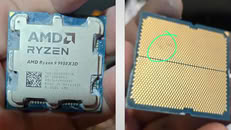
A Ryzen 9 9950X3D has reportedly died just an hour after being moved into an ASUS ROG Crosshair X670E Hero motherboard. According to Reddit user SpecialistConcept423, posting in r/GamersNexus, the chip had been running fine for about a year and a half in an ASRock X670E Taichi Carrara before the swap. After switching to the new board, no manual overclocking or voltage tweaks were applied; only one of the board's built-in memory presets was enabled for a set of SK hynix 6200 MHz modules. After saving that setting and rebooting, the board threw a "00" Q-Code and refused to post. Pulling the CPU and inspecting it revealed two brown marks on its contacts, which all but confirmed the catastrophic failure.

Things got stranger when the user resorted to an older Ryzen 5 8500G that had previously worked fine on the same board. That chip apparently now throws a "4D" code too, pointing at the motherboard itself as the culprit, not just the CPU. There's no confirmation yet on whether a faulty BIOS, a bad batch of boards, or something else is to blame, and ASUS hasn't commented on this specific case. It is worth noting that the ASUS board was not new, and it had undergone USB-related repairs and a BIOS rewrite. The user has since contacted AMD in Brazil for an RMA, but has shared no updates yet.
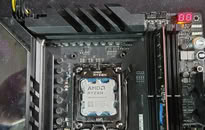
Interestingly, this isn't the first CPU failure tied to this exact board either. We covered a Ryzen 7 7800X3D that swelled and burned on the same ROG Crosshair X670E Hero model just days ago, and last year ASRock also admitted that overly aggressive PBO current limits fried a wave of Ryzen 9000 chips on its own boards. It's too early to say if these share a root cause, but there is certainly a pattern here. In this particular case, the X670E Hero claimed not one but two CPUs, and it only needed a single setting change to do so.
Source: Reddit
Add your own comment

207 Comments on Redditor's AMD Ryzen 9 9950X3D Reportedly Dies Shortly After Changing Motherboards

#101
AusWolf
Dr. DroYes, but I'm not talking about merely just killing the CPU, but the fireworks spectacle, like see this case. this is extreme physical damage.

Raptor Lake was degrading for a similar reason, high volts + high current = dielectric breakdown, accelerated electromigration, dead CPU, but even then, they did not combust like this

Perhaps electromigration is causing a really spectacular short circuit in some cases. Let's not forget, 5-6 nm is extremely thin. Who knows where your electrons migrate to.
Posted on Reply
#102
R-T-B
Dr. DroYes, but I'm not talking about merely just killing the CPU, but the fireworks spectacle, like see this case. this is extreme physical damage.

Raptor Lake was degrading for a similar reason, high volts + high current = dielectric breakdown, accelerated electromigration, dead CPU, but even then, they did not combust like this

Man even MSI boards are burning. Ouch.
Posted on Reply
#103
Dr. Dro
AusWolfPerhaps electromigration is causing a really spectacular short circuit in some cases. Let's not forget, 5-6 nm is extremely thin. Who knows where your electrons migrate to.
Electromigration is a microscopic process and it certainly does not cause this fantastical kind of damage on the package itself, it simply makes the semiconductor die lose its physical properties over time. You know how the processor is made, right? Essentially with a bit of oversimplification, the logic is "etched" into the slab of silicon, and the flow of electrons, much like water in a river, "erodes" the silicon (atomic displacement) causing voids and hillocks, which are empty spaces and areas where material that used to be in the voids will pile up. Best way I can explain it. The formula that explains this wear is known as Black's equation


This physical damage essentially breaks the semiconductor from the inside, which is what causes instability. Heat may be the bane of all electronics, but current is the grim reaper
Posted on Reply
#104
AusWolf
Dr. DroElectromigration is a microscopic process and it certainly does not cause this fantastical kind of damage on the package itself, it simply makes the semiconductor die lose its physical properties over time. You know how the processor is made, right? Essentially with a bit of oversimplification, the logic is "etched" into the slab of silicon, and the flow of electrons, much like water in a river, "erodes" the silicon (atomic displacement) causing voids and hillocks, which are empty spaces and areas where material that used to be in the voids will pile up. Best way I can explain it. The formula that explains this wear is known as Black's equation


This physical damage essentially breaks the semiconductor from the inside, which is what causes instability. Heat may be the bane of all electronics, but current is the grim reaper
I know that. And when the insulating material has been eroded, or it's insufficient to keep the current contained, you get a short circuit. With your analogy, the river overflows into and interferes with other rivers. Short circuits cause rapid heat buildup, and/or fires. Less insulating material or higher voltage accelerates the process.

Why are we talking like I'm the only one here who watched GN's burning 7800X3D analysis?
Posted on Reply
#105
Aleksandar_038
Modern CPUs, like modern GPUs, simply are too power hungry.

It is not normal to have 300w, or 800w parts in desktop PC for personal use.

Yes, we accepted it as reality, but it is not viable in long run - those hardware will degrade much faster and have much shorter lifetime.

So... Direction must change in future, adding more watts is wrong and won't lead to anything good in long term...
Posted on Reply
#106
kazuviking
_roman_ASUS makes the board, ASUS sets the default values. Asus could leave the fields empty.
Even worse when left empty. Agesa didnt even had max voltage limit for dram until very recently.
LittleBrosuspect ASUS from releasing a piece of shit BIOS for this board. If you take a look at ASUS' support page,
you'll see this board gets BIOS update like every damn week. Every week there's a fix for some issue.
What the hell? No testiong prior to releasing new BIOS?
Just like the intel vmin issue. Its a hardware design issue with the x3d that board partners bave to fix because amd refuses to aknowledge it as their fuckup.
R-T-BMan even MSI boards are burning. Ouch.
Every single board burns as its an hardware defect from amd. Amd didn even give oems proper max voltages for a long time.
Posted on Reply
#107
LittleBro
kazuvikingEven worse when left empty. Agesa didnt even had max voltage limit for dram until very recently.


Just like the intel vmin issue. Its a hardware design issue with the x3d that board partners bave to fix because amd refuses to aknowledge it as their fuckup.
If you lock all the settings in BIOS, why even bother with introducing CPUs with unlocked multiplier? Why even allow any OC at all?

The reason why many Ryzen 7800X3D have burned was high SoC voltage (above 1.35V) when EXPO memory profile was switched on.
It's not like you wrote. This is really not on AMD. AMD gives mobo makers free hands in how they manage few things (incl. voltages). And that's good.
The problem was the EXPO implementation on motherboards. When EXPO was enabled, many voltages (incl. SoC) were increased automatically by BIOS,
though absolutely unnecessary. Mobo makers does not care, they want to provide users with fast and easy tweaking/OC tools. And that's what happened.
Just like OC tool, which will set PBO to -30 and call it a day. Or another one, which will set multiplier to 52 and CPU voltage to 1.45V.

EXPO/XMP should never alter any other voltage than VDIMM voltage!
kazuvikingEvery single board burns as its an hardware defect from amd. Amd didn even give oems proper max voltages for a long time.
This is absolutely false. When new CPU arrives, AMD/Intel sends specifications (incl. voltages) to motherboard makers.
EXPO has nothing to do with SoC voltage and never had. Mobo makers came up with idea that the higher the SoC voltage, the better is memory OC.
(Or else I don't really know why otherwise would they want to raise SoC voltage with EXPO.)
AsRock admitted they had problems in BIOS.

With your way of thinking (everything must be locked), AMD might as well make boards themselves and sell it locked. Fortunately, this is not how it works.
Never ever settle for EXPO and other one-click tweaking methods. Always do tweaking manually and step by step.

Intel issue was a bit different. Intel themselves did not know that such high voltage could damage ring bus under heavy load when applied long-term.
Posted on Reply
#108
Dr. Dro
LittleBroEXPO/XMP should never alter any other voltage than VDIMM voltage!
Not even remotely plausible for ULL and/or (especially those where and applies) high-speed kits. No CPU will ever be stable without the correct adjustments.

What we need is a well-documented safe operational range and safeties so this problem is fixed.
Posted on Reply
#109
Prima.Vera
RecusHow AMD is still not sued?
It looks like more of a Mobo issue...
Posted on Reply
#110
Dr. Dro
Prima.VeraIt looks like more of a Mobo issue...
It's not. It happens across multiple models of multiple vendors across different chipsets. It's just relatively rare, I would not be surprised if there was a bug in AGESA similar in nature to the Raptor Lake microcode issue that is setting some current limit incorrectly under specific conditions
Posted on Reply
#111
Yumi
AusWolfNah, I think those profiles are based on whatever weird stuff the guys at Asus were smoking on the day they set them up. I don't expect that any engineer made any testing on any of them ever.

Lesson learned, better stay away from built in memory profiles. They are irresponsible and dangerous.


That's good news! I wish you good luck, and thank you for sharing your story. :)
Sure, i never had issues with pre built memory profile before, even in Rampage IV, V and X370 Hero i used as a baseline against xmp or my manual profiles, sadly killed the cpu at first try :(

My ram kit is fine, i tested with the new kit and went well up to 7400cl38, not going to push further too soon (just xmp, some clock and loose timings are okay for me)
Posted on Reply
#112
kazuviking
YumiMy ram kit is fine, i tested with the new kit and went well up to 7400cl38, not going to push further too soon (just xmp, some clock and loose timings are okay for me)
Because its a non issue with arl as the voltages it uses completely separate from what agesa does.
Posted on Reply
#113
Jism
LittleBroThe reason why many Ryzen 7800X3D have burned was high SoC voltage (above 1.35V) when EXPO memory profile was switched on.
LittleBroWhen EXPO was enabled, many voltages (incl. SoC) were increased automatically by BIOS,

though absolutely unnecessary. Mobo makers does not care, they want to provide users with fast and easy tweaking/OC tools. And that's what happened.
Just like OC tool, which will set PBO to -30 and call it a day. Or another one, which will set multiplier to 52 and CPU voltage to 1.45V.
LittleBroEXPO/XMP should never alter any other voltage than VDIMM voltage!


This is absolutely false. When new CPU arrives, AMD/Intel sends specifications (incl. voltages) to motherboard makers.
EXPO has nothing to do with SoC voltage and never had. Mobo makers came up with idea that the higher the SoC voltage, the better is memory OC.
(Or else I don't really know why otherwise would they want to raise SoC voltage with EXPO.)
AsRock admitted they had problems in BIOS.
I kind of disagree. A higher soc voltage is used to guarantee a stable XMP setting you just dialed in. Ive learned that setting AUTO soc voltage on my 5950X using 4 sticks of each 32GB jacks up soc voltage to 1.175V by default. It's needed because your running 4 and not 2 sticks, which does make sense because it's tougher on the memory controller. I figured that motherboard makers are looking for a "One setting fits all" approach but i also learned the SOC voltage could simply be lowered at 1.1V and not have a constant 20 ~ 25W idle output. I suspect this is where www.techpowerup.com/forums/threads/zen-3-if-imc-degradation.345042 comes from as well.

But nobody is going to test, bench, every setting to find a absolute stable voltage. People just wanna click auto, dial it in and call it a day. Never trust what is actually send through your motherboard on AUTO voltages. I mean check what AMD recommends vs what your motherboard is doing. Big difference.

The higher the speeds, the higher the fabric (IMC) will run and the higher of a soc voltage you need.
Posted on Reply
#114
AusWolf
YumiSure, i never had issues with pre built memory profile before, even in Rampage IV, V and X370 Hero i used as a baseline against xmp or my manual profiles, sadly killed the cpu at first try :(

My ram kit is fine, i tested with the new kit and went well up to 7400cl38, not going to push further too soon (just xmp, some clock and loose timings are okay for me)
As I've seen, DDR4 was a lot less aggressive on your CPU's memory controller than DDR5 is, especially with AMD that has a weak MC to begin with.

Anyway, glad you're happy with your new system. I'm sure you'll have a lot more luck at RAM OC with Intel. :)
Posted on Reply
#115
Yumi
AusWolfAs I've seen, DDR4 was a lot less aggressive on your CPU's memory controller than DDR5 is, especially with AMD that has a weak MC to begin with.

Anyway, glad you're happy with your new system. I'm sure you'll have a lot more luck at RAM OC with Intel. :)
Thanks, i liked so much my 5600G, i liked to play with some binned b-die sticks (pushed him to 4533 cl16 without issues in a b450 tuf) :D

I analyzed the last minidumps from my AM5 Setup and i want to share with you some information i dig from them (let me know if you want the minidumps):

2 memory related BSOD in the same day, 2 min apart (i was using 4800cl40 jedec spec, no PBO no xmp etc)
1 ssd related (virtual memory) since i only use NVME, PCIE maybe?
one with ethernet (svchost) (cpu related?)
the other one i don't know if its related or not (hibernation)

i used windbg

Apart from those BSOD as i stated i had multiples PCIE Erros in hwinfo64, some in pcie lane7, lane1, bad tlp and receiver error, i have one picture from hwinfo (sorry didnt show it was from 9950x3d because i cut the image to sent to a friend) and one from event viewer with many erros from windows in the same week i did the swap

i'm sending too a screenshot from hwinfo64 from day 20/8/2026, all images are from my onedrive backup and the last screen was about my work so i needed to cut and hide sensitive information but theres memory specs, hour, date and the best game in the world: War Thunder (isn't a joke :pimp:)
Posted on Reply
#116
AusWolf
YumiThanks, i liked so much my 5600G, i liked to play with some binned b-die sticks (pushed him to 4533 cl16 without issues in a b450 tuf) :D

I analyzed the last minidumps from my AM5 Setup and i want to share with you some information i dig from them:

2 memory related BSOD in the same day, 2 min apart (i was using 4800cl40 jedec spec, no PBO no xmp etc)
1 ssd related (virtual memory) since i only use NVME, PCIE maybe?
one with ethernet (svchost) (cpu related?)
the other one i don't know if its related or not (hibernation)

i used windbg

Apart from those BSOD as i stated i had multiples PCIE Erros in hwinfo64, some in pcie lane7, lane1, bad tlp and receiver error, i have one picture from hwinfo (sorry didnt show it was from 9950x3d because i cut the image to sent to a friend) and one from event viewer with many erros from windows in the same week i did the swap

i'm sending too a screenshot from hwinfo64 from day 20/8/2026, all images are from my onedrive backup and the last screen was about my work so i needed to cut and hide sensitive information but theres memory specs, hour, date and the best game in the world: War Thunder (isn't a joke :pimp:)
Hmm, that all points towards the CPU's SoC (IO die) being shot, imo.

I just recently had an experience with a used 8700G. It worked with 1 stick of RAM at 4800 CL40, but when I put a second stick in, it produced random freezes and system restarts. Enabling my 6000 CL30 EXPO profile made it unable to boot with the CPU led lit up on the motherboard, whether it's with 1 stick or 2. Luckily, I bought it from a second-hand store, so I RMA'd it straight away. Either the poor thing had a really bad last owner, or these AMD chips really can't take too much stress on the MC (or both).

Anyway, how is War Thunder? I used to play World of Tanks a lot before it got overly complicated with the bazillion different currencies and leveling options and whatnot.
Posted on Reply
#117
Yumi
AusWolfHmm, that all points towards the CPU's SoC (IO die) being shot, imo.

I just recently had an experience with a used 8700G. It worked with 1 stick of RAM at 4800 CL40, but when I put a second stick in, it produced random freezes and system restarts. Enabling my 6000 CL30 EXPO profile made it unable to boot with the CPU led lit up on the motherboard, whether it's with 1 stick or 2. Luckily, I bought it from a second-hand store, so I RMA'd it straight away. Either the poor thing had a really bad last owner, or these AMD chips really can't take too much stress on the MC (or both).

Anyway, how is War Thunder? I used to play World of Tanks a lot before it got overly complicated with the bazillion different currencies and leveling options and whatnot.
Yeah, i was afraid the MC for a while before the swap (months before), i noticed with newer bios the cpu got more unstable by the time, i was hopping the CPU could hold till Intel launches the new gen (i was planning to put the AM5 aside and use the Intel as primary), those BSODs are with last bios (4.43) from ASRock

Also for War Thunder i can't say much, i have 8000+ hour in this game (all US and Russian planes, tanks lmao) and my soul already turned into a snail :fear:


There's a event for F-16XL also, my account is a very old (2013 beta)
Posted on Reply
#118
LittleBro
JismI kind of disagree. A higher soc voltage is used to guarantee a stable XMP setting you just dialed in. Ive learned that setting AUTO soc voltage on my 5950X using 4 sticks of each 32GB jacks up soc voltage to 1.175V by default. It's needed because your running 4 and not 2 sticks, which does make sense because it's tougher on the memory controller. I figured that motherboard makers are looking for a "One setting fits all" approach but i also learned the SOC voltage could simply be lowered at 1.1V and not have a constant 20 ~ 25W idle output. I suspect this is where www.techpowerup.com/forums/threads/zen-3-if-imc-degradation.345042 comes from as well.
Again, SoC voltage is not part of XMP profile, therefore AMD cannot be blamed for mobo makers ramping it up.
SoC voltage may affect inifity fabric stability, you might get better IF clock with higher SoC voltage and that's it. VDDIO is IMC voltage.
When you populate all 4 slots, it's known that IMC can't handle that and memory clocks will be dialed down.
If mobo maker has a workaround implemented in terms of not lowering frequency and ramping up VSoC and VDDIO instead, it's all on them.
(If you can run 4 DIMMS at same speed as 2 DIMMs with voltages suitable for just 2 DIMMs, consider yourself extremely lucky.)

I wonder how many CPUs died because of this sort of auto tweaking shit.

Every motherboard vendor and even AMD have a table published what clocks can be achieved with particular count of DIMMs installed.
If you install 4 DIMMs and manualy ramp up voltage to push IMC work harder, it's all on you and CPU might die.
This does no meat it should be locked option. This is for enthusiasts, who want to do OC. With OC, warranty may be void.

The thing is, many users are completely unaware of this. Mobo makers made separate BIOS sections for tweaking/ocing.
There's also an official AMD section, which clearly displays warning about losing warranty when doing OC.
However, there's no such warning on mobo maker's own tuning BIOS section (like "Ai tweaker" in ASUS).

EXPO profile should be completely safe and should cause at most memory instabilities, not CPU burning.
JismBut nobody is going to test, bench, every setting to find a absolute stable voltage. People just wanna click auto, dial it in and call it a day. Never trust what is actually send through your motherboard on AUTO voltages. I mean check what AMD recommends vs what your motherboard is doing. Big difference.
Agreed. And never use any auto tuning Ai Tweaker or any similar shit. It may cause more harm than benefit.
JismThe higher the speeds, the higher the fabric (IMC) will run and the higher of a soc voltage you need.
IF has a limit, then a divider is applied even on auto. If you leave IF on auto and set 7800 MHz memory, it will automatically apply divider but won't go past 2200 MHz.
But you can manually run memory at whatever speed and still have IF at 1900 MHz. Same goes for IMC.

IMC is not IF. There are three things:
Infinity fabric clock (FCLCK)
Memory controller clock (UCLCK)
Memory clock (MCLK)

Prior to Zen 4, a ratio 1:1:1 would yield best performance and lowest latency. Since Zen 4, it's 3:2:2.

VSoC and VDDIO have separate power rails, which means they are independent.
Never ever touch VSoC and VDDIO, if you really don't know what you're doing.


When mobo makers apply settings on top of EXPO profile, it's on them.
Like when you buy a car a have it chip-tuned during warranty period. If shit hits the fan, it's on you.
Posted on Reply
#119
Yumi
LittleBroAgain, SoC voltage is not part of XMP profile, therefore AMD cannot be blamed for mobo makers ramping it up.
SoC voltage may affect inifity fabric stability, you might get better IF clock with higher SoC voltage and that's it. VDDIO is IMC voltage.
When you populate all 4 slots, it's known that IMC can't handle that and memory clocks will be dialed down.
If mobo maker has a workaround implemented in terms of not lowering frequency and ramping up VSoC and VDDIO instead, it's all on them.
(If you can run 4 DIMMS at same speed as 2 DIMMs with voltages suitable for just 2 DIMMs, consider yourself extremely lucky.)

I wonder how many CPUs died because of this sort of auto tweaking shit.

Every motherboard vendor and even AMD have a table published what clocks can be achieved with particular count of DIMMs installed.
If you install 4 DIMMs and manualy ramp up voltage to push IMC work harder, it's all on you and CPU might die.
This does no meat it should be locked option. This is for enthusiasts, who want to do OC. With OC, warranty may be void.

The thing is, many users are completely unaware of this. Mobo makers made separate BIOS sections for tweaking/ocing.
There's also an official AMD section, which clearly displays warning about losing warranty when doing OC.
However, there's no such warning on mobo maker's own tuning BIOS section (like "Ai tweaker" in ASUS).

EXPO profile should be completely safe and should cause at most memory instabilities, not CPU burning.


Agreed. And never use any auto tuning Ai Tweaker or any similar shit. It may cause more harm than benefit.


IF has a limit, then a divider is applied even on auto. If you leave IF on auto and set 7800 MHz memory, it will automatically apply divider but won't go past 2200 MHz.
But you can manually run memory at whatever speed and still have IF at 1900 MHz. Same goes for IMC.

IMC is not IF. There are three things:
Infinity fabric clock (FCLCK)
Memory controller clock (UCLCK)
Memory clock (MCLK)

Prior to Zen 4, a ratio 1:1:1 would yield best performance and lowest latency. Since Zen 4, it's 3:2:2.

VSoC and VDDIO have separate power rails, which means they are independent.
Never ever touch VSoC and VDDIO, if you really don't know what you're doing.


When mobo makers apply settings on top of EXPO profile, it's on them.
Like when you buy a car a have it chip-tuned during warranty period. If shit hits the fan, it's on you.
For me the only fault from AMD is letting board makers do whatever they want and after many incidents with ASRock and ASUS AMD didn't forced them to fix asap, i didn't noticed Gigabyte and MSI boards with this behavior on AM5
Posted on Reply
#120
rv8000
LittleBroAgain, SoC voltage is not part of XMP profile, therefore AMD cannot be blamed for mobo makers ramping it up.
SoC voltage may affect inifity fabric stability, you might get better IF clock with higher SoC voltage and that's it. VDDIO is IMC voltage.
When you populate all 4 slots, it's known that IMC can't handle that and memory clocks will be dialed down.
If mobo maker has a workaround implemented in terms of not lowering frequency and ramping up VSoC and VDDIO instead, it's all on them.
(If you can run 4 DIMMS at same speed as 2 DIMMs with voltages suitable for just 2 DIMMs, consider yourself extremely lucky.)

I wonder how many CPUs died because of this sort of auto tweaking shit.

Every motherboard vendor and even AMD have a table published what clocks can be achieved with particular count of DIMMs installed.
If you install 4 DIMMs and manualy ramp up voltage to push IMC work harder, it's all on you and CPU might die.
This does no meat it should be locked option. This is for enthusiasts, who want to do OC. With OC, warranty may be void.

The thing is, many users are completely unaware of this. Mobo makers made separate BIOS sections for tweaking/ocing.
There's also an official AMD section, which clearly displays warning about losing warranty when doing OC.
However, there's no such warning on mobo maker's own tuning BIOS section (like "Ai tweaker" in ASUS).

EXPO profile should be completely safe and should cause at most memory instabilities, not CPU burning.


Agreed. And never use any auto tuning Ai Tweaker or any similar shit. It may cause more harm than benefit.


IF has a limit, then a divider is applied even on auto. If you leave IF on auto and set 7800 MHz memory, it will automatically apply divider but won't go past 2200 MHz.
But you can manually run memory at whatever speed and still have IF at 1900 MHz. Same goes for IMC.

IMC is not IF. There are three things:
Infinity fabric clock (FCLCK)
Memory controller clock (UCLCK)
Memory clock (MCLK)

Prior to Zen 4, a ratio 1:1:1 would yield best performance and lowest latency. Since Zen 4, it's 3:2:2.

VSoC and VDDIO have separate power rails, which means they are independent.
Never ever touch VSoC and VDDIO, if you really don't know what you're doing.


When mobo makers apply settings on top of EXPO profile, it's on them.
Like when you buy a car a have it chip-tuned during warranty period. If shit hits the fan, it's on you.
Small correction, VSOC negatively impacts FCLK in most cases; increasing VSOC helps stabilized higher uclk (directly related to why 1:1 speeds like 6200-6600 are very difficult to run and require high vsoc, while the opposite is true for 2:1 setups).

Each mobo vendor likely increases VSOC for expo settings as a catch-all for weak samples (general assumption).

Example: both my 7900X3D and 9800X3D require ~1.25+ VSOC when ranging from 6000-6600 with tight timings, whereas 8000,8200, 8400 requires 1.1-1.2 respectively.
Posted on Reply
#121
AusWolf
rv8000Example: both my 7900X3D and 9800X3D require ~1.25+ VSOC when ranging from 6000-6600 with tight timings, whereas 8000,8200, 8400 requires 1.1-1.2 respectively.
Isn't that because 6000-6600 runs with 1:1 MCLK:UCLK while 8000+ runs with 1:2, so then a lower UCLK needs lower VSOC?
Posted on Reply
#122
rv8000
AusWolfIsn't that because 6000-6600 runs with 1:1 MCLK:UCLK while 8000+ runs with 1:2, so then a lower UCLK needs lower VSOC?
Correct, lower UCLK requires less VSOC.
Posted on Reply
#123
Dr. Dro
LittleBroAgain, SoC voltage is not part of XMP profile, therefore AMD cannot be blamed for mobo makers ramping it up.
SoC voltage may affect inifity fabric stability, you might get better IF clock with higher SoC voltage and that's it. VDDIO is IMC voltage.
When you populate all 4 slots, it's known that IMC can't handle that and memory clocks will be dialed down.
If mobo maker has a workaround implemented in terms of not lowering frequency and ramping up VSoC and VDDIO instead, it's all on them.
(If you can run 4 DIMMS at same speed as 2 DIMMs with voltages suitable for just 2 DIMMs, consider yourself extremely lucky.)

I wonder how many CPUs died because of this sort of auto tweaking shit.

Every motherboard vendor and even AMD have a table published what clocks can be achieved with particular count of DIMMs installed.
If you install 4 DIMMs and manualy ramp up voltage to push IMC work harder, it's all on you and CPU might die.
This does no meat it should be locked option. This is for enthusiasts, who want to do OC. With OC, warranty may be void.

The thing is, many users are completely unaware of this. Mobo makers made separate BIOS sections for tweaking/ocing.
There's also an official AMD section, which clearly displays warning about losing warranty when doing OC.
However, there's no such warning on mobo maker's own tuning BIOS section (like "Ai tweaker" in ASUS).

EXPO profile should be completely safe and should cause at most memory instabilities, not CPU burning.


Agreed. And never use any auto tuning Ai Tweaker or any similar shit. It may cause more harm than benefit.


IF has a limit, then a divider is applied even on auto. If you leave IF on auto and set 7800 MHz memory, it will automatically apply divider but won't go past 2200 MHz.
But you can manually run memory at whatever speed and still have IF at 1900 MHz. Same goes for IMC.

IMC is not IF. There are three things:
Infinity fabric clock (FCLCK)
Memory controller clock (UCLCK)
Memory clock (MCLK)

Prior to Zen 4, a ratio 1:1:1 would yield best performance and lowest latency. Since Zen 4, it's 3:2:2.

VSoC and VDDIO have separate power rails, which means they are independent.
Never ever touch VSoC and VDDIO, if you really don't know what you're doing.


When mobo makers apply settings on top of EXPO profile, it's on them.
Like when you buy a car a have it chip-tuned during warranty period. If shit hits the fan, it's on you.
The only problem I have with this is that AMD is the one responsible for the AGESA code and management of all power-related features, therefore, they are to blame. It's not *mobo makers*, it's AMD. They oversee and license the motherboard products that carry their chipsets, word and trade marks, we need to stop trying to shield them from blame at each and every turn.

If chips are frying, it IS AMD's fault.
Posted on Reply
#124
Sol_Badguy
Dr. DroIf chips are frying, it IS AMD's fault.
Agreed it's their fault even if the actual frying part is the motherboard's fault (and consequently the mobo maker's fault).

Because of the following:
If chips would be frying AMD would find out about it simply by means of RMAs, through this they would also learn about the motherboards involved.
Then they would communicate closely with the mobo makers to try and identify the issue.
Those guys would provide all of the settings/parameters that the mobos use and eventually AMD would identify what is the problem, because they can also compare these settings across mobo makers and even several models for one mobo maker to try and single out that "loose cannon" of a setting (or maybe several which create a compound effect).
So there's no way AMD is kept in the dark about this.
Also this is not something which popped up (poor choice of words there?) recently so it's like "they just started the investigation, let's have some patience".
Posted on Reply
#125
AusWolf
Sol_BadguyAgreed it's their fault even if the actual frying part is the motherboard's fault (and consequently the mobo maker's fault).

Because of the following:
If chips would be frying AMD would find out about it simply by means of RMAs, through this they would also learn about the motherboards involved.
Then they would communicate closely with the mobo makers to try and identify the issue.
Those guys would provide all of the settings/parameters that the mobos use and eventually AMD would identify what is the problem, because they can also compare these settings across mobo makers and even several models for one mobo maker to try and single out that "loose cannon" of a setting (or maybe several which create a compound effect).
So there's no way AMD is kept in the dark about this.
Also this is not something which popped up (poor choice of words there?) recently so it's like "they just started the investigation, let's have some patience".
They're not gonna investigate anything as long as a few RMAs cost them a lot less than conducting an investigation would. When 7800X3Ds blew up left and right, they had to do something because it was far too common... And it was common because EXPO profiles gave the chip too much voltage. The issue was mostly sorted out then with the SOC voltage restriction. Now, if motherboard makers were far too lazy to overwrite their built in tuning profiles with the new restrictions, that's on them. AMD doesn't control what bullshit they put into their made up menus (maybe that's on AMD). And as I said, if almost nobody uses these profiles, and only a handful of CPUs die as a result, AMD will not investigate, as it's far cheaper to just fulfil those couple of RMAs. It's all about costs vs benefits.
Posted on Reply
Add your own comment
Nov 11th, 2026 04:16 CST change timezone

New Forum Posts

Popular Reviews

TPU on YouTube

Controversial News Posts