Tuesday, September 8th 2026

Redditor's AMD Ryzen 9 9950X3D Reportedly Dies Shortly After Changing Motherboards

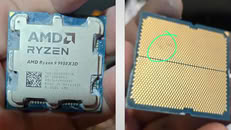
A Ryzen 9 9950X3D has reportedly died just an hour after being moved into an ASUS ROG Crosshair X670E Hero motherboard. According to Reddit user SpecialistConcept423, posting in r/GamersNexus, the chip had been running fine for about a year and a half in an ASRock X670E Taichi Carrara before the swap. After switching to the new board, no manual overclocking or voltage tweaks were applied; only one of the board's built-in memory presets was enabled for a set of SK hynix 6200 MHz modules. After saving that setting and rebooting, the board threw a "00" Q-Code and refused to post. Pulling the CPU and inspecting it revealed two brown marks on its contacts, which all but confirmed the catastrophic failure.

Things got stranger when the user resorted to an older Ryzen 5 8500G that had previously worked fine on the same board. That chip apparently now throws a "4D" code too, pointing at the motherboard itself as the culprit, not just the CPU. There's no confirmation yet on whether a faulty BIOS, a bad batch of boards, or something else is to blame, and ASUS hasn't commented on this specific case. It is worth noting that the ASUS board was not new, and it had undergone USB-related repairs and a BIOS rewrite. The user has since contacted AMD in Brazil for an RMA, but has shared no updates yet.
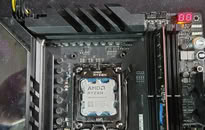
Interestingly, this isn't the first CPU failure tied to this exact board either. We covered a Ryzen 7 7800X3D that swelled and burned on the same ROG Crosshair X670E Hero model just days ago, and last year ASRock also admitted that overly aggressive PBO current limits fried a wave of Ryzen 9000 chips on its own boards. It's too early to say if these share a root cause, but there is certainly a pattern here. In this particular case, the X670E Hero claimed not one but two CPUs, and it only needed a single setting change to do so.
Source: Reddit
Add your own comment

207 Comments on Redditor's AMD Ryzen 9 9950X3D Reportedly Dies Shortly After Changing Motherboards

#176
JustBenching
Dr. DroAlways the need to play devil's advocate, in the meantime, look at the AIDA64 score thread, a dude posted a 9950X3D2 doing 1.7 VDDIO on an Apex motherboard, and the chip survived even after hours of Karhu. This is clearly a microcode level failure.
Was running mine a 1.65 for 6600c26 1:1. On an asrock motherboard mind you. Still alive and kicking
Posted on Reply
#177
lexluthermiester
A Computer GuyIm inclined to believe this is the case. It wouldn’t surprise me if the chiplet design produces a pretty wide variation in manufacturing quality.
Until AMD talks about it, and it's likely they will not, we'll never know for sure. My theory is that they had something small go wrong in a limited batch(s), the problem was swiftly resolved and they didn't think it would be a problem, until it was.
freeagentOhhh they did get back to me yay :)
What's the verdict?
Posted on Reply
#178
Yumi
AusWolfSure, but what settings / RAM profiles did you use? What were your voltages?
One time for benchmark when was brand new and passed in VT3 but ins't reliable for my work so i let Jedec 4800cl40 and without PBO
_roman_I ignored that topic on purpose to think about it and to let it cool down. (To prevent myself to write too much too early)

INTEL AX200 and INTEL AX210 were broken on my motherboards (more than one motherboard). AMD has also issues with usb. wlan sometimes work with usb also on motherboards.
MY motherboards were not defective, some wlan chips, especially intel ones are crap.

Other users claim other WLAN cards as problematic. I had massive issues in gnu gentoo linux, windows 10 pro and 11 pro nope.

that wlan bluetooth topic I will ignore it, as I had it myself and such small intel cards can be replaced for less than 35€. ax210 notebook small add in card with the notches are sold for 35€ on amazon.de in the past.

--

Ethernet
Same some intel Ethernet motherboard chips are shit, also intel.

Note: I learnt it from gnu gentoo linux, usb tethering. A core feature of Android, you share your mobile internet connection while charging to your computer. That was the way i saw intel wireless was shithouse, the ax200 (good bye msi b550 gaming edge wifi) and intel ax210 (collecting dust - sad face for the 35€)

--

BUT Running out of spec BUS speeds, which indicate by the user setting stuff themselves. I will not now check and make screenshot of my uefi. When you run out of the range, i think it is 100mhz, the bus speed on both of my asus and msi motherboards, you will also get issues for usb and other peripherals. Did the user do that? most likely not. But it could be an influence factor. I did run 101mhz, i think at 105mhz it gets flaky, unstable shit zone.

--

www.thermaltake.com/th420-v2-argb-sync-all-in-one-liquid-cooler.html

I do not know. Is it only a fancy RGB led cooler? or has it a display? It looks more like a RGB only pump header.

--

argb no idea. never used. do not care. RGB needs software and maybe the windows software is shit problematic. I do not care and it does not matter, exceot when it is usb related. but software bugs could exists or windows bugs.

--

thanks for giving us details.

No idea what F10 does on your motherboard. I assume it is one of those buttons which ASUS and MSI has, but is it the build in uefi key, the build in uefi bootloader key or something else?

--

Taichi board, That seems to be ASROCK one and different hardware.

I will focus on the, what i read days ago, ASUS overclocker wannabe hero motherboard with amd cpu. i will ignore the asrock one

-- I would also buy something else in your situation. Whose fault it is, hard to tell. ASUS - i hate asus - shit support - problematic ASUS proart monitor and the asus prime motherboard is also garbage. Asrock questionable brand, very questionable. // Anyway you decide what you want to buy or use etc.

The previous ryzen 7600x was more oc friendly, my ryzen 7700x wants too high settings and that is the reason i have to keep it at 6000 mt/s cl32, not cl30. The 6000 mt/s cl30 setting the user claimed could have set other higher settings as usual. I see it very biased from my motherboards and my 7000 cpus withotu 3d cache.

The costs of dead hardware would drive me nuts, I assume two questionable or dead high end motherboards + 1x amd cpu on the very expensive end. :(

Note i deleted some lines from the quote, not a full quote.

--

Days later - I saw my motherboard got another agesa. And only one source pointed to changes for transient voltages. It could be amd fault
- AGESA PI-1.3.0.1d updated.
note: check the other post from myself in the security section where i quoted that.

-- some higher voltages can faster degrade silicion. I think we do not need to discuss basics, like water is wet.
Stuff is slowly changing over the time when in use. when we really need to argue about that, it calls for an ignore list spot. that are basics. that was in books from 1990 or 1995 when i read those.

-- x3d seems problematic for some users. how the influence is because some users set stuff whcih tehy should not - who knows. And i do not have access to all working settings, and how long these settings work.

A new purchase of a intel board / intel cpu just starts the game fresh. New period to degrade the silicion, parts etc.
If intel allows more oc? I do not know? is intel more forgiving for certain settings? i do not know.

-- xmp and qvl nonsense. I only care for the dram chip type. than look up the values. I have hynix a die and therefore i wasted too much time reading checking hynix a die settings. I had on ddr4 micron wahtever and i also checked only those settings.

the user bought nice high quality parts, expensive ones.


The motherboard should not be dead. When it does not work, RMA it

I obtained by not legal ways the boardview for my msi motherboard. Voltage regulators, chips, etc are all unrelated to the cpu. that stuff has to work, if not, the motherboard is faulty. especially with your overclocker or wannabe overclocker boards. I know the asus is a wannaybe overclocker one, the asrock one, i think tachi is also a wannabe overclocker board.

The board generates most of the clocks and also all voltages, the current is just a result for the voltages.

when the board brands refuse the rma, post it on reddit. Except like asus, they insist on the two year only period, like europe has. no warranty for second hand purchases, etc.

+ I would carefully remove those heatsinks etc and look carefully on both motherboards if i would find blown parts, missing parts like capacitors, resitors, etc, burn marks, etc. I would also check if I (i talk about myself only here!) have accidentically scratched the motherboard with a screwdriver or any RMA denying stuff on the motherboard.

a screwdriver slice on the board and cut traces and cuts the circuit. blown or missing parts also break functionality of the circuit.

i would also before i do that, replace the cmos cell, measure properly if the cmos battery has the desired voltage. And test again.

--

asus is shit brand and asrock also.
i bought 1x asrock challenger radeon 6600xt 8gb d graphic card which had not working PWM fans when the radeon 6600XT cards were released in austria. the quality does not exists for asrock and asus.
i had some emails from the past when i asked asus for help for my asus notebooks / asus prime motherboard.


The reason for passive coolers on DRAM. And some put fans near the DRAM to cool them down.


1 = 100% agree . the only explanation, higher values guarantee that the hardware post and works in most cases.

I doubt AMD knows it themselves what is a save value, or they do not care or the motherboard brands do not care.

The reason i run default first, to check two weeks and than try to read what i do before i set a value and hit safe and exist

turning off secure boot, ethernet chip, tpm are user settings which should not impact the life of the hardware.
anything which sets voltage or has something related needs reading before i personally set something.

skatterbencher - someone who does overclock and guides. i did ignore that user, i stumbled over it several times.

-- ------

I wrote it earlier, the socked is flipped, as I learned from the boardview, pinout, vs which side you look at the cpu, from top or bottom. It is like x-rax.

Some boards have extra clock generators for more overclock games, so the main clock has not one but several clcok generators for different board parts. as can be seen on some motherboard homepages. that is a feature sold by the motherboard. i assume some asus hero motherboards ship with such features.


I saw it a few days ago, the Be Quiet Thermal Paste does not stick and makes small lines. I had to remove and put the Arctic Pump header several times on the socket because it refused / did not fit on the first try.

do not blame me that be quiet has not usual viscosity. igorslab has always nice arcticles in german on how the thermal paste sticks or not sticks, how it moves etc under pressure.

-- I have it much easier to cleanup as the red aluminum is not the motherboard, it is the aftermarket cpu socket. + non conductive. my sold asus g75vw notebook was full with thermal paste between the gpu dram chips over the years.

only such new fancy, was not available in the past, graphene sheet can prevent the thermal paste mess in the long run.


I disagree with that E statement. nope

without x670 and X670e i agree on your statement. i have both, 2x amd chipsets, X670E is only pcie 5 on the gpu slot what my X670 only have Pcie 4 on the graphic card slot.


the gentoo wiki has multiple sections, about problematic ryzen 1000 issues with the linux kernel.

I am partly glad i did not bought ryzen 1000, i looked at ryzen 1000 / 2000 / 3000 and only bought ryzen 5000 and ryzen 7000 later.

-- I personally consider ryzen 1000 chips, any, as defective for a linux box.
note: i do not care to read every single issues to the last bit. I saw it multiple times but that stuff is hardly told or reported.
the ryzen 3100 i bought and sold later, i ignored ryzen 1000, was much cheaper anyway as ryzen 1000 and 2000


I really wonder how fast and what voltages you used?

The DRAM kit is a very expensive one.

www.corsair.com/us/en/p/memory/cmp64gx5m2x6600c32w/dominator-titanium-rgb-2x32gb-ddr5-dram-6600mt-s-cl32-intel-xmp-memory-kit-white-cmp64gx5m2x6600c32w

A very nice kit and relative safe values with
Tested Voltage
1.40V

I can not verify if those are Hynix-A die. Those values are safe values. The dram is not to blame. When the motherboard sets something else as 1.40V DC for the usual fields at 6600mt/s or below than it is the motherboard and the user fault. These are selected chips, 1.40V DC is very plausible, a very nice and expensive DRAM kit.


I know, and MSI uefi is also like ASUS, bad. note, i talk about my msi x670e gaming plus wifi vs asus prime x670-p


Nothing wrong with that. I want an open field. The user should not be an idiot to set stuff and than cry

I wanted to fry my ryzen 3100 in year 2023. some silicion clocks much better. ~40 or 45€ cpu and i was moving to am5 anyway in a few months later. that second hand ryzen 3100 with the original box, same as my other ryzen 5800x, clocked much better.

Ryzen 5000 and ryzen 7000 was much more sensitive as the ryzen 3100 i had. At that point i had plenty of knowledge about my mciron ddr4 kit with the previous 5800x / 3700x / fresh bought antoher 5800x on that board.

--

Consumers ( do not dare to write kids! roman) compalin about no Overclock settings for ryzne 5800x3d. Now we have those settings and now we have more issues. I do not take responsibility and blame only AMD. Not asus and asrock and not the user. AMD is to blame not to tell others on what are the max values and what to set. Regardless that ASUS sold the motherboard and set all the firmware bits.

the hole concept of overclocking is to destroy the hardware when something gets wrong.

Risking your hardware for possible 10 to 20% performance gain on such new expensive hardware? It is the consumers choice.
I wrote it in teh past several times, amd should make an overclocker one time trigger fuse to deny any rma. big warning box, are you sure, this will void your warranty and blow the one time only overclocking fuse.

AMD for sure asks for more money from everyone for those X3d chips etc because of the possible RMA rate from some users. I forgot, of course i could buy a tray cpu without warranty vs a box cpu


I assume it is the same DRAM Kit. As we all can see, DRAM works fine.

I would not mix apples with banana. AM4 was more durable, root cause, different manufacturing method / physics

That screenshot also shows me, i beg your pardon when i offend you, i am sorry, you are a heavy overclocker user.
nothing wrong with that. Seeing such intel high overclock values makes me wonder what you did or not did to your am5 parts.

-- i had 3 ryzen 5800x, and all 3 showed degradation. that is an amd flaw. I restrict myself to 500 amd chipset and msi motherboards only to the rzyen 5800x. Not hitting the max clock anymore etc. I am glad i got rid of two of those. The 3rd one is indirectly mine, i build the box and it still works as an office box.


I have boardview of my board.

When the repair shop is transparent and does not tell lies like my car repair shop it is safe to use.

What was changed, how was it verified that it was dead. some analogue components do look fine, but they are faulty and can only be measured when removing those.

i would only go the rma route or sell the boards, when the rma is denied.

--------

-- windows 11 pro never showed me any issues, windows 11 pro can run and game for a long time with not stable settings.

i really wonder if the user here, stable tested the hardware.

sometimes libreoffice would compile and it would fail on the installation phase, sometimes it will fail while compiling. gcc and gnu gentoo linux are far more reliable to show myself how stable teh setup is as windows 11 pro.

Other posts from the hardware owner also imply, possible unstable overclock settings usage. I get the feeling / impression the stability was never tested and re verified.

i have it much more easier as i compile two gcc versions every week which tests my hardware and other software. i use a lot the dram.

corrupt downloads etc ... BTRFS will cry, other indicators will show me in the log

i watch actively my system log on another screen regularly.

I am still reading this topic, for over 2 hours by now. The impression that the hardware owner may set too much overlock and did not stable test gets stronger. I read too many defective components, etc. and i see too high overclock settings.

I read it as this time I have the rare chance to maybe interact with the hardware owner of the reddit post with the defective parts.


It could be also shit schematics by ASUS and ASrock.

I also made an error in calculcations for a coil which fried any PIC ucontroller i put in my self made programmer.

We should never assume ASUS and Asrock, they do not provide schematics and source code for their firmware, and datasheets for all parts in questions, did make a correct schematic.

Feel free to post those novuton and other novuton related datasheets and coding manuals here when you disagree.

AGESA is one factor but what the board does and the board schematics is also important. The board feeds all voltages and data lines to the cpu and dram and all the other peripherals.

Overclock motherboard on the very expensive end and sold with overclock motherboard firmware which my lying around asus prime x670-p does not have. A product segmentation. Prime vs Hero from ASUS has big differences regarding schematic, firmware, uefi firmware, overclock settings, if extra hardware components like extra clock generators exists, etc.

I would never ever only blame AMD.

asus can set what they want, they can overrule. AGESA and novuton just initialise the hardware. what asus and asrock does is not always in the influence of AMD. asrock ans asus were known for "enabling" features which were not there in the first place. more cpu cores as stated on the box cpu when bought, etc.


intel cpus were rotten from the inside, regardless of the operation values.

so far i have not heard that amd or any other non intel brand cpus were rotten = "short cirucit" - insulation not working anymore
that was a hidden defect caused by improper engineering, no quality department, refusing, lack of knowledge, bad manufacturing process, etc.

-- i understood, i agree with the following. reasonable operating values are safe values. operating the cpu or hardware out of spec may degrade the hardware faster which causes some defects in some time frame. long term defects caused by unsafe operations. i state, hard to give facts or proof, so it is my personal opinion, that shows up in 6 months to 3 years usually, when operating values were not safe


-- nice argument, but the core is, intel cpus fail on any values. AMD on same operating values. That shows itself that it rott from inside after a certain power on / usage hours on intel.


I do not want to test. I am sure i can fry my ryzen 7700x on my msi board with only once save and exit step in uefi.

My only excuse of knowing what i set. MSI has not like ASUS a restore from USB feature when changing the firmware. I have to set every field by hand again, a 10 to 15 minutes progress to check my screenshots and type the values. For every uefi upgrade on msi.

When you do not know aht you set in uefi the most likely root cause is the "newbie" autooverclock feature of the asus and asrock motherboard and using default values. The default - i do not care - dangerous values for most of the cases. We have multiple users here who state, the default values are far too high in regards of power consumption and other issues.

The only default values I deem acceptable are teh 4800 mt/s cmos reset default values for my asus and msi motherboard/s.

AMD is not to blame on what ASUS and Asrock overrules on their fancy ASUS hero overclocker 800€ or costing more motherboards. AMD does not control what the ASUS motherboard does with the novuton chip, and what the circuitry does on the asus motherboard. you can amd for the agesa and the hidden transient spikes what they fixed. You can not blame for a flaky shitty circuit design which includes overvoltage set by the user on asus and asrock motherboards.

I bothered myself to figure out what sensors read out, how the cirucit is. When the circuit is such unprecise on my msi motherboard it is very likely it is the same on asus. So many users correct me and say i am wrong. motherboard sensor read out values are not a "correct / accurate" measurement. What i remember from 01 / 2026. it seems novuton only has a ADC resolution of 10 bit with 2048 values in the given resistor divider section wiht the given resistor accuracy. Feel free to check out the cryptic post i did in the linux section around 01/ 2026 about sensors and msi x670E mootherboard

when you measure shit, what asus and msi do on my motherboards, do not expect they set correct values to the cpu.

i state the same, and i state it again, motherboard readouts are not valid measurements. any true rms multimeter has accuracy statement for the given measurement range + tollerances, - tollerances and digit errors. So a user can calculate the error margin when the measurement build was done correctly.

I saw it a few hours ago, what nonsense my msi x670e gaming plus wifi motherboard showed me for pwm and voltages while setting up my arctic aio cooler.

the hole concept of the motherboard novuton measurement is only, to check, is the 12V DC, etc. in the given range to bootup the box. it is not a valid measurement. novuton chip only checks during bootup, the datasheet can not be obtained anyway, are the voltages in operating values so the cpu can be bootup. when the voltages are incorrectly shown in uefi do not expect accurate DC Voltages on the am5 socket.

i think hwinfo is the windows software called, no voltage jumps in 1 ADC step, lets assume, from 12.000 V DC to 12.024V DC. no voltage does this. not on an oscilloscope, not on a true rms multimeter whicn only usualyl do 3 samples per second.
I explained it in details with screenshot in the linux section around 01/ 2026.

TLDR: inaccuracte motherboard sensor readout will cause inaccurate voltage and current regulations on the motherboard also very likely.

The basics are explained in any PIC ucontroller ADC application notes etc. That is generic knowledge regardless of which chip. It is generic ADC knowledge and generic electronics knowledge. PIC =microchip company
As for the Wi-Fi card i knew Intel Ethernet and Wi-Fi cards are known issue in many board (Intel 226 and 225 gives me headaches just for remember my z690 tuf)

I just started to have wi-fi disappearing from the Windows on boot this year, never happened before, even after a OS Format still happening so i thought: its a hardware issue but can't find the main reason since its intermittent and a little bit rare to happen

For the watercooler was the LCD version with USB header (yes i used Milos for the screens (don't bully me for Ricardo Milos please), all Lian Li Wireless Screens and the Th420 screen blinked and loose connection after a while when using the PC, this started months before the swap (if i'm correct 4~5 months before)

F10 in asus and asrock boards meant to save settings in Bios

about Intel kit, i just got because was way cheaper and the multi thread are almost the same for me (comparated to 9950x and x3d version)

for asrock board i'll try to contact the latin american manager if he could help about this situation, in brazil the board only had 1yr warranty and was expired in December 2025 (thats why i just tried RMA with AMD atm)

i used here in Intel kit 1.48v for 7600cl36 stable without touching the secondary, the kit passed in memtest86

In am4 when i had issue with 2700x (i lost the AVX in 4 cores in this cpu) and x370 professional gaming i used first the ripjaws iv from my x99 kit: hwbot.org/benchmarks/cinebench_-_r20/submissions/4122875 and later i used patriot viper steel 4133c19 with 3700x, 5600/G

about the boards, if i had the boardview for taichi carrara and the hero i'll be glad to share with the repairshop, i can't update the status of the board now because will take time to do, i dont know if should try to repair those boards and risk killing another cpu or even sell them and someone start to have issue with those boards (thats my first concern by the way)

here a screenshot with zentimings i used one time when was brand new the cpu, only did it to test if those kits are good for low latency but i removed the OC because the temperature
freeagentOr AMD CPU's might just a little weak.. no shame in admitting it.

Does it suck? Sure. A lot, trust me.

Could there be some bugs in all AGESA versions? Absofuckinglutely.

AMD still has not gotten back to me about my RMA even after I inquired further.

But but.. I spent nearly 3K on their CPU's in the last 6 years and bought a lot of motherboards lol.. and that is what customer loyalty gets ya in 2026 :laugh:

I didn't say that.. just reminded me of that Asus guy lol..
well, i'm a AMD user since 939 and a Asus fan and what i got in 2026 :cry:

Also i still have my A8N-SLi working :rockout:
AusWolfThat's possible. I also find it interesting that they picked two different max supported memory speeds for the two generations even though the IF and MC are exactly the same.


That's possible, too, although I wouldn't call it a defect, considering the max officially supported RAM speeds are well-known.
as far i know there's difference between 7000 and 9000 MCs, i noticed the 9000 series are worse in many ways in overclocking against the 7000 series
LittleBroI'd say Intel's case is a bit different, as high voltage was intended use to achieve 6 GHz clocks, which were part of the marketing.
Their 13th and 14th gen CPUs came out from their factory this way (part of the design to achieve 6 GHz).

As for AMD, I have serious doubt that ramping up VSoC voltage was part of the design. It's an absolutely unnecessary step to do to guarantee officially recommended 3:2:2 6000/3000/3000 memory setting.
There's no real reason why AMD would do this themselves, as for 99% Zen 4/5 CPUs, 2000 FCLK is perfectly doable at <1.2V VSoC and rest will need default 1.25V, which is absolutely safe.
Besides, if you do RAM OC manually (you apply timings, memory frequency and VDIMM voltage), VSoC won't go past 1.25V.

I own Assuss mobo with some integrated memory tuning profiles/presets (apart from EXPO ones) in BIOS. It's a damn stupid thing to include this in BIOS.
There are like 7 Hynix A, B profiles. There is no guarantee that user's particular Hynix A chips can do what other users achieved with them.
I once tried to apply such setting, just out of curiosity. No warning whatsoever. I still think, that kind of this presets and wrong implementation of EXPO logic fucked up 7800X3Ds back then.
I also found it a just a bit strange that 2 X3D CPUs died on the same board (same model) within a week or two.
Assuss releases BIOS for this board once per week, always fixing something as poor Dell does on my company laptop (man, BIOS and driver updates very week).
This deployment frequency of fixes/patches does say something about it.

To wrap it up, we have different opinions and I won't change mine and I think you won't change yours.
When more information about this case emerges, we might come back and discuss it further.
For know, I think there's no reason to talk about it anymore, as we're both stubborn as f*ck. :laugh:
For me the most strange thing about the other guy with 7800x3d and x670e Hero is this issue started in 2023 and still happening in 2026 and no light of fix yet

As far i know ASRock stated their bios behavior was wrong but if they fixed (or not completely), the fact is still happening in 2026 even with 2023 kits with newer bioses
Posted on Reply
#179
AusWolf
YumiOne time for benchmark when was brand new and passed in VT3 but ins't reliable for my work so i let Jedec 4800cl40 and without PBO
Hmm I see. Well, then maybe your brief overclock damaged the CPU (however unlikely considering your symptoms appeared much later), or maybe something's really wrong with ASRock (which I also find unlikely at such low memory speeds), or @lexluthermiester is right:
lexluthermiesterUntil AMD talks about it, and it's likely they will not, we'll never know for sure. My theory is that they had something small go wrong in a limited batch(s), the problem was swiftly resolved and they didn't think it would be a problem, until it was.
Posted on Reply
#180
freeagent
Yumiwell, i'm a AMD user since 939 and a Asus fan and what i got in 2026 :cry:

Also i still have my A8N-SLi working :rockout:
On 939 I was using Abit, but I moved to Asus when the Abit died..

I would still be using Abit if they were around, Asus was number 2 to me lol :laugh:
Posted on Reply
#181
lexluthermiester
freeagentI would still be using Abit if they were around
Same here. Abit and QDI both.
Posted on Reply
#182
LittleBro
YumiAs far i know ASRock stated their bios behavior was wrong but if they fixed (or not completely), the fact is still happening in 2026 even with 2023 kits with newer bioses
As for recent 2 cases of burning X3D CPUs on the same board, there was no info given on whether BIOS was ever updated or not.
If you use nearly 4 years old mobo with outdated BIOS and use feature that is known to ramp up voltages to unsafe levels, guess what will happen.
With computers, time itself will not fix things. With time, updates are provided and when those are applied/installed, something can be fixed.
Dr. DroDisagree on the availability of profiles being stupid, these are extremely useful to serve as a baseline for memory tweaking, as usual, the operator needs to RTFM and understand what they are doing. I was surprised even my Prime A620A has them, I thought these were usually reserved for the ROG Maximus and Crosshair motherboards.
Most people will use these profiles without prior warning and then will RMA the memory for "being faulty".
Again, what is baseline for Hynix kit #1 might not be baseline for Hynix kit #2, despite both kits being sold under same SKU.
Apart from EXPO profiles, these OC profiles are not certified or guaranteed to run stable.

When doing memory tweaking, it's much better to search for information first, then apply.
Also, when you apply whole set of settings at once and memory becomes unstable, you won't find the culprit easily.
If you, on the other hand, go step by step, at least you know what setting caused a problem.
Sure, this method requires a lot more testing and time, but finding culprit in preset timings can also take a lot of time.
Dr. DroIt's not a problem, most people will not activate these - and if EXPO is enough to cause this level of damage, then AMD needs to stop certifying EXPO kits that need VSOC adjustments (aka entirely discontinue and withdraw the ULL program and revoke EXPO certification for every kit rated above 5600 C36)
There is EXPO certified profile and EXPO implementation in BIOS. Those two are not the same thing.
I'm saying it for the last time, EXPO profile does not include setting for any other voltages than VDIMM.
No EXPO certified kits need VSoC adjustments. VSoC voltage affects infinity fabric, not memory controller or VDIMM.
EXPO is tied with memory kit, not CPU. You can run memory at EXPO frequency and timings, and your CPU (infinity fabric) might not be abe to run IF in 3:2 ratio.

EXPO, apart from VDIMM and timings, will only alter memory clock setting in BIOS.
There is logic in BIOS which will automatically try to couple memory clock with IMC clock. This logic is not part of EXPO profile!
Then there is another logic that handles fabric clock and applies divider when certain memory clock is reached. This logic is not part of EXPO profile!

So, to sum it up:
- EXPO profile itself (stored in RAM) will NOT change any other voltage but VDIMM
- EXPO profile certification is per-memory, not per CPU (AMD created EXPO as a counterpart to Intel's XMP, the fundamentals are the same)
- AMD cannot stop certification of EXPO kits that need VSoC adjustment, because there are no such kits, EXPO and VSoC are different things
- there are guaranteed IMC and fabric clocks and anything above is considered OC (same does Intel with XMP)
- applying certified EXPO profile that sets memory clock higher than oficially supported is considered OC, but while memory is certified for it's clock and timings and therefore stable,
this does not mean the CPU (IMC, fabric) can handle it. It's the same with Intel - there is guaranteed supported clock and loading faster XMP profile supported by RAM does not mean
CPU will handle it
Posted on Reply
#183
Dr. Dro
LittleBroAs for recent 2 cases of burning X3D CPUs on the same board, there was no info given on whether BIOS was ever updated or not.
If you use nearly 4 years old mobo with outdated BIOS and use feature that is known to ramp up voltages to unsafe levels, guess what will happen.
With computers, time itself will not fix things. With time, updates are provided and when those are applied/installed, something can be fixed.


Most people will use these profiles without prior warning and then will RMA the memory for "being faulty".
Again, what is baseline for Hynix kit #1 might not be baseline for Hynix kit #2, despite both kits being sold under same SKU.
Apart from EXPO profiles, these OC profiles are not certified or guaranteed to run stable.

When doing memory tweaking, it's much better to search for information first, then apply.
Also, when you apply whole set of settings at once and memory becomes unstable, you won't find the culprit easily.
If you, on the other hand, go step by step, at least you know what setting caused a problem.
Sure, this method requires a lot more testing and time, but finding culprit in preset timings can also take a lot of time.


There is EXPO certified profile and EXPO implementation in BIOS. Those two are not the same thing.
I'm saying it for the last time, EXPO profile does not include setting for any other voltages than VDIMM.
No EXPO certified kits need VSoC adjustments. VSoC voltage affects infinity fabric, not memory controller or VDIMM.
EXPO is tied with memory kit, not CPU. You can run memory at EXPO frequency and timings, and your CPU (infinity fabric) might not be abe to run IF in 3:2 ratio.

EXPO, apart from VDIMM and timings, will only alter memory clock setting in BIOS.
There is logic in BIOS which will automatically try to couple memory clock with IMC clock. This logic is not part of EXPO profile!
Then there is another logic that handles fabric clock and applies divider when certain memory clock is reached. This logic is not part of EXPO profile!

So, to sum it up:
- EXPO profile itself (stored in RAM) will NOT change any other voltage but VDIMM
- EXPO profile certification is per-memory, not per CPU (AMD created EXPO as a counterpart to Intel's XMP, the fundamentals are the same)
- AMD cannot stop certification of EXPO kits that need VSoC adjustment, because there are no such kits, EXPO and VSoC are different things
- there are guaranteed IMC and fabric clocks and anything above is considered OC (same does Intel with XMP)
- applying certified EXPO profile that sets memory clock higher than oficially supported is considered OC, but while memory is certified for it's clock and timings and therefore stable,
this does not mean the CPU (IMC, fabric) can handle it. It's the same with Intel - there is guaranteed supported clock and loading faster XMP profile supported by RAM does not mean
CPU will handle it
i am well aware of this but see how you contradict yourself with the "if you don't know what you're doing enable expo and get out of BIOS"

This actual text wall is exculpatory and tries to pin all blame on the user, because technically any use of expo is overclocking or they might be using an outdated BIOS (nothing like the case here)

Yet we're talking about scenarios extreme enough for the socket to ignite and the CPU substrate to bloat, the only counterpoint being "shoulda just run JEDEC"

I just...
Posted on Reply
#184
Yumi
LittleBroAs for recent 2 cases of burning X3D CPUs on the same board, there was no info given on whether BIOS was ever updated or not.
If you use nearly 4 years old mobo with outdated BIOS and use feature that is known to ramp up voltages to unsafe levels, guess what will happen.
With computers, time itself will not fix things. With time, updates are provided and when those are applied/installed, something can be fixed.


Most people will use these profiles without prior warning and then will RMA the memory for "being faulty".
Again, what is baseline for Hynix kit #1 might not be baseline for Hynix kit #2, despite both kits being sold under same SKU.
Apart from EXPO profiles, these OC profiles are not certified or guaranteed to run stable.

When doing memory tweaking, it's much better to search for information first, then apply.
Also, when you apply whole set of settings at once and memory becomes unstable, you won't find the culprit easily.
If you, on the other hand, go step by step, at least you know what setting caused a problem.
Sure, this method requires a lot more testing and time, but finding culprit in preset timings can also take a lot of time.


There is EXPO certified profile and EXPO implementation in BIOS. Those two are not the same thing.
I'm saying it for the last time, EXPO profile does not include setting for any other voltages than VDIMM.
No EXPO certified kits need VSoC adjustments. VSoC voltage affects infinity fabric, not memory controller or VDIMM.
EXPO is tied with memory kit, not CPU. You can run memory at EXPO frequency and timings, and your CPU (infinity fabric) might not be abe to run IF in 3:2 ratio.

EXPO, apart from VDIMM and timings, will only alter memory clock setting in BIOS.
There is logic in BIOS which will automatically try to couple memory clock with IMC clock. This logic is not part of EXPO profile!
Then there is another logic that handles fabric clock and applies divider when certain memory clock is reached. This logic is not part of EXPO profile!

So, to sum it up:
- EXPO profile itself (stored in RAM) will NOT change any other voltage but VDIMM
- EXPO profile certification is per-memory, not per CPU (AMD created EXPO as a counterpart to Intel's XMP, the fundamentals are the same)
- AMD cannot stop certification of EXPO kits that need VSoC adjustment, because there are no such kits, EXPO and VSoC are different things
- there are guaranteed IMC and fabric clocks and anything above is considered OC (same does Intel with XMP)
- applying certified EXPO profile that sets memory clock higher than oficially supported is considered OC, but while memory is certified for it's clock and timings and therefore stable,
this does not mean the CPU (IMC, fabric) can handle it. It's the same with Intel - there is guaranteed supported clock and loading faster XMP profile supported by RAM does not mean
CPU will handle it
I assure i used both boards with latest bios as possible, the Asus board i did a validation in July when i started to test the repair in the USB and was already the latest bios: valid.x86.fr/in7vbq

ASRock i started to use form 3.50 in 2025 to 4.43 bios before the swap
Posted on Reply
#185
LittleBro
Dr. Droi am well aware of this but see how you contradict yourself with the "if you don't know what you're doing enable expo and get out of BIOS"
I never said that. I explicitly stated in my previous posts that user should never use predefined profiles, be it EXPO or not.

EXPO/XMP does not directly alter any other voltage than VDIMM. Therefore EXPO/XMP may cause instabilities between CPU and memory, but can't really burn the socket.

This is what I'm talking about from the beginning - fucked up implementation, bad logic.

Anyway, I screwed up on one thing - 6000 MHz is not oficially supported, 5600 MHz is. AMD specified 6000 MHz as a sweet spot, though not guaranteed and considered OC. That does not really change a thing on what memory profile should and shouldn't alter. But it's pretty clear mobo makers rather than betting on silicon lottery chose additional measures to ensure OC profile stability beyond 5600 MHz. I still don't get why using VSoC, since it's power rail isolated from VDDIO. I suppose not all critical information was disclosed.
YumiI assure i used both boards with latest bios as possible, the Asus board i did a validation in July when i started to test the repair in the USB and was already the latest bios: valid.x86.fr/in7vbq

ASRock i started to use form 3.50 in 2025 to 4.43 bios before the swap
Wait, you're the guy from the reddit?
Posted on Reply
#186
A Computer Guy
Solaris17"I ONLY selected PERFORMANCE OVERDRIVE and ONLY SET CPU performance profile to ENTHUSIAST".
I have to say when I got my 9950X3D2 I was absolute terrified at the idea of enabling any overclocking options in my Asus board while I was waiting for them to fix the ECC ram speed issue.
Dr. DroIt's plausible, certainly merits investigation. VDDCR is core voltage, VDDCR_SOC is for the SoC, and if what I'm reading is right, VSS is a ground pin. SoC is certainly stimulated when changing memory settings. These presets are actually templates that you can use to help hand-optimize your memory timings down to the tertiaries, but they do come with the nasty side effect of setting your SoC, VDDIO, MC voltage, etc. all very high, not in the danger zone but certainly on the quick n dirty realm.
From what I remember in the first round of AMD X3D explosions the high SOC was determined to be the cause along with damage to the underside of the CPU. I remember at some point in the lifetime of my Asrock AM5 board SOC voltage was pretty high even when I was running 5600MT/s (running 7950x at the time) and eventually they did UEFI adjustments which seemed to lower the SOC voltage even more sometime after that time period. I wonder if the original Asrock board ran that X3D cpu prior to the first round of X3D related VSOC fixes and took some degradation from that. (I'm just starting to backpedal my way though the thread comments.)
Posted on Reply
#187
Sol_Badguy
LittleBroWait, you're the guy from the reddit?
Late to the party, eh?
See here for the introduction.
She's a woman not a man.
LittleBroAnyway, I screwed up on one thing - 6000 MHz is not oficially supported, 5600 MHz is. AMD specified 6000 MHz as a sweet spot, though not guaranteed and considered OC.
Yep. 5600 for Zen5 and 5200 for Zen4.
Posted on Reply
#188
Dr. Dro
LittleBroI never said that. I explicitly stated in my previous posts that user should never use predefined profiles, be it EXPO or not.
Which entirely defeats the point of having EXPO/XMP or even the ability to adjust memory settings, which are apparentlly important enough to be present down to the lowest chipset SKU available (the A620A)
LittleBroEXPO/XMP does not directly alter any other voltage than VDIMM. Therefore EXPO/XMP may cause instabilities between CPU and memory, but can't really burn the socket.
Yes... that is what I've been saying all along. There is something wrong and no amount of voltage you put through it should cause this kind of damage, unless there is a bug applying much, much more than it ought to ;)
LittleBroWait, you're the guy from the reddit?
Yes, and she happens to be a friend of mine. I invited her here to debate with you guys and clarify any questions you may have. She's currently negotiating the RMA with AMD, a replacement was approved but she's looking for a refund as she had to replace the whole system for work already and went with Intel.
Posted on Reply
#189
AusWolf
Using the same EXPO profile on the same 6000 Corsair RAM kit makes my board set 1.3 VSOC on 7000, and 1.2 on 9000 series Ryzen CPUs. I just thought I'd drop this here.
Posted on Reply
#190
Yumi
LittleBroI never said that. I explicitly stated in my previous posts that user should never use predefined profiles, be it EXPO or not.

EXPO/XMP does not directly alter any other voltage than VDIMM. Therefore EXPO/XMP may cause instabilities between CPU and memory, but can't really burn the socket.

This is what I'm talking about from the beginning - fucked up implementation, bad logic.

Anyway, I screwed up on one thing - 6000 MHz is not oficially supported, 5600 MHz is. AMD specified 6000 MHz as a sweet spot, though not guaranteed and considered OC. That does not really change a thing on what memory profile should and shouldn't alter. But it's pretty clear mobo makers rather than betting on silicon lottery chose additional measures to ensure OC profile stability beyond 5600 MHz. I still don't get why using VSoC, since it's power rail isolated from VDDIO. I suppose not all critical information was disclosed.


Wait, you're the guy from the reddit?
i'm not a guy but yes :D i'm specialistconcept423 on reddit

I received a confirmation from the RMA of the 9950x3d, AMD will refund the CPU (here in Brazil it's common to have this behavior from both Intel and AMD and other brands)
Posted on Reply
#191
A Computer Guy
Visible NoiseCan you set registers in the CPU that will cause it to self destruct?

If yes, that is a defective product.
The starship enterprise has that feature, is it defective?
Posted on Reply
#192
AusWolf
A Computer GuyThe starship enterprise has that feature, is it defective?
Heck, human beings have that feature.
Posted on Reply
#193
Visible Noise
A Computer GuyThe starship enterprise has that feature, is it defective?
Didn’t it have it on every episode? Lol.
Posted on Reply
#194
AusWolf
Visible NoiseDidn’t it have it on every episode? Lol.
Your CPU dies only once, too.
Posted on Reply
#195
LittleBro
Sol_BadguyLate to the party, eh?
See here for the introduction.
She's a woman not a man.
You can't be sure these days ...
Anyway, I'm speechless.
But not for too long.
Dr. DroYes, and she happens to be a friend of mine. I invited her here to debate with you guys and clarify any questions you may have.
You crazy?!
Yumii'm not a guy but yes :D i'm specialistconcept423 on reddit

I received a confirmation from the RMA of the 9950x3d, AMD will refund the CPU (here in Brazil it's common to have this behavior from both Intel and AMD and other brands)
I don't believe you. Post a message on Reddit about how you adore me LittleBro, then maybe I will change my mind.


Okay, jokes aside ... so you had AsRock Taichi and it started to do some errors, then you switched to a Assus X670 Hero which was already damaged so you got it repaired? And on this Hero the 9950X3D burned after you tried memory profile? And you regularly updated BIOS, every week when new version got released?
DrUsmanSaleem in AMD Ryzen 7 7800X3D Swells and Burns Again, This Time on an ASUS Crosshair X670E HeroAnother Ryzen 7 7800X3D has reportedly swollen and burned, while also damaging the ROG Crosshair X670E Hero motherboard in the process. UNIKO's Hardware flagged the case, citing a video posted to Bili…
Previous burning CPU was 7800X3D on the same Assus X670 Hero board. @Dr. Dro Maybe you can manage to get this one to this forum, too.
Posted on Reply
#196
Yumi
LittleBroYou can't be sure these days ...
Anyway, I'm speechless.
But not for too long.


You crazy?!


I don't believe you. Post a message on Reddit about how you adore me LittleBro, then maybe I will change my mind.


Okay, jokes aside ... so you had AsRock Taichi and it started to do some errors, then you switched to a Assus X670 Hero which was already damaged so you got it repaired? And on this Hero the 9950X3D burned after you tried memory profile? And you regularly updated BIOS, every week when new version got released?
DrUsmanSaleem in AMD Ryzen 7 7800X3D Swells and Burns Again, This Time on an ASUS Crosshair X670E HeroAnother Ryzen 7 7800X3D has reportedly swollen and burned, while also damaging the ROG Crosshair X670E Hero motherboard in the process. UNIKO's Hardware flagged the case, citing a video posted to Bili…
Previous burning CPU was 7800X3D on the same Assus X670 Hero board. @Dr. Dro Maybe you can manage to get this one to this forum, too.
The damage on the Hero board was a faulty USB IC who messed with the bios flashback function, but this isn't the main cause of the burn since the board worked well with 8500G for 2 months before the swap and worked for a hour with the 9950x3d before applying the Hynix preset from Tweakers Paradise tab, i know those presets are bad and not good to use but i knew this board could kill the cpu, either the ASROCK could be killing my CPU overtime, so i give a try to a fast preset to test the whole system (this happened Sunday 9/6), i didn't count with the 8500G having issues after the incident and the x670e Taichi Carrara suddenly stopped working :( and that's the main reason i got a Intel kit, if the CPU dies but both boards keeps working and the 8500G, i'll just RMA the CPU and later swap the board for a "non assassin" ones :)
Posted on Reply
#197
A Computer Guy
YumiThe damage on the Hero board was a faulty USB IC who messed with the bios flashback function, but this isn't the main cause of the burn since the board worked well with 8500G for 2 months before the swap and worked for a hour with the 9950x3d before applying the Hynix preset from Tweakers Paradise tab, i know those presets are bad and not good to use but i knew this board could kill the cpu, either the ASROCK could be killing my CPU overtime, so i give a try to a fast preset to test the whole system (this happened Sunday 9/6), i didn't count with the 8500G having issues after the incident and the x670e Taichi Carrara suddenly stopped working :( and that's the main reason i got a Intel kit, if the CPU dies but both boards keeps working and the 8500G, i'll just RMA the CPU and later swap the board for a "non assassin" ones :)
Does the 8500G still work at all?
Posted on Reply
#198
freeagent
AusWolfYour CPU dies only once, too.
It is true.

Since I have had all of this good luck with my new PSU, I figured I would try my 9900X again..

Still dead. After I start the laundry I will get back to AMD. They sent a follow up since I have remained dark.
Posted on Reply
#199
Yumi
A Computer GuyDoes the 8500G still work at all?
yes, working very well, i did a "frankenstein" to my mom, i bought (and the case too) a B850M Colorfire (Meow series) from Colorful and the 8500G worked well with one notebook ram and one desktop ram :kookoo:

valid.cpuid.com/tvj3pf5l (she's using the same PSU i used to test the x670e boards)

So i can confirm the X670E Crosshair Hero is dead too o_O
Posted on Reply
#200
A Computer Guy
Yumiyes, working very well, i did a "frankenstein" to my mom, i bought (and the case too) a B850M Colorfire (Meow series) from Colorful and the 8500G worked well with one notebook ram and one desktop ram :kookoo:

valid.cpuid.com/tvj3pf5l (she's using the same PSU i used to test the x670e boards)

So i can confirm the X670E Crosshair Hero is dead too o_O
That makes 2 dead motherboards 1 dead cpu right? Interesting situation a bad cpu killing 2 motherboards.
Posted on Reply
Add your own comment
Nov 11th, 2026 04:16 CST change timezone

New Forum Posts

Popular Reviews

TPU on YouTube

Controversial News Posts